90
Contents
Preparation/
Setup
Print Using a
Computer
Appendix
IndexPrint/SaveInput/Edit
Names of
Components
Maintenance/
Printer Settings
Trouble-
shooting
■
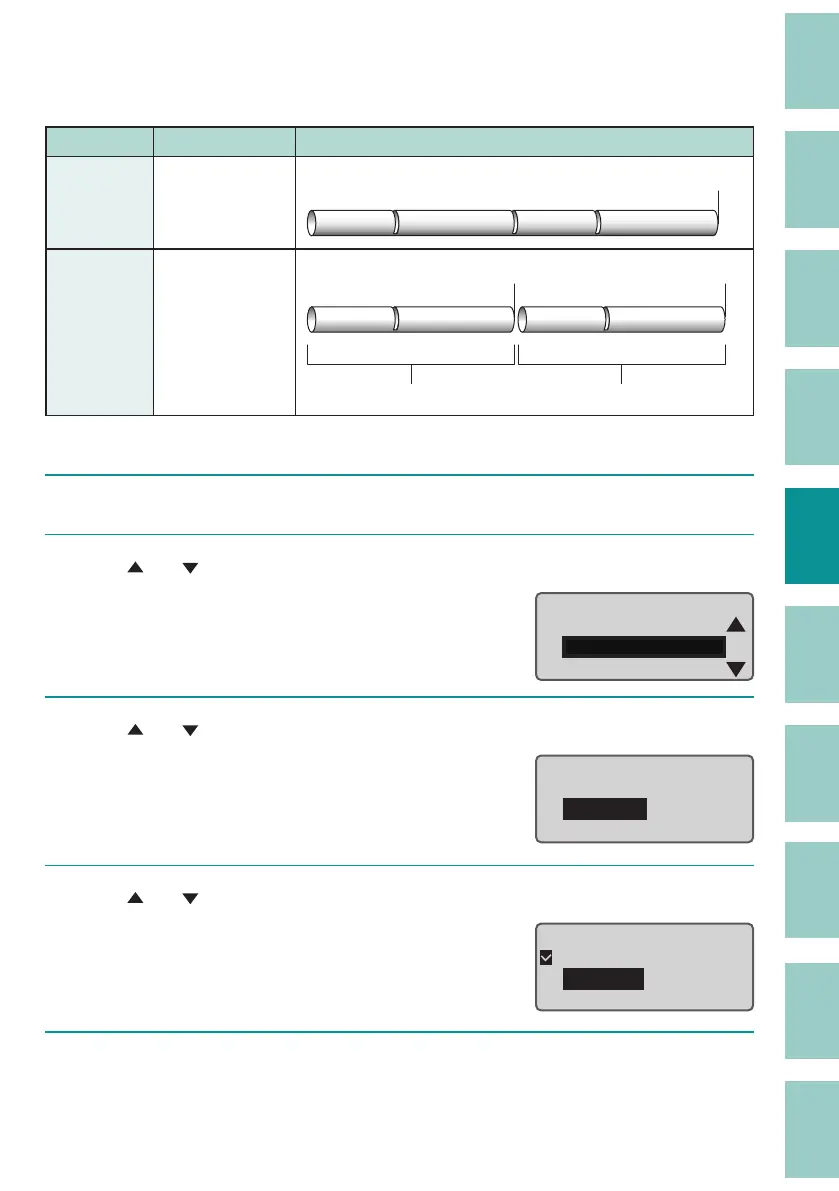
Changing the Full Cut Settings
The default setting is "End only."
Setting Details Print Preview
End only
(Default
Setting)
Cuts the print
media at the end
of printing.
Full cut
A1 Pump Room A1 Pump Room
Each set
Cuts match the
number of prints.
1st group 2nd group
Full cut Full cut
A1 Pump Room A1 Pump Room
[Example] Full cut for all pages printed.
1
Press the [Option] key.
2
Use [ ] or [ ] to select "Print Settings" and press the [Enter] key.
Page Settings
Print Settings
Delete All
Option
3
Use [ ] or [ ] to select "Full cut" and press the [Enter] key.
Print Settings
Half cut
Full
cut
Underline 6 , 9
4
Use [ ] or [ ] to select "Each set," and then press the [Enter] key.
Full Cut
End only
Each set
5
Press the [Shift]+[Cancel] keys.
The display returns to the character input display.


 To Next Page