21
Basic Functions
Recording
E
Recording
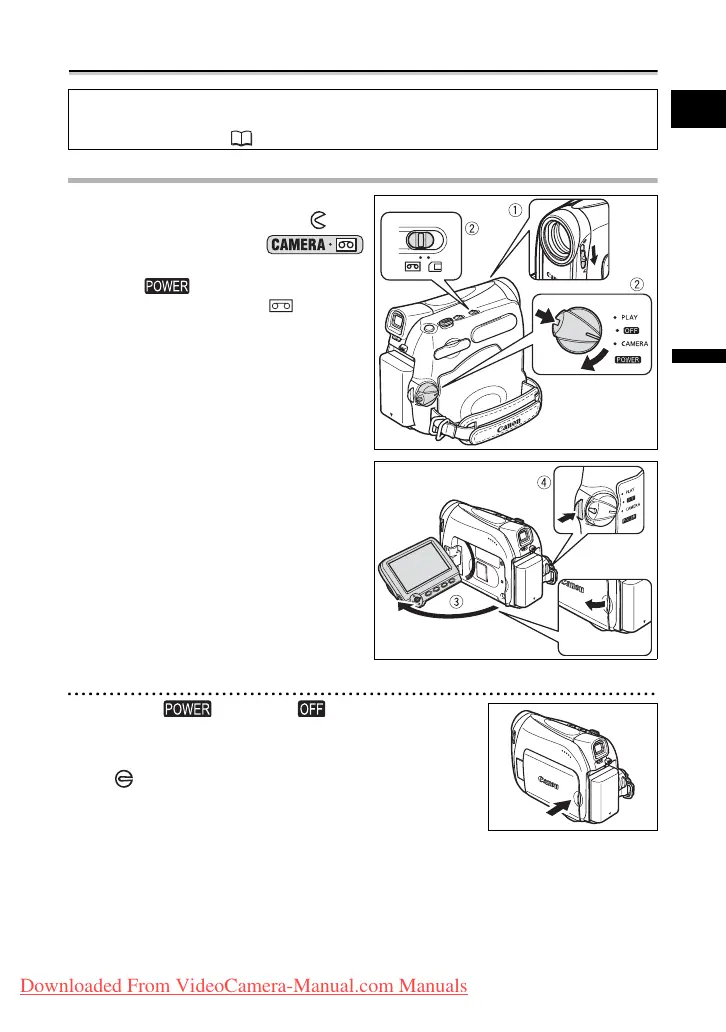
Recording Movies on a Tape
Recording
1. Open the lens cover (move the
lens cover switch down to ).
2. Set the camcorder to
mode.
Set the switch to CAMERA and
the TAPE/CARD switch to .
3. Open the LCD panel.
4. Press the start/stop button to
begin recording.
Press the start/stop button again to pause
the recording.
When You Have Finished Recording
1. Turn the switch to .
2. Close the LCD panel.
3. Close the lens cover (move the lens cover switch
to ).
4. Unload the cassette.
5. Disconnect the power source.
Before You Begin Recording
Make a test recording first to check if the camcorder operates correctly. If necessary,
clean the video heads (
114).
Downloaded From VideoCamera-Manual.com Manuals



 To Next Page