46
Adjusting the Focus Manually
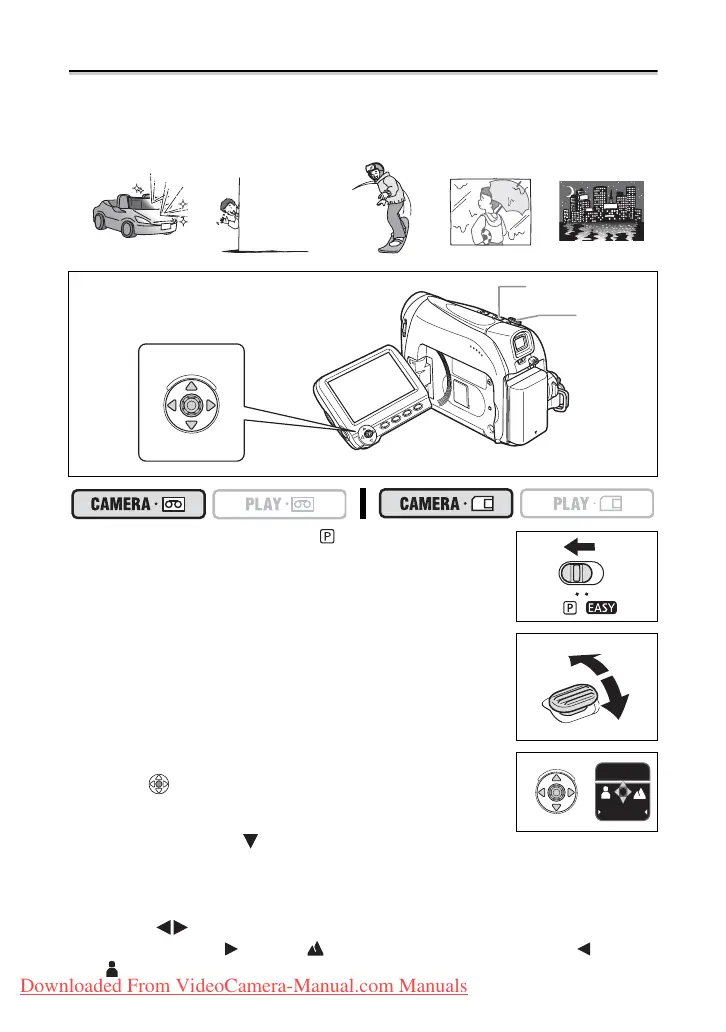
Autofocus may not work well on the following subjects. In such case, focus manually.
1. Set the program selector to .
2. Adjust the zoom.
When you operate the zoom after adjusting the focus, the
subject may not stay in focus. Adjust the zoom before the focus.
3. If the joystick guide does not appear on screen,
press ( ) to display it.
4. Push the joystick ( ) towards [FOCUS] to activate
the manual focus.
[FOCUS] on the joystick guide will be displayed in light blue and “MF” appears on the
screen.
5. Adjust ( ) the focus as necessary.
• Push the joystick ( ) towards for a farther focal distance or push it ( ) towards
for a closer focal distance.
Reflective
surfaces
Subjects with low
contrast or without
vertical lines
Fast Moving
Subjects
Through dirty or
wet windows
Night Scenes
Joystick
Program selector
Zoom lever
BACK
FOCUS
Downloaded From VideoCamera-Manual.com Manuals



 To Next Page