EasyManua.ls Logo

Canon PowerShot SD600 - Page 10

Canon PowerShot SD600
347 pages
Print Icon
To Next Page IconTo Next Page
To Previous Page IconTo Previous Page
Loading...
1m
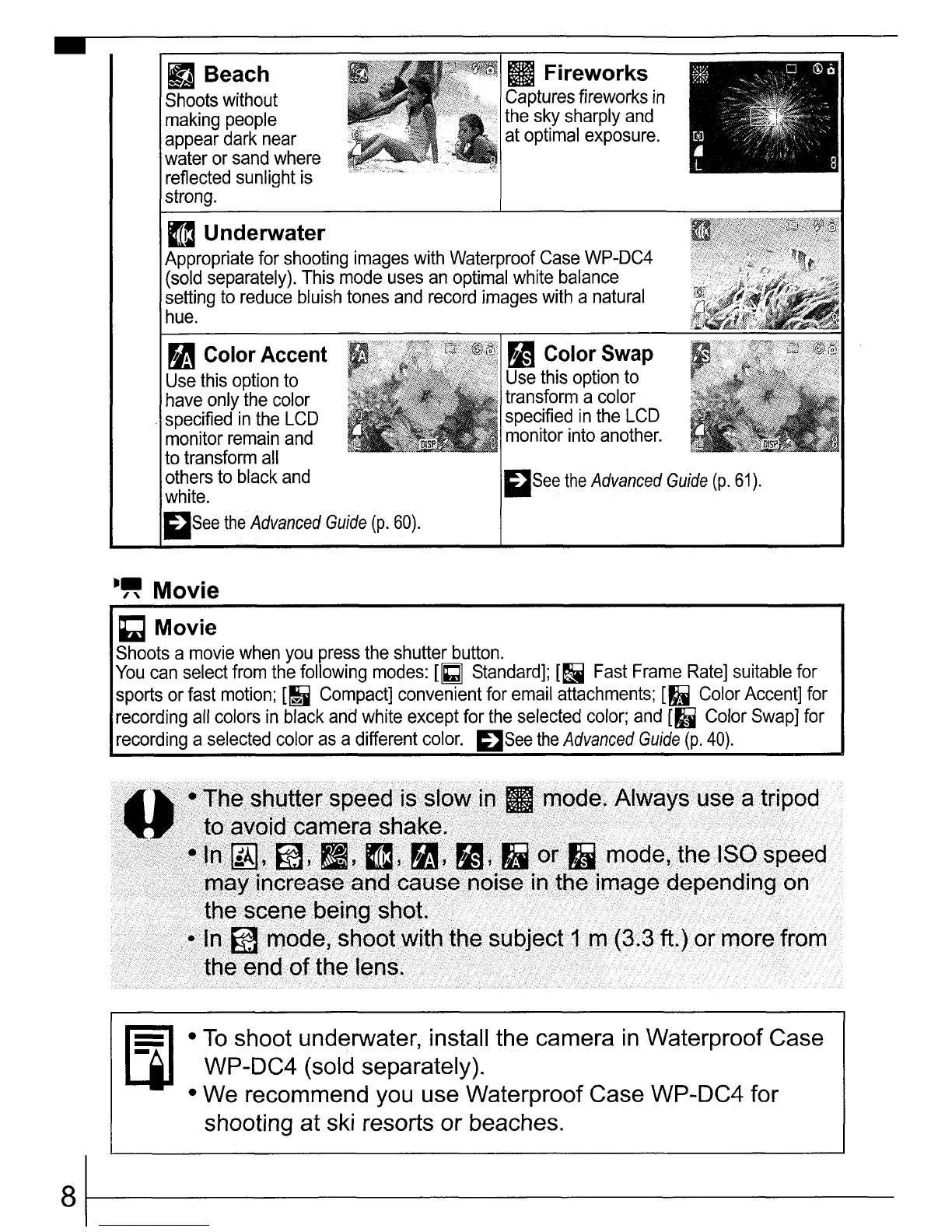
Underwater
Appropriate
for
shooting
images
with
Waterproof
Case
WP-DC4
(sold
separately).
This
mode
uses
an
optimal
white
balance
setting
to
reduce
bluish
tones
and
record
images
with
a
natural
hue.
mSee
the
Advanced
Guide
(p.
61).
~
Color Swap
Use
this
option
to
transform
a
color
specified
in
the
LCD
monitor
into
another.
m
Fireworks
Captures
fireworks
in
the
sky
sharply
and
at
optimal
exposure.
[fJ
Beach
Shoots
without
making
people
appear
dark
near
water
or
sand
where
reflected
sunlight
is
strong.
~
Color Accent
Use
this
option
to
have
only
the
color
specified
in
the
LCD
monitor
remain
and
to
transform
all
others
to
black
and
white.
mSee
the
Advanced
Guide
(p.
60).
-
-"
Movie
~
Movie
Shoots
a
movie
when
you
press
the
shutter
button.
You
can
select
from
the
following
modes:
UGJ
Standard];
[~
Fast
Frame
Rate]
suitable
for
sports
or
fast
motion;
[~
Compact]
convenient
for
email
attachments;
[I'
Color
Accent]
for
recording
all
colors
in
black
and
white
except
for
the
selected
color;
and
[II
Color
Swap]
for
recording
a
selected
color
as
a
different
color.
~See
the
Advanced
Guide
(p.
40).
To
shoot underwater, install the camera
in
Waterproof Case
WP-DC4 (sold separately).
We recommend you use Waterproof Case WP-DC4 for
shooting at ski resorts
or
beaches.
81------

Table of Contents

Related product manuals