•
Using
the
Zoom
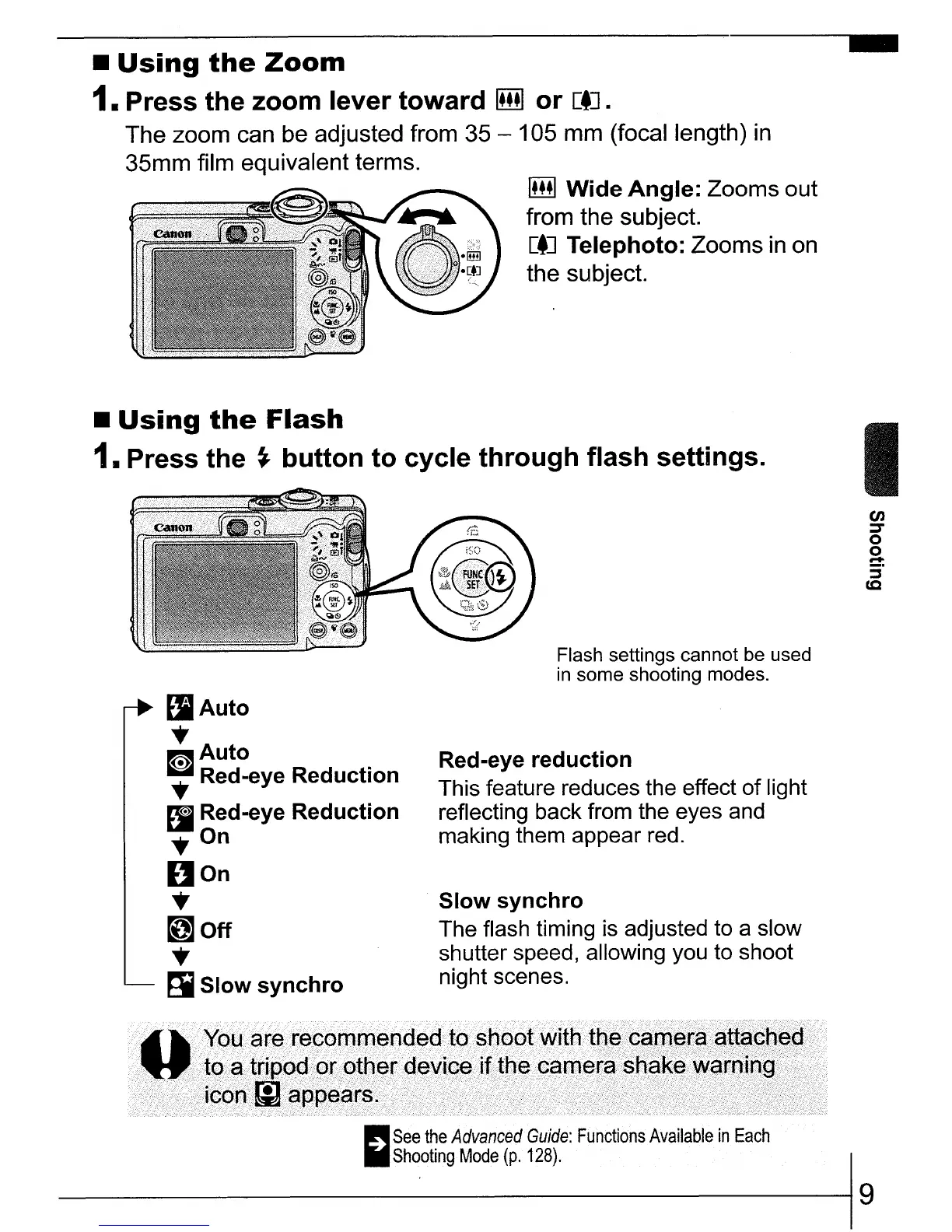
1. Press the zoom
lever
toward
IillI
or
[tJ.
The zoom can be adjusted from 35 - 105 mm (focal length)
in
35mm film equivalent terms.
IillI
Wide
Angle:
Zooms out
from the subject.
[tJ
Telephoto: Zooms
in
on
the subject.
Flash settings cannot be used
in
some shooting modes.
Slow
synchro
The flash timing is adjusted to a slow
shutter speed, allowing you to shoot
night scenes.
Red-eye
reduction
This feature reduces the effect
of
light
reflecting back from the eyes and
making them appear red.
lIAuto
..
m
Auto
..
Red-eye Reduction
11
Red-eye Reduction
..
On
DOn
..
~Off
..
~
Slow
synchro
•
Using
the
Flash
1.
Press
the
~
button
to
cycle
through
flash
settings.
I
en
::T
o
2-
:i'
cc
;
~~~~~~:~~~c(:
rf~f.e:
Functions
Available
in
Each
-----1
9




 To Next Page