Rec., Play, Print, Set
up
and My Camera Menus
Convenient settings for shooting, playback
or
printing can be set with these
menus.
-
L!J
(Rec.) Menu
CD
e
~
(2)
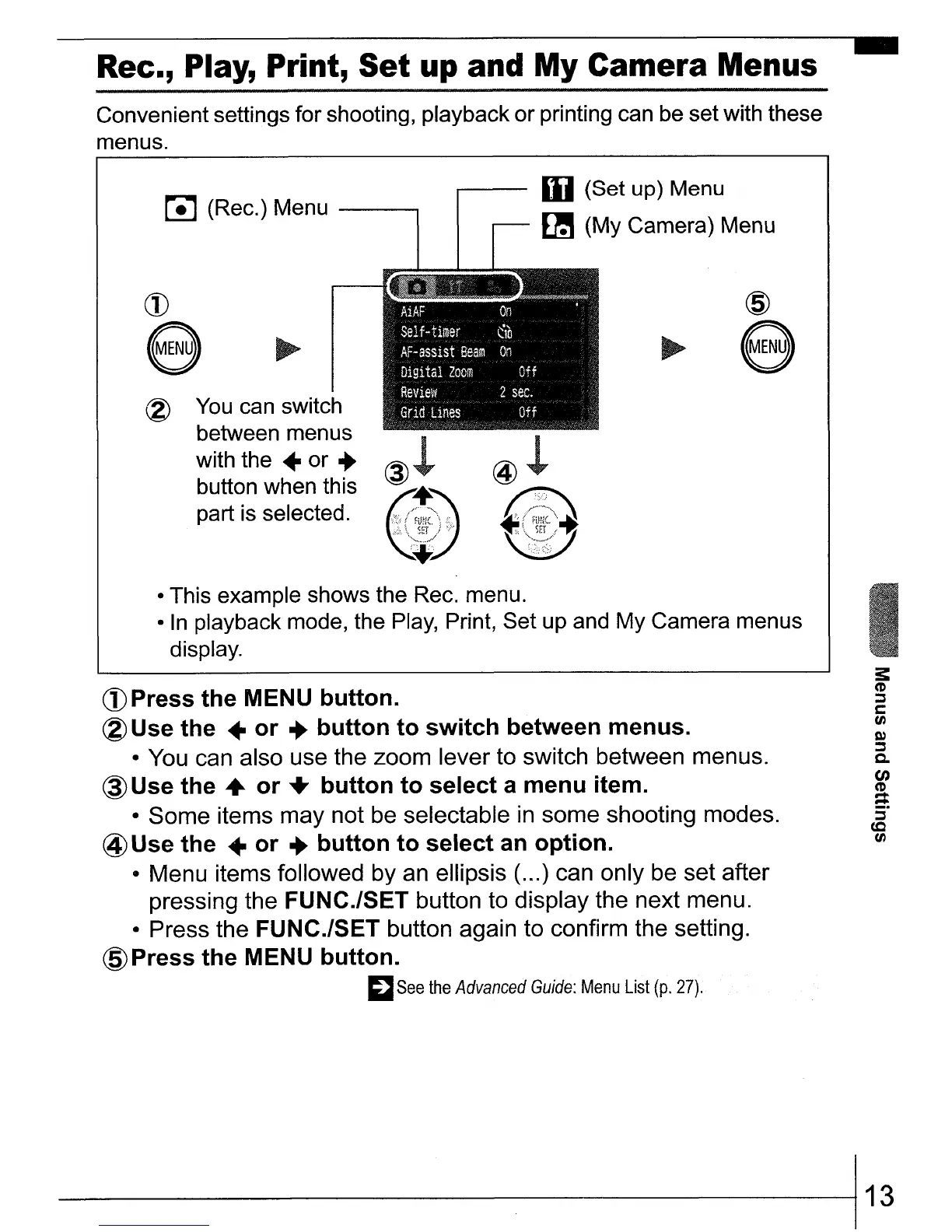
You can switch
between menus
with the
..
or ...
button when this
part is selected.
@
e
• This example shows the Rec. menu.
•
In
playback mode, the Play, Print, Set up and My Camera menus
display.
CD
Press
the
MENU
button.
(2)
Use the
..
or
...
button
to
switch
between menus.
•
You
can also use the zoom lever to switch between menus.
@Use
the"
or
...
button
to
select
a
menu
item.
• Some items may not be selectable
in
some shooting modes.
@Use
the
..
or
...
button
to
select
an
option.
• Menu items followed by an ellipsis (
...
) can only
be
set after
pressing the
FUNC.lSET button to display the next menu.
• Press the
FUNC.lSET button again to confirm the setting.
@Press
the
MENU
button.
~
See
the
Advanced
Guide:
Menu
List
(p.
27).
3:
CD
~
C
tJ)
D)
~
Q.
en
CD
:::
S'
co
tJ)
----------1
13















 To Next Page