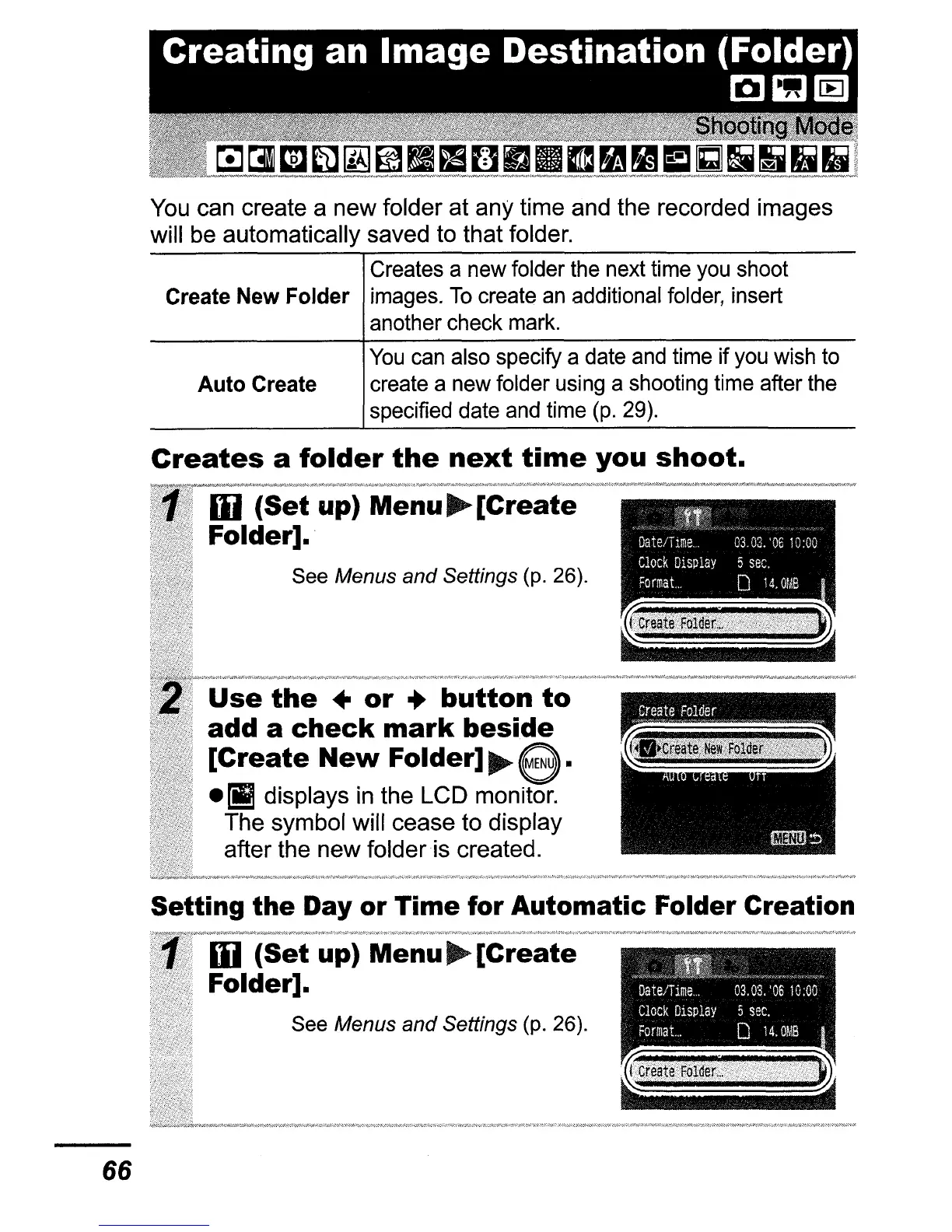
You can create a new folder at any time and the recorded images
will be automatically saved to that folder.
Creates a
new
folder
the
next time
you
shoot
Create
New
Folder
images.
To
create
an
additional
folder,
insert
another check
mark.
You
can
also specify a
date
and
time
if
you
wish
to
Auto
Create
create a
new
folder
using
a shooting
time
after
the
specified date
and
time
(p.
29).
!j1l
ffi
Date/TIme
0303,'0610:00
Clock
D1Splay
5
sec.
Format
0
14.0MB
Use
the
..
or
..
button
to
add a
check
mark
beside
[Create
New
Folder]
~
e.
-II
displays
in
the LCD monitor.
The symbol will cease to display
after the new folder is created.
Creates
a
folder
the
next
time
you
shoot.
Iii
(Set
up)
Menu~[Create
Folder].
See Menus and Settings (p. 26).
".,'''''"'".'''«'""o".,"''~>>>,
DateJTlme
03,03.
'0610:00
Clock
D1Splay
5
sec,
Format.
0
14.
OMS
Setting the Day or Time for Automatic Folder Creation
Iii
(Set
up) Menu
~
[Create
Folder].
See Menus
and
Settings (p. 26).
66















 To Next Page