EasyManua.ls Logo

Canon UC10 - Page 27

Canon UC10
104 pages
Print Icon
To Next Page IconTo Next Page
To Previous Page IconTo Previous Page
Loading...
Before
Using
Your
Camera
2
5
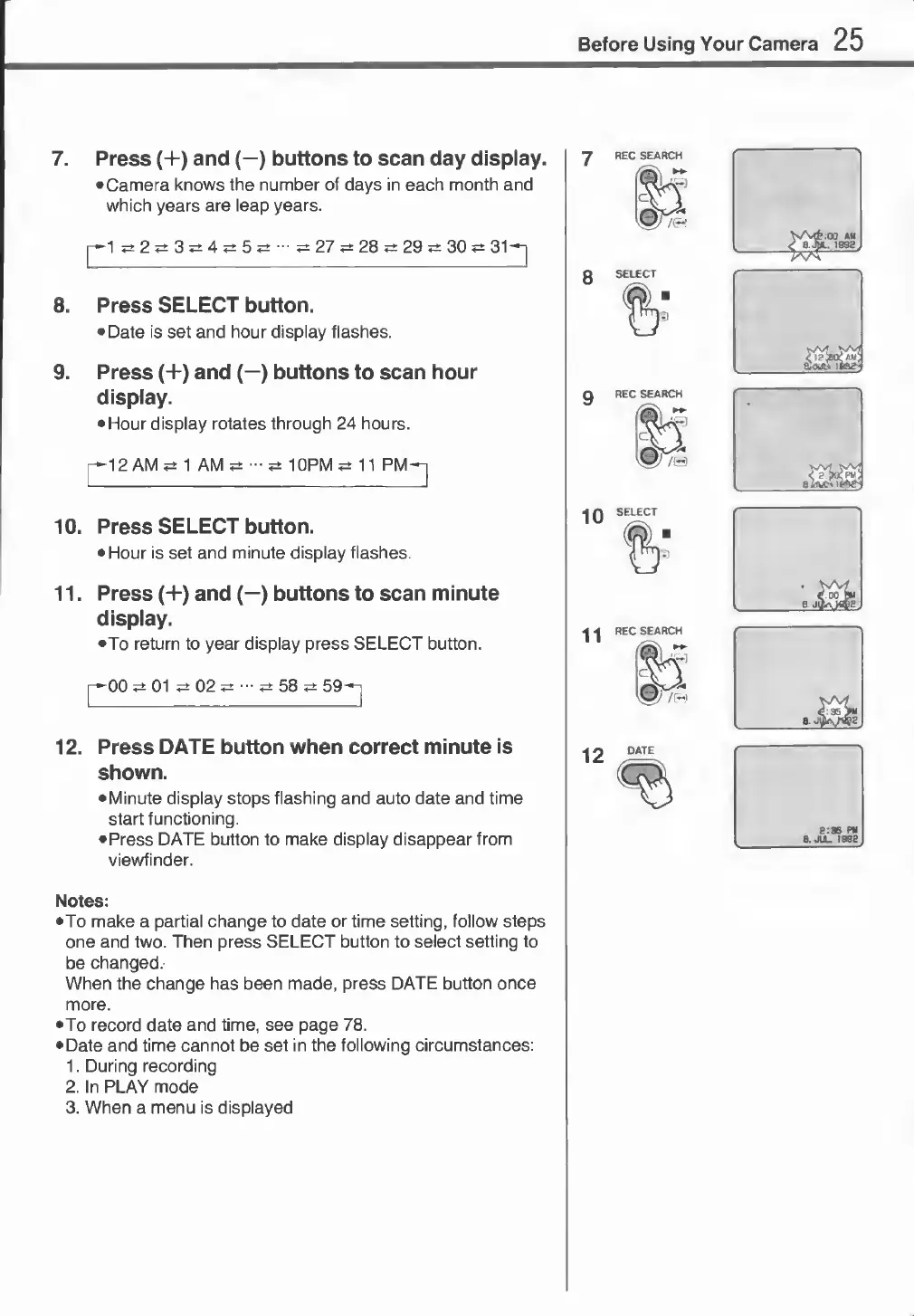
7.
Press
(+)
and
(—)
buttons
to
scan
day
display.
•
Camera
knows
the
number
of
days
in
each
month
and
which
years
are
leap
years.
|—1
2
3
4
«±
5
?±
■■■
27
^
28
*±
29
*
30
?±
31—-[
8.
Press
SELECT
button.
•
Date
is
set
and
hour
display
flashes.
9.
Press
(+)
and
(—)
buttons
to
scan
hour
display.
•
Hour
display
rotates
through
24
hours.
p^12
AM
1
AM
10PM
11
PM-n
10.
Press
SELECT
button.
•
Hour
is
set
and
minute
display
flashes.
11.
Press
(+)
and
(—)
buttons
to
scan
minute
display.
•To
return
to
year
display
press
SELECT
button.
01
02
^
58
12.
Press
DATE
button
when
correct
minute
is
shown.
•
Minute
display
stops
flashing
and
auto
date
and
time
start
functioning.
•
Press
DATE
button
to
make
display
disappear
from
viewfinder.
7
REC
SEARCH
8
SELECT
Notes:
•To
make
a
partial
change
to
date
or
time
setting,
follow
steps
one
and
two.
Then
press
SELECT
button
to
select
setting
to
be
changed.
When
the
change
has
been
made,
press
DATE
button
once
more.
•To
record
date
and
time,
see
page
78.
•
Date
and
time
cannot
be
set
in
the
following
circumstances:
1.
During
recording
2.
In
PLAY
mode
3.
When
a
menu
is
displayed