EasyManua.ls Logo

Canon UC10 - High-Speed Shutter.58

Canon UC10
104 pages
Print Icon
To Next Page IconTo Next Page
To Previous Page IconTo Previous Page
Loading...
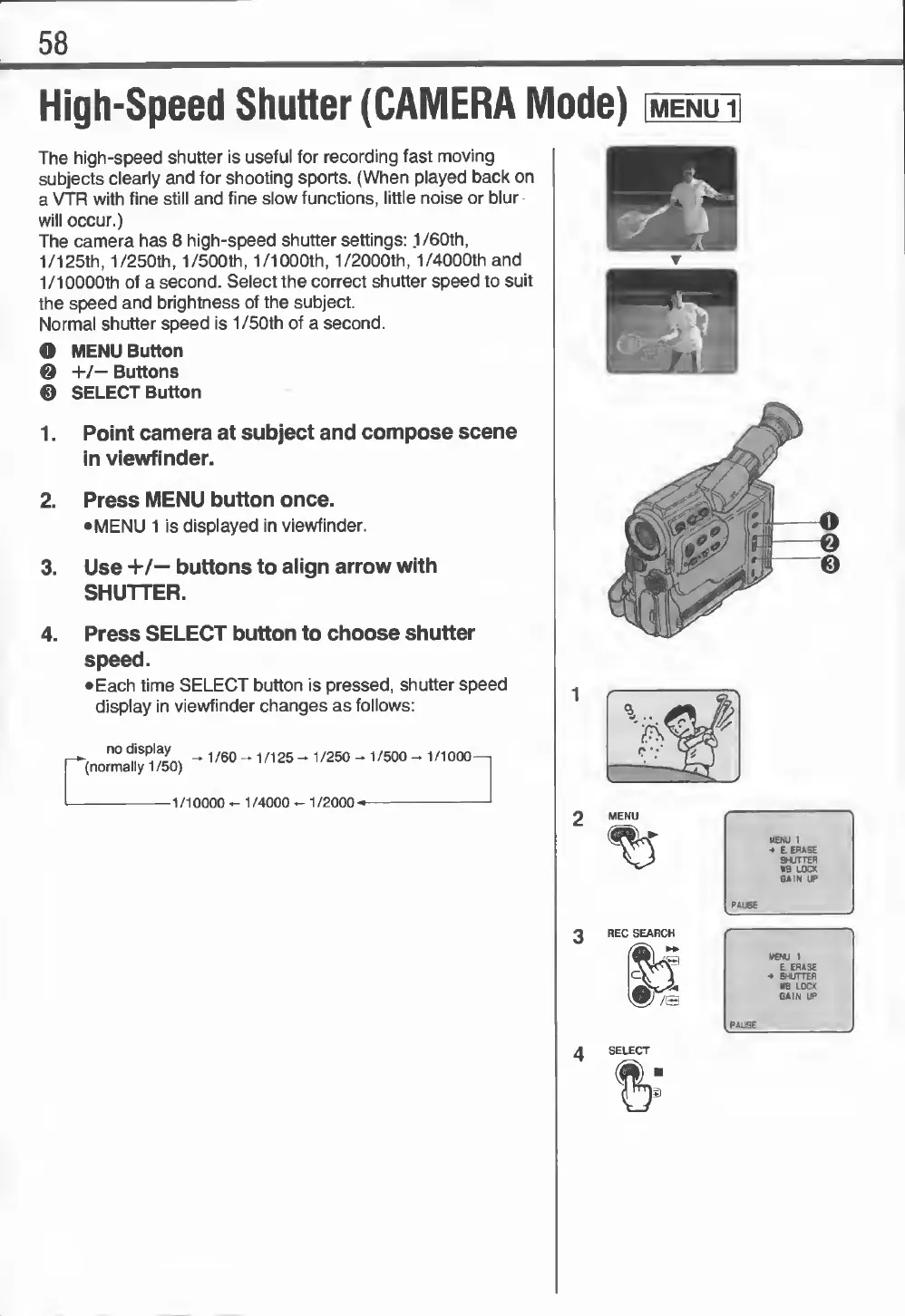
58
High-Speed
Shutter
(CAMERA
Mode)
The
high-speed
shutter
is
useful
for
recording
fast
moving
subjects
clearly
and
for
shooting
sports.
(When
played
back
on
a
VTR
with
fine
still
and
fine
slow
functions,
little
noise
or
blur
will
occur.)
The
camera
has
8
high-speed
shutter
settings:
1
/60th,
1/125th,
1/250th,
1/500th,
1/1000th,
1/2000th,
1/4000th
and
1/10000th
of
a
second.
Select
the
correct
shutter
speed
to
suit
the
speed
and
brightness
of
the
subject.
Normal
shutter
speed
is
1
/50th
of
a
second.
O
MENU
Button
@
+/—
Buttons
®
SELECT
Button
1.
Point
camera
at
subject
and
compose
scene
in
viewfinder.
2.
Press
MENU
button
once.
•MENU
1
is
displayed
in
viewfinder.
3.
Use
+/—
buttons
to
align
arrow
with
SHUTTER.
Press
SELECT
button
to
choose
shutter
speed.
•Each
time
SELECT
button
is
pressed,
shutter
speed
display
in
viewfinder
changes
as
follows:
no
display
^
1
/
60
-
1
/
125
-
1
/
250-1
/500
—
1/1000
—
(normally
1/50)
-1
/10000
-
1
/4000
-
1
/2000
-
—