EasyManua.ls Logo

Canon UC10 - Problems and Troubleshooting.94

Canon UC10
104 pages
Print Icon
To Next Page IconTo Next Page
To Previous Page IconTo Previous Page
Loading...
r
94
_
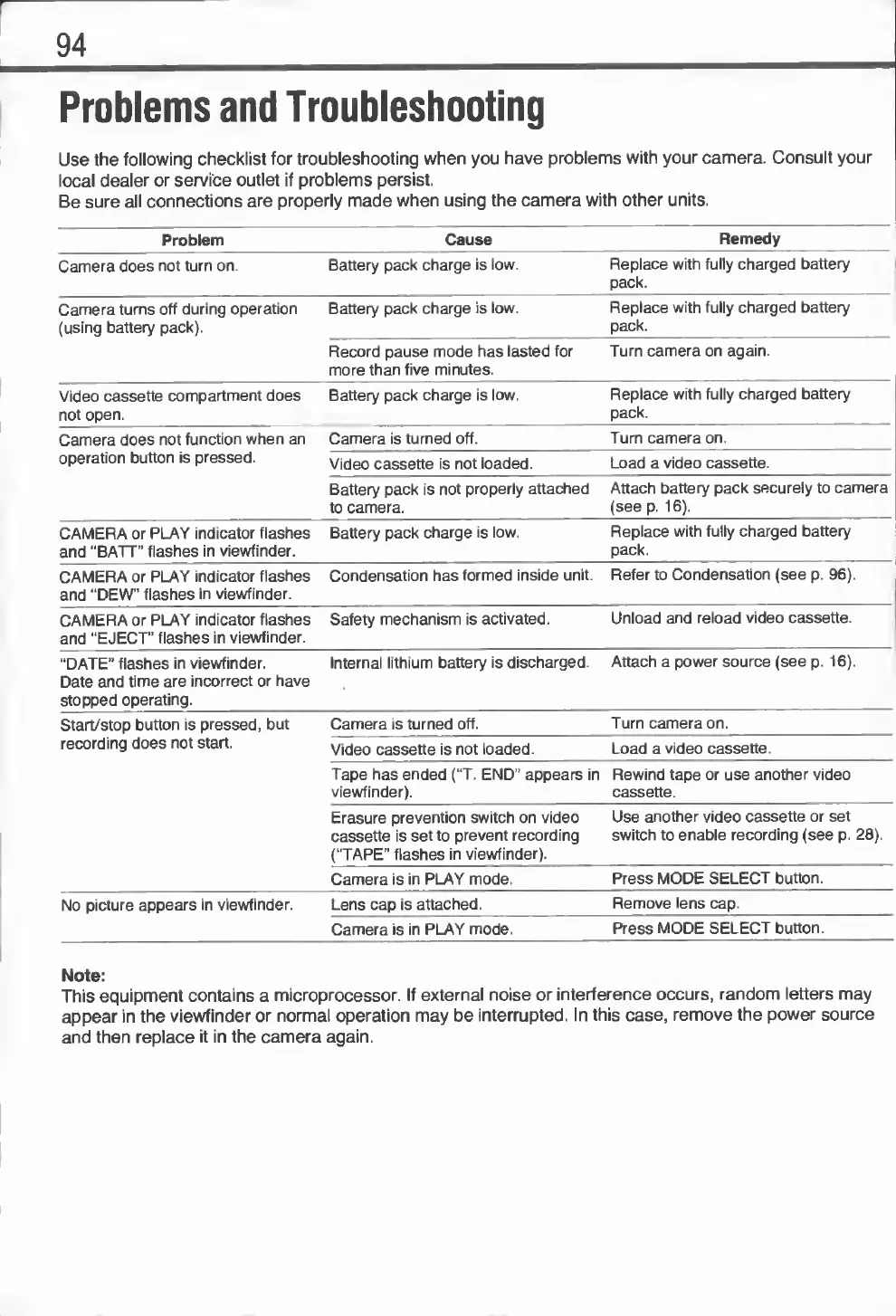
Problems
and
Troubleshooting
Use
the
following
checklist
for
troubleshooting
when
you
have
problems
with
your
camera.
Consult
your
local
dealer
or
service
outlet
if
problems
persist.
Be
sure
all
connections
are
properly
made
when
using
the
camera
with
other
units.
Problem
Cause
Remedy
Camera
does
not
turn
on.
Battery
pack
charge
is
low.
Replace
with
fully
charged
battery
pack.
Camera
turns
off
during
operation
(using
battery
pack).
Battery
pack
charge
is
low.
Replace
with
fully
charged
battery
pack.
Record
pause
mode
has
lasted
for
Turn
camera
on
again.
more
than
five
minutes.
Video
cassette
compartment
does
not
open.
Battery
pack
charge
is
low.
Replace
with
fully
charged
battery
pack.
Camera
does
not
function
when
an
Camera
is
turned
off.
Turn
camera
on.
operation
button
is
pressed.
Video
cassette
is
not
loaded.
Load
a
video
cassette.
Battery
pack
is
not
properly
attached
to
camera.
Attach
battery
pack
securely
to
camera
(see
p.
16).
CAMERA
or
PLAY
indicator
flashes
and
"BATT”
flashes
in
viewfinder.
Battery
pack
charge
is
low.
Replace
with
fully
charged
battery
pack.
CAMERA
or
PLAY
indicator
flashes
Condensation
has
formed
inside
unit.
Refer
to
Condensation
(see
p.
96).
and
“DEW"
flashes
in
viewfinder.
CAMERA
or
PLAY
indicator
flashes
and
“EJECT”
flashes
in
viewfinder.
Safety
mechanism
is
activated.
Unload
and
reload
video
cassette.
“DATE”
flashes
in
viewfinder.
Date
and
time
are
incorrect
or
have
Internal
lithium
battery
is
discharged.
Attach
a
power
source
(see
p.
16).
stopped
operating.
Start/stop
button
is
pressed,
but
Camera
is
turned
off.
Turn
camera
on.
recording
does
not
start.
Video
cassette
is
not
loaded.
Load
a
video
cassette.
Tape
has
ended
(“T.
END”
appears
in
viewfinder).
Rewind
tape
or
use
another
video
cassette.
Erasure
prevention
switch
on
video
cassette
is
set
to
prevent
recording
(“TAPE"
flashes
in
viewfinder).
Use
another
video
cassette
or
set
switch
to
enable
recording
(see
p.
28).
Camera
is
in
PLAY
mode.
Press
MODE
SELECT
button.
No
picture
appears
in
viewfinder.
Lens
cap
is
attached.
Remove
lens
cap.
Camera
is
in
PLAY
mode.
Press
MODE
SELECT
button.
Note:
This
equipment
contains
a
microprocessor.
If
external
noise
or
interference
occurs,
random
letters
may
appear
in
the
viewfinder
or
normal
operation
may
be
interrupted.
In
this
case,
remove
the
power
source
and
then
replace
it
in
the
camera
again.

Related product manuals