EasyManua.ls Logo

Canon UC10 - Loading and Unloading Video Cassettes.27

Canon UC10
104 pages
Print Icon
To Next Page IconTo Next Page
To Previous Page IconTo Previous Page
Loading...
Before
Using
Your
Camera
27
Loading
and
Unloading
Video
Cassettes
Use
video
cassettes
with
the
ID
mark
(P5
type).
Be
sure
to
attach
a
power
source
to
the
camera
before
loading
or
unloading
a
video
cassette.
When
a
power
source
is
attached
the
EJECT
button
will
work
even
if
the
camera
is
turned
off.
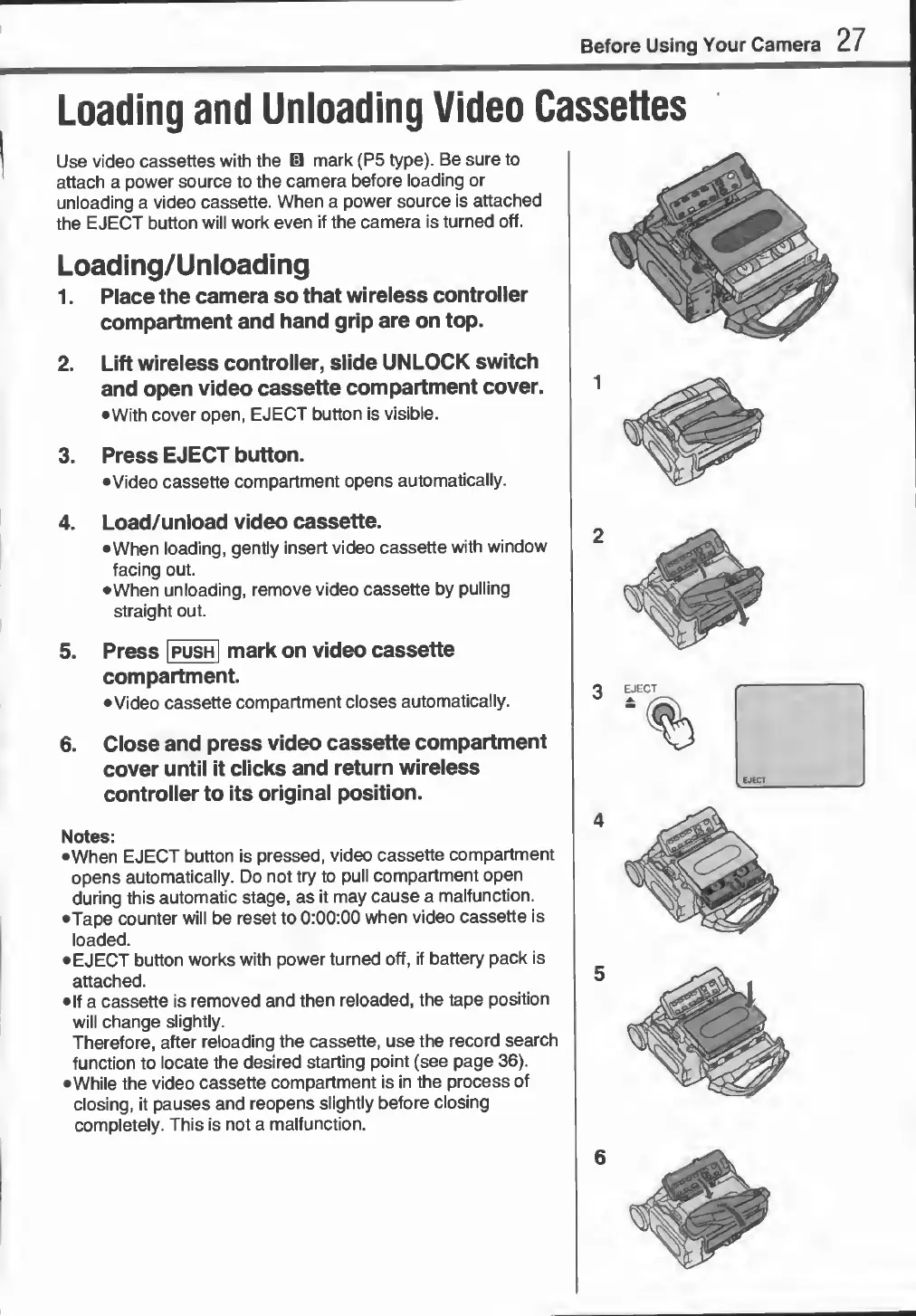
Loading/Unloading
1.
Place
the
camera
so
that
wireless
controller
compartment
and
hand
grip
are
on
top.
2.
Lift
wireless
controller,
slide
UNLOCK
switch
and
open
video
cassette
compartment
cover.
•With
cover
open,
EJECT
button
is
visible.
3.
Press
EJECT
button.
•Video
cassette
compartment
opens
automatically.
4.
L
oad/unload
video
cassette.
•When
loading,
gently
insert
video
cassette
with
window
facing
out.
•When
unloading,
remove
video
cassette
by
pulling
straight
out.
Press
|
push
|
mark
on
video
cassette
compartment.
•
Video
cassette
compartment
closes
automatically.
6.
Close
and
press
video
cassette
compartment
cover
until
it
clicks
and
return
wireless
controller
to
its
original
position.
Notes:
•When
EJECT
button
is
pressed,
video
cassette
compartment
opens
automatically.
Do
not
try
to
pull
compartment
open
during
this
automatic
stage,
as
it
may
cause
a
malfunction.
•Tape
counter
will
be
reset
to
0:00:00
when
video
cassette
is
loaded.
•
EJECT
button
works
with
power
turned
off,
if
battery
pack
is
attached.
•If
a
cassette
is
removed
and
then
reloaded,
the
tape
position
will
change
slightly.
Therefore,
after
reloading
the
cassette,
use
the
record
search
function
to
locate
the
desired
starting
point
(see
page
36).
•While
the
video
cassette
compartment
is
in
the
process
of
closing,
it
pauses
and
reopens
slightly
before
closing
completely.
This
is
not
a
malfunction.