EasyManua.ls Logo

Canon UC10 - Special Playback Methods.46

Canon UC10
104 pages
Print Icon
To Next Page IconTo Next Page
To Previous Page IconTo Previous Page
Loading...
46
Special
Playback
Methods
(PLAY
Mode)
In
addition
to
normal
playback,
the
camera
also
has
fast
forward,
rewind
and
still
playback.
Playback
is
controlled
by
pressing
the
buttons
on
the
camera
or
by
using
the
wireless
controller
attached
to
or
detached
from
the
camera.
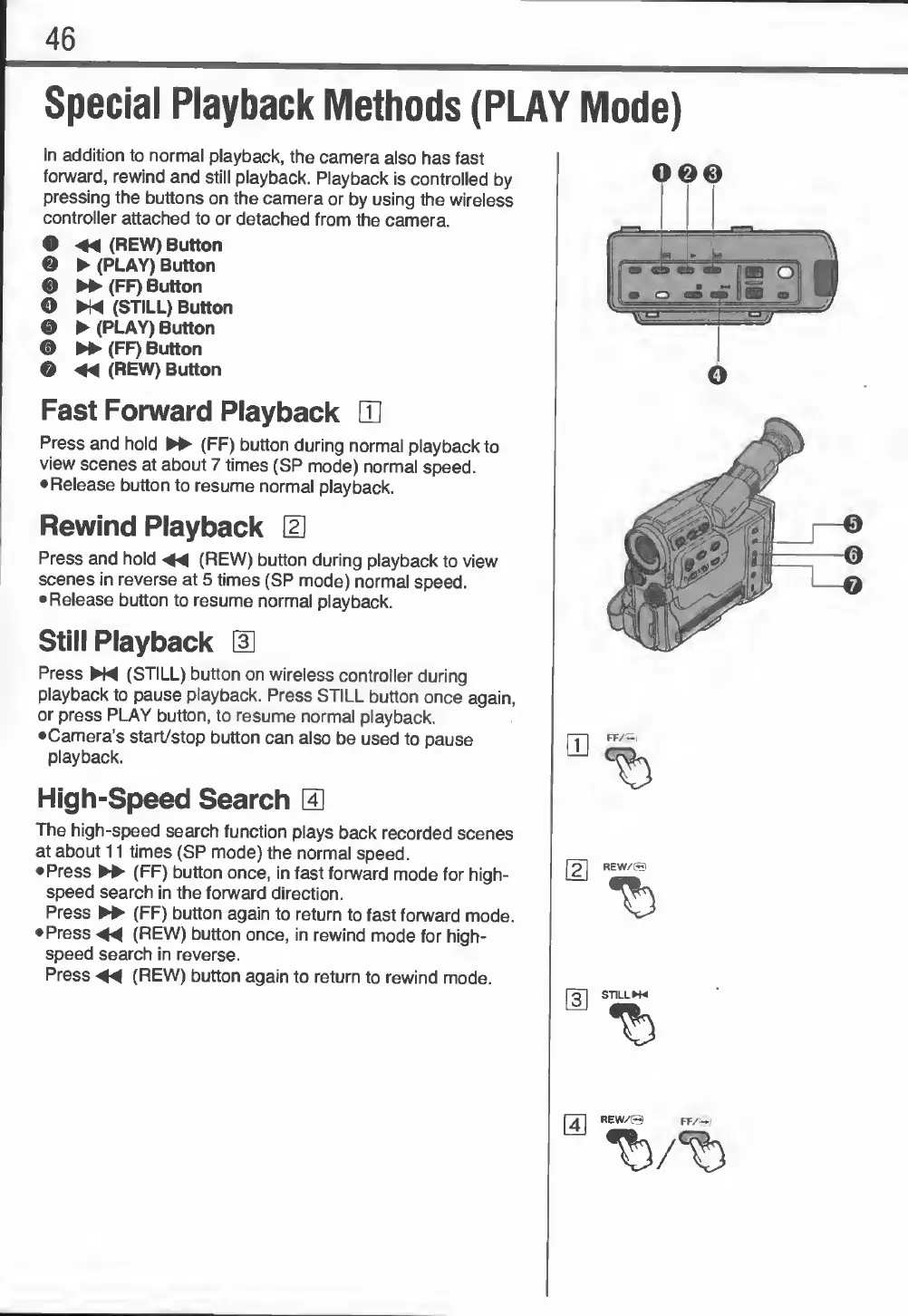
O
<44
(REW)
Button
0
(PLAY)
Button
0
►►
(
FF)
Button
O
N4
(STILL)
Button
0
(PLAY)
Button
0
►►
(FF)
Button
G
44
(REW)
Button
Fast
Forward
Playback
CD
Press
and
hold
►►
(FF)
button
during
normal
playback
to
view
scenes
at
about
7
times
(SP
mode)
normal
speed.
•Release
button
to
resume
normal
playback.
Rewind
Playback
d]
Press
and
hold
44
(REW)
button
during
playback
to
view
scenes
in
reverse
at
5
times
(SP
mode)
normal
speed.
Release
button
to
resume
normal
playback.
Still
Playback
3
Press
N4
(STILL)
button
on
wireless
controller
during
playback
to
pause
playback.
Press
STILL
button
once
again,
or
press
PLAY
button,
to
resume
normal
playback.
•Camera’s
start/stop
button
can
also
be
used
to
pause
playback.
High-Speed
Search
S
The
high-speed
search
function
plays
back
recorded
scenes
at
about
11
times
(SP
mode)
the
normal
speed.
Press
►►
(FF)
button
once,
in
fast
forward
mode
for
high¬
speed
search
in
the
forward
direction.
Press
►►
(FF)
button
again
to
return
to
fast
forward
mode.
Press
<44
(REW)
button
once,
in
rewind
mode
for
high¬
speed
search
in
reverse.
Press
<44
(REW)
button
again
to
return
to
rewind
mode.
ooe
o
REW/©
REW/©
FF/~i

Related product manuals