EasyManua.ls Logo

Canon UC10 - Fade.64

Canon UC10
104 pages
Print Icon
To Next Page IconTo Next Page
To Previous Page IconTo Previous Page
Loading...
64
Fade
(CAMERA
Mode)
The
fade
function
allows
you
to
make
scenes
gradually
appear
or
disappear
in
smooth
transition.
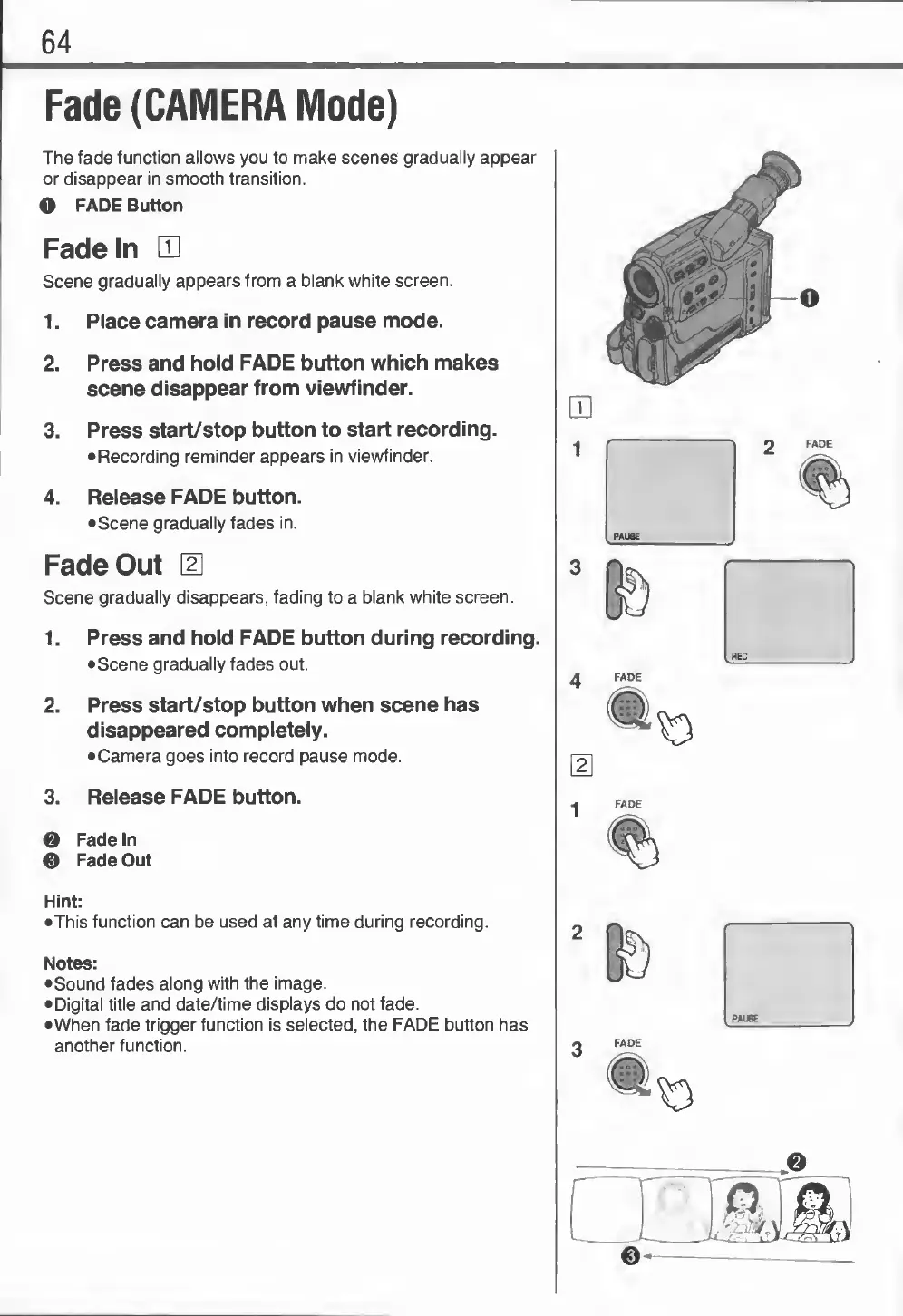
O
FADE
Button
Fade
In
LD
Scene
gradually
appears
from
a
blank
white
screen.
1.
Place
camera
in
record
pause
mode.
2.
Press
and
hold
FADE
button
which
makes
scene
disappear
from
viewfinder.
3.
Press
start/stop
button
to
start
recording.
•Recording
reminder
appears
in
viewfinder.
4.
Release
FADE
button.
•Scene
gradually
fades
in.
Fade
Out
\E
Scene
gradually
disappears,
fading
to
a
blank
white
screen.
1.
Press
and
hold
FADE
button
during
recording.
•
Scene
gradually
fades
out.
2.
Press
start/stop
button
when
scene
has
disappeared
completely.
•Camera
goes
into
record
pause
mode.
3.
R
elease
FADE
button.
0
Fade
In
0
Fade
Out
Hint:
•This
function
can
be
used
at
any
time
during
recording.
Notes:
•
Sound
fades
along
with
the
image.
•
Digital
title
and
date/time
displays
do
not
fade.
•When
fade
trigger
function
is
selected,
the
FADE
button
has
another
function.
1
2
FADE
16
3
FADE
PAUSE