EasyManua.ls Logo

Canon UC10 - Edit-Erase.56

Canon UC10
104 pages
Print Icon
To Next Page IconTo Next Page
To Previous Page IconTo Previous Page
Loading...
56
Edit-erase
(CAMERA
Mode)
[MENU
1
When
an
undesirable
object
or
sound
is
recorded,
such
as
someone
walking
across
the
picture
or
the
sound
of
a
car
horn,
the
edit-erase
function
can
be
used
to
quickly
return
to
the
precise
point
where
recording
began,
and
record
the
scene
pgain.
This
function
only
operates
during
the
first
40
seconds
or
so
of
recording.
For
about
40
seconds
after
starting
to
shoot
a
scene,
an
*
(asterisk)
mark
appears
in
the
viewfinder
next
to
the
operating
display.
The
edit-erase
function
can
be
used
while
this
*
mark
is
displayed.
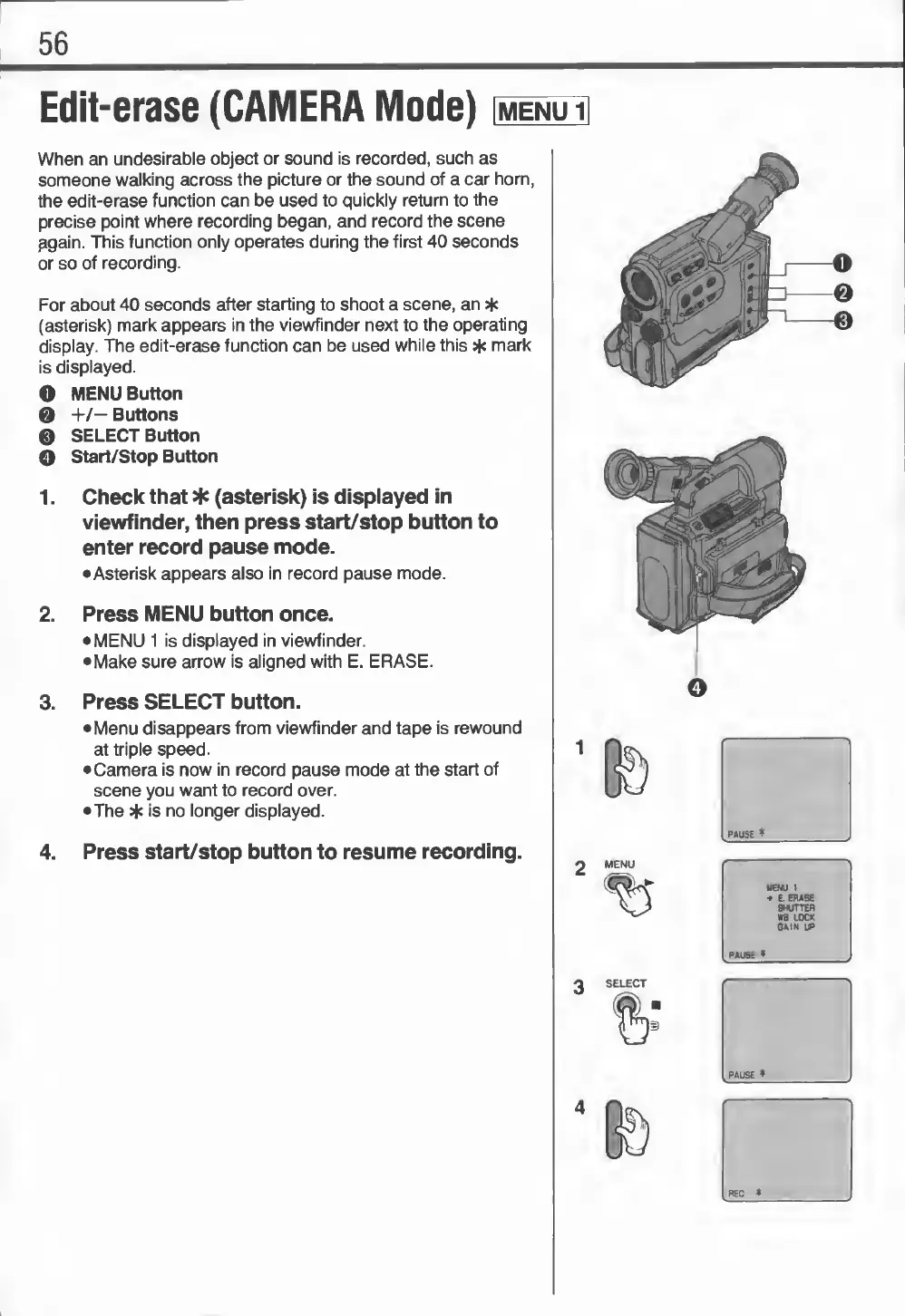
O
MENU
Button
0
+/—
Buttons
0
SELECT
Button
O
Start/Stop
Button
1.
Check
that
*
(asterisk)
is
displayed
in
viewfinder,
then
press
start/stop
button
to
enter
record
pause
mode.
•Asterisk
appears
also
in
record
pause
mode.
2.
Press
MENU
button
once.
MENU
1
is
displayed
in
viewfinder.
Make
sure
arrow
is
aligned
with
E.
ERASE.
3.
Press
SELECT
button.
Menu
disappears
from
viewfinder
and
tape
is
rewound
at
triple
speed.
Camera
is
now
in
record
pause
mode
at
the
start
of
scene
you
want
to
record
over.
The
*
is
no
longer
displayed.
4.
Press
start/stop
button
to
resume
recording.

Related product manuals