EasyManua.ls Logo

Canon UC10 - Record Review.37

Canon UC10
104 pages
Print Icon
To Next Page IconTo Next Page
To Previous Page IconTo Previous Page
Loading...
Basic
Operations
37
Record
Review
(CAMERA
Mode)
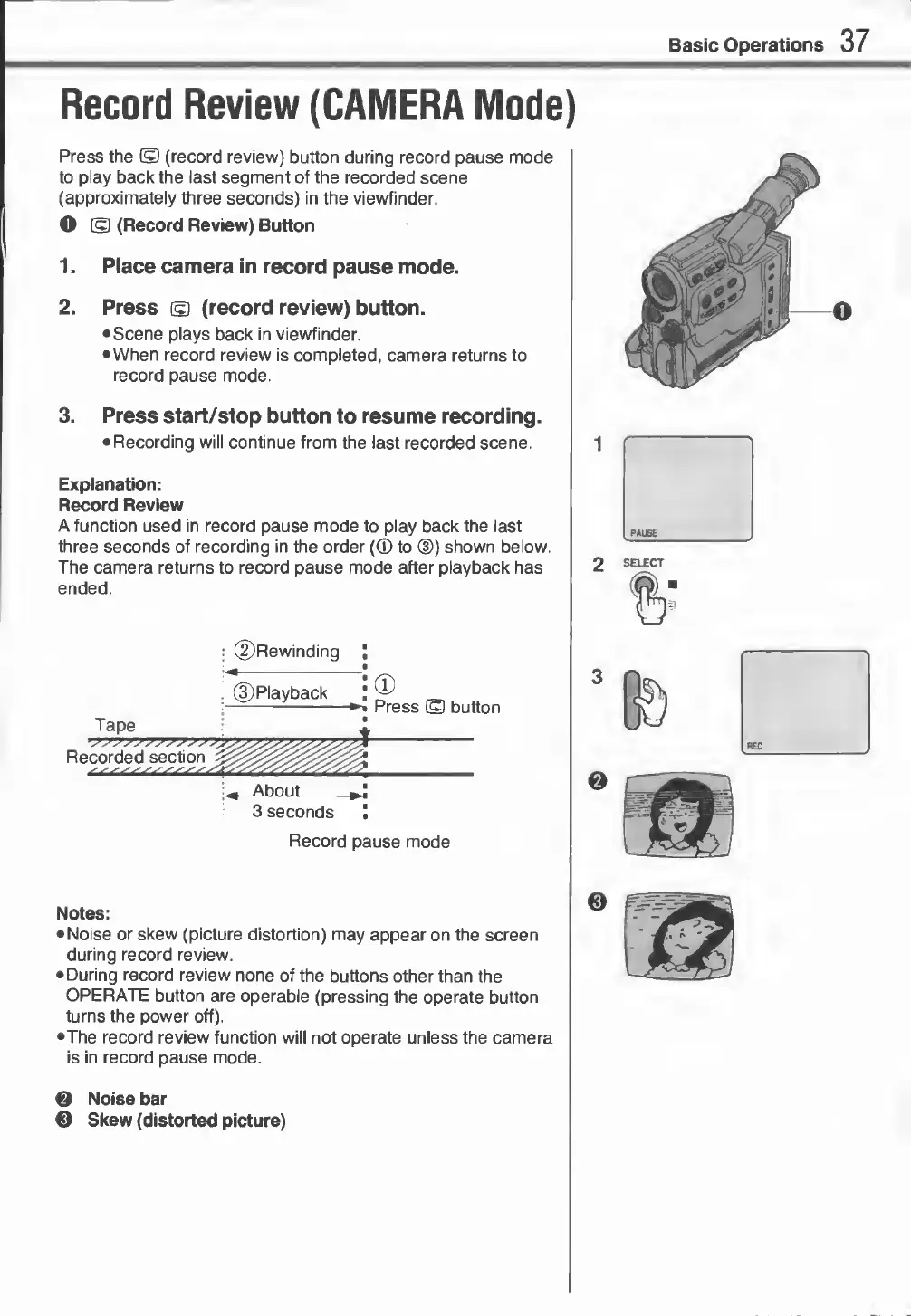
Press
the
©
(record
review)
button
during
record
pause
mode
to
play
back
the
last
segment
of
the
recorded
scene
(approximately
three
seconds)
in
the
viewfinder.
O
©
(Record
Review)
Button
1.
Place
camera
in
record
pause
mode.
2.
Press
©
(record
review)
button.
•
Scene
plays
back
in
viewfinder.
•When
record
review
is
completed,
camera
returns
to
record
pause
mode.
3.
P
ress
start/stop
button
to
resume
recording.
•
Recording
will
continue
from
the
last
recorded
scene.
Explanation:
Record
Review
A
function
used
in
record
pause
mode
to
play
back
the
last
three
seconds
of
recording
in
the
order
(CD
to
(D)
shown
below.
The
camera
returns
to
record
pause
mode
after
playback
has
ended.
1
PAUSE
2
SELECT
©Rewinding
©Playback
Tape
Recorded
section
^
About
3
seconds
Record
pause
mode
i®
3
-«
Press
©
button
•
In/
i
-
REC
Notes:
•
Noise
or
skew
(picture
distortion)
may
appear
on
the
screen
during
record
review.
•
During
record
review
none
of
the
buttons
other
than
the
OPERATE
button
are
operable
(pressing
the
operate
button
turns
the
power
off).
•The
record
review
function
will
not
operate
unless
the
camera
is
in
record
pause
mode.
e
Noise
bar
©
Skew
(distorted
picture)