EasyManua.ls Logo

Canon UC10 - Focusing.50

Canon UC10
104 pages
Print Icon
To Next Page IconTo Next Page
To Previous Page IconTo Previous Page
Loading...
r
52
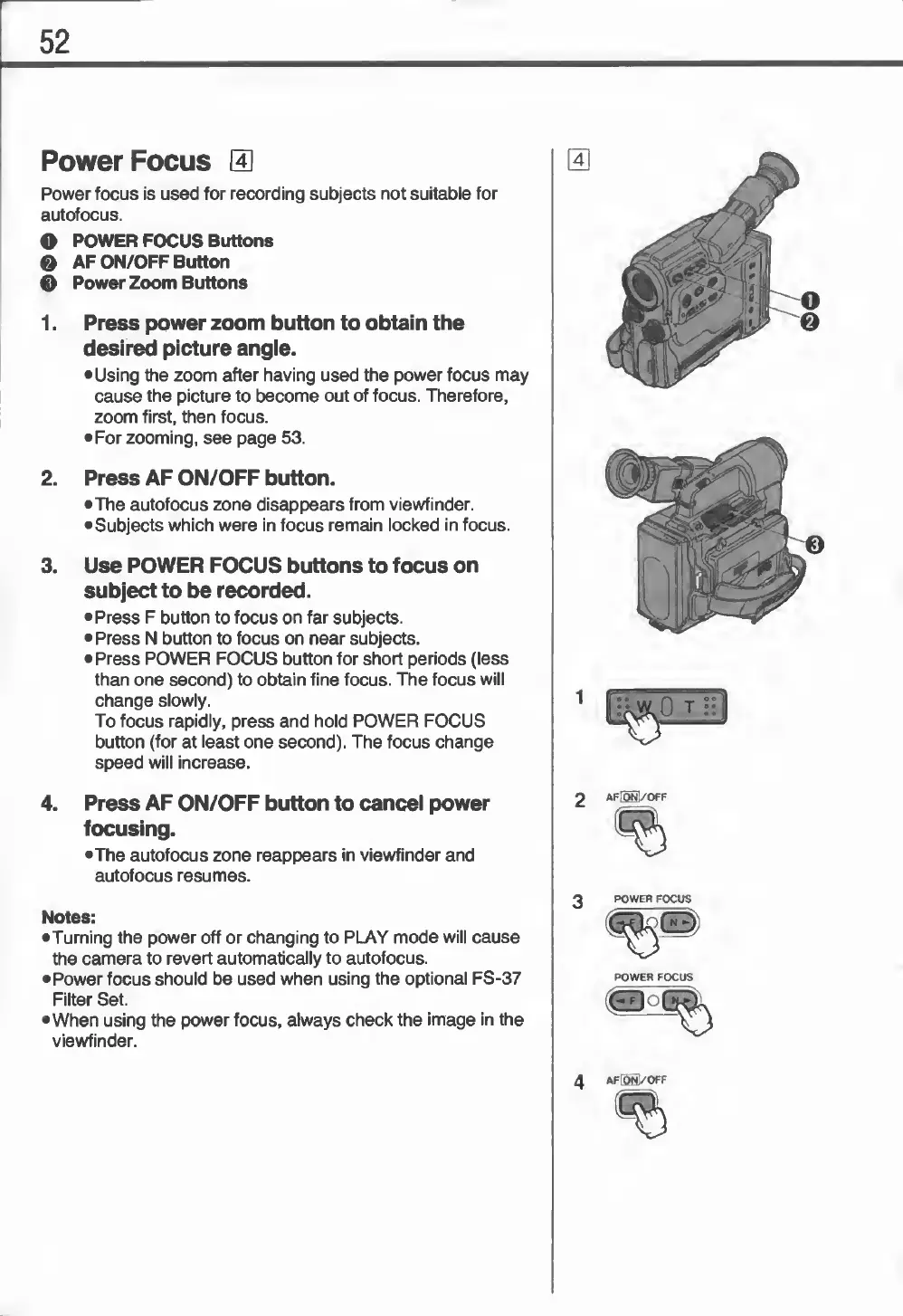
Power
Focus
0
Power
focus
is
used
for
recording
subjects
not
suitable
for
autofocus.
O
POWER
FOCUS
Buttons
0
AF
ON/OFF
Button
0
Power
Zoom
Buttons
1.
Press
power
zoom
button
to
obtain
the
desired
picture
angle.
•Using
the
zoom
after
having
used
the
power
focus
may
cause
the
picture
to
become
out
of
focus.
Therefore,
zoom
first,
then
focus.
•For
zooming,
see
page
53.
2.
Press
AF
ON/OFF
button.
•The
autofocus
zone
disappears
from
viewfinder.
•
Subjects
which
were
in
focus
remain
locked
in
focus.
3.
Use
POWER
FOCUS
buttons
to
focus
on
subject
to
be
recorded.
•Press
F
button
to
focus
on
far
subjects.
•Press
N
button
to
focus
on
near
subjects.
•
Press
POWER
FOCUS
button
for
short
periods
(less
than
one
second)
to
obtain
fine
focus.
The
focus
will
change
slowly.
To
focus
rapidly,
press
and
hold
POWER
FOCUS
button
(for
at
least
one
second).
The
focus
change
speed
will
increase.
4.
Press
AF
ON/OFF
button
to
cancel
power
focusing.
•The
autofocus
zone
reappears
in
viewfinder
and
autofocus
resumes.
Notes:
•Turning
the
power
off
or
changing
to
PLAY
mode
will
cause
the
camera
to
revert
automatically
to
autofocus.
•
Power
focus
should
be
used
when
using
the
optional
FS-37
Filter
Set.
•When
using
the
power
focus,
always
check
the
image
in
the
viewfinder.
4
AF
fONl
/OFF