EasyManua.ls Logo

Canon UC10 - Page 52

Canon UC10
104 pages
Print Icon
To Next Page IconTo Next Page
To Previous Page IconTo Previous Page
Loading...
50
Focusing
(CAMERA
Mode)
The
camera
has
two
focus
modes:
autofocus
and
power
focus.
Each
time
the
AF
ON/OFF
button
is
pressed,
the
selected
mode
changes
as
shown
below.
Camera
ON
-
Autofocus
-
Power
Focus
i
_I
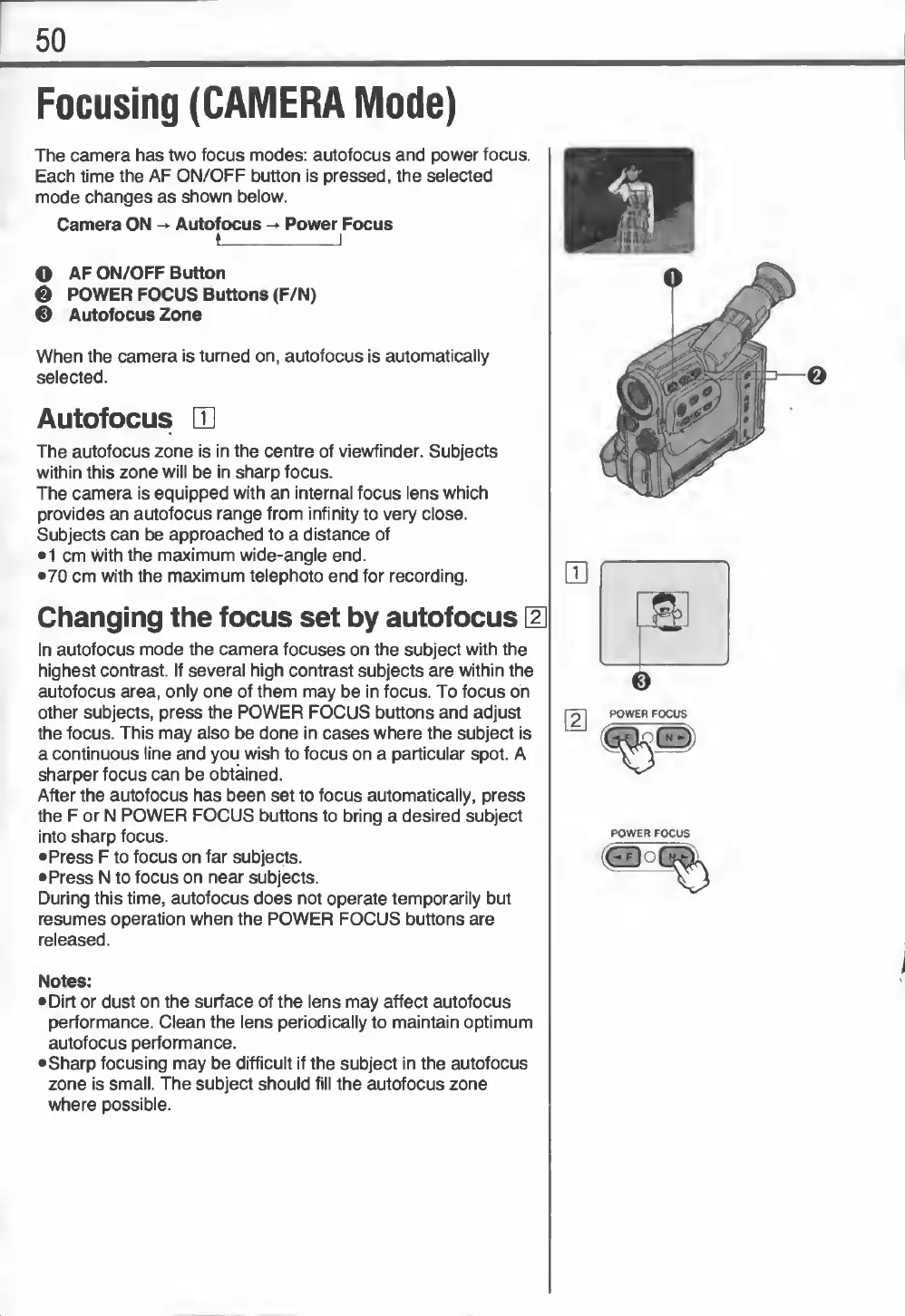
O
AF
ON/OFF
Button
0
POWER
FOCUS
Buttons
(F/N)
®
Autofocus
Zone
When
the
camera
is
turned
on,
autofocus
is
automatically
selected.
Autofocus
CD
The
autofocus
zone
is
in
the
centre
of
viewfinder.
Subjects
within
this
zone
will
be
in
sharp
focus.
The
camera
is
equipped
with
an
internal
focus
lens
which
provides
an
autofocus
range
from
infinity
to
very
close.
Subjects
can
be
approached
to
a
distance
of
1
cm
with
the
maximum
wide-angle
end.
•70
cm
with
the
maximum
telephoto
end
for
recording.
Changing
the
focus
set
by
autofocus
[U
In
autofocus
mode
the
camera
focuses
on
the
subject
with
the
highest
contrast.
If
several
high
contrast
subjects
are
within
the
autofocus
area,
only
one
of
them
may
be
in
focus.
To
focus
on
other
subjects,
press
the
POWER
FOCUS
buttons
and
adjust
the
focus.
This
may
also
be
done
in
cases
where
the
subject
is
a
continuous
line
and
you
wish
to
focus
on
a
particular
spot.
A
sharper
focus
can
be
obtained.
After
the
autofocus
has
been
set
to
focus
automatically,
press
the
F
or
N
POWER
FOCUS
buttons
to
bring
a
desired
subject
into
sharp
focus.
•Press
F
to
focus
on
far
subjects.
•Press
N
to
focus
on
near
subjects.
During
this
time,
autofocus
does
not
operate
temporarily
but
resumes
operation
when
the
POWER
FOCUS
buttons
are
released.
POWER
FOCUS
Notes:
•Dirt
or
dust
on
the
surface
of
the
lens
may
affect
autofocus
performance.
Clean
the
lens
periodically
to
maintain
optimum
autofocus
performance.
•Sharp
focusing
may
be
difficult
if
the
subject
in
the
autofocus
zone
is
small.
The
subject
should
fill
the
autofocus
zone
where
possible.

Related product manuals