EasyManua.ls Logo

Canon UC10 - Page 85

Canon UC10
104 pages
Print Icon
To Next Page IconTo Next Page
To Previous Page IconTo Previous Page
Loading...
Advanced
Operations
83
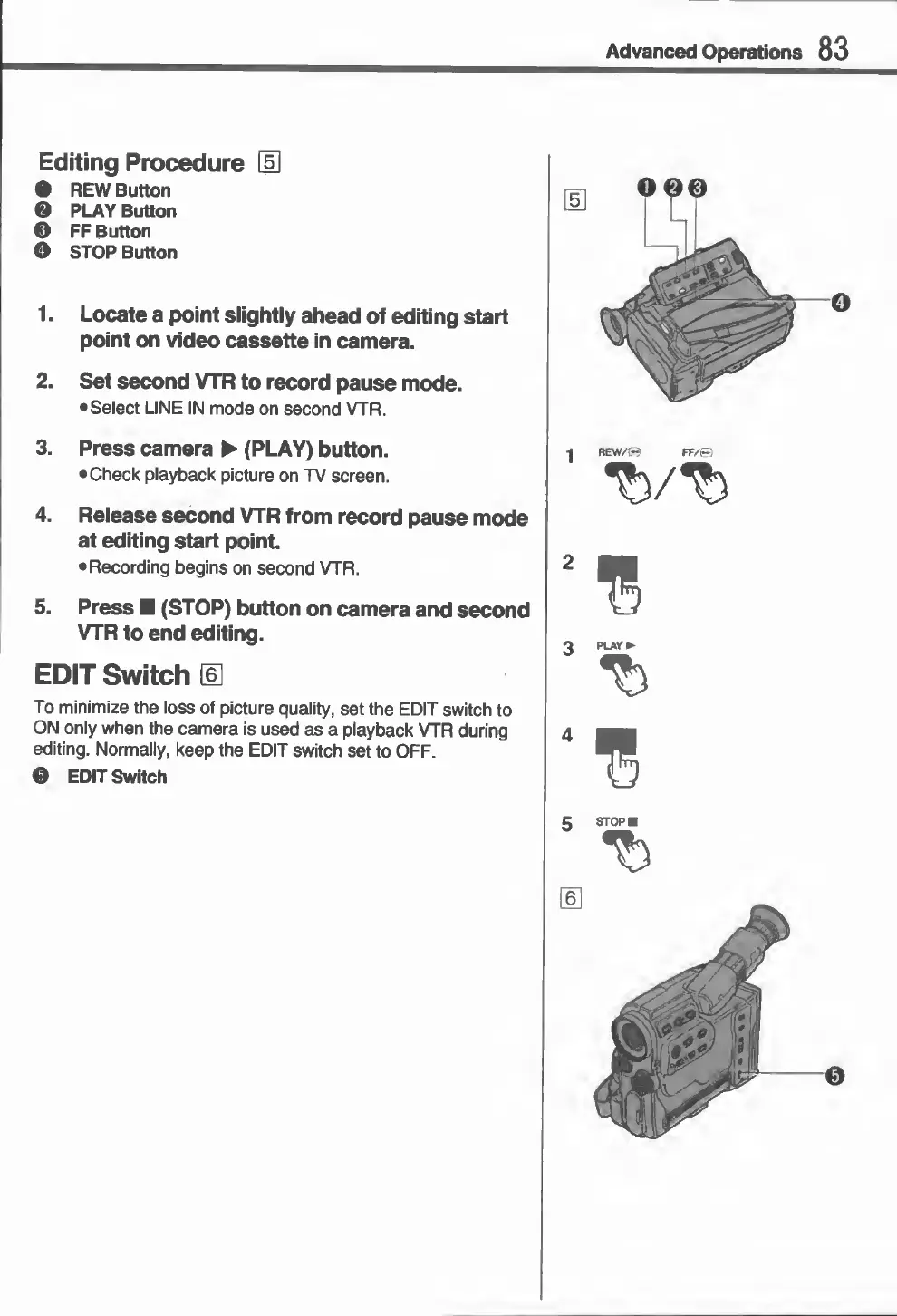
Editing
Procedure
OH
O
REW
Button
0
PLAY
Button
0
FF
Button
©
STOP
Button
1.
Locate
a
point
slightly
ahead
of
editing
start
point
on
video
cassette
in
camera.
2.
Set
second
VTR
to
record
pause
mode.
•Select
LINE
IN
mode
on
second
VTR.
3.
Press
camera
(PLAY)
button.
•Check
playback
picture
on
TV
screen.
4.
Release
second
VTR
from
record
pause
mode
at
editing
start
point.
•Recording
begins
on
second
VTR.
5.
Press
(STOP)
button
on
camera
and
second
VTR
to
end
editing.
EDIT
Switch
d]
To
minimize
the
loss
of
picture
quality,
set
the
EDIT
switch
to
ON
only
when
the
camera
is
used
as
a
playback
VTR
during
editing.
Normally,
keep
the
EDIT
switch
set
to
OFF.
0
EDIT
Switch
J
REW/R
FF/©
3
PLAY
7
)

Related product manuals