Page 1
Keypad Programming Guide
Keypad Programming Guide
Keypad Programming Guide
AUG 10, 2005
WELCOME
10
12
11
13
2
6
5 7
8
9
4
3
1
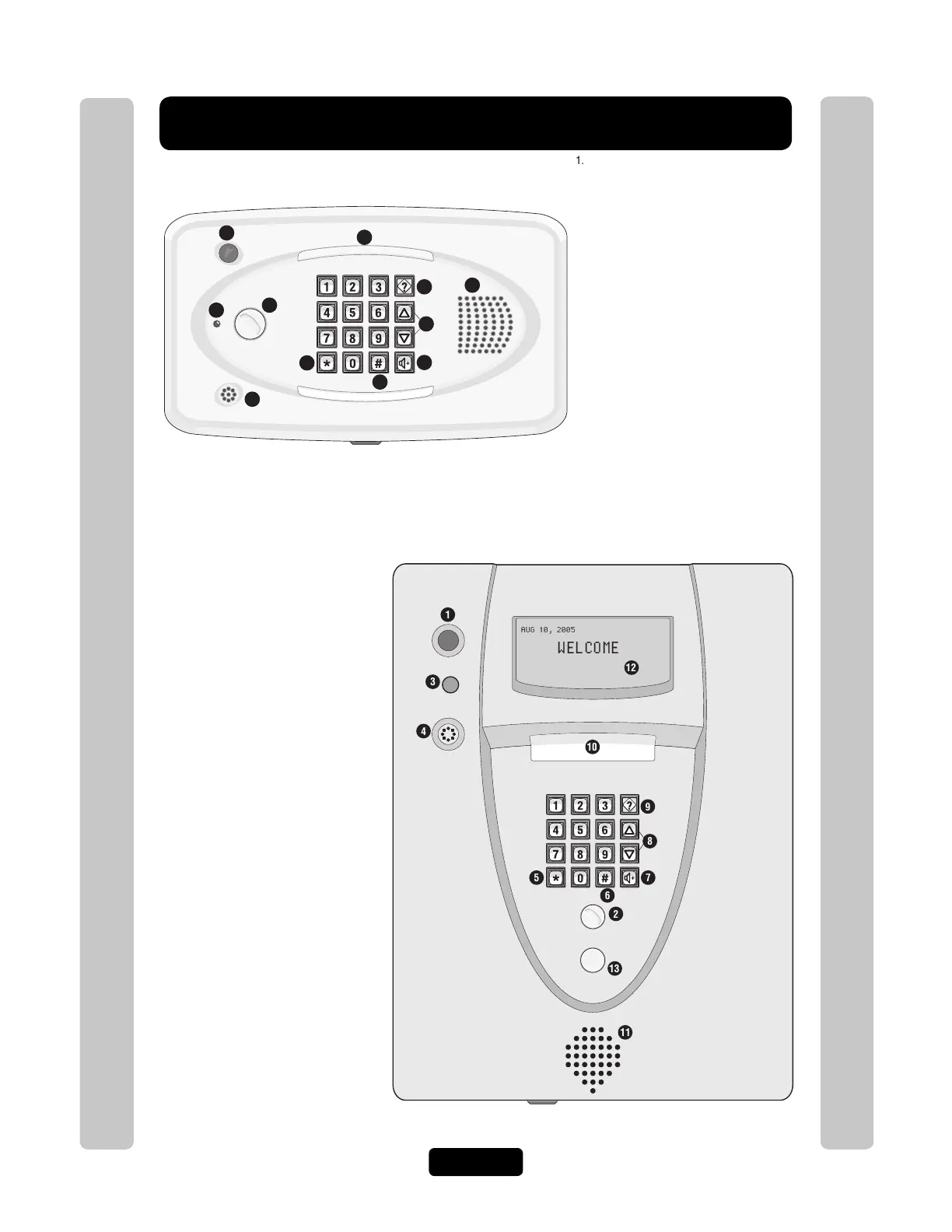
1. CCTV Camera: Optional
2. Call Button: Press to call a resident inside the
complex, or office.
3. Status LED: Solid Red (EL25 idle power, doors
are locked); Blinking Red (Strikes and Out for
a door); Solid Green (Granted access for a
door); Blinking Green (Latch for a door is
unlocked). NOTE: All references are for
door 1.
4. Microphone
5. Asterisk Key: "Start Programming Mode" or a
Cancel Key.
6. Pound Key: Data field separator, optional skip
step or enter key. Call a resident using the
directory codes.
7. Visitor Volume Key: Visitors can physically
adjust the speaker volume of the unit. Unit will
return to programmed volume setting when
transaction complete.
8. Up/Down Key: Serves no function on this unit.
9. Help Key: Receive a quick audio description of
a keypad button by pressing the Help key
followed by the key to be described.
10. Lights: Top and Bottom of Keypad.
11. Speaker: Allows resident and visitors to
communicate; plays responses to
communicate programming or function
commands.
1. CCTV Camera: Optional
2. Call Button: Press to call a resident inside the
complex, or office. Also when calling someone
using the directory code listing.
3. Status LED: Solid Red (EL2000 idle power,
doors are locked); Blinking Red (Strikes and
Out for a door); Solid Green (Granted access
for a door); Blinking Green (Latch for door 1 is
unlocked). NOTE: All references are for
door 1.
4. Microphone
5. Asterisk Key: "Start Programming Mode" or a
Cancel Key.
6. Pound Key: Data field separator, optional skip
step or enter key. Call a resident using the
directory codes.
7. Visitor Volume Key: Visitors can physically
adjust the speaker volume of the unit. Unit will
return to programmed volume setting when
transaction complete.
8. Up/Down Key: For scrolling through tenant
listing.
9. Help Key: Receive a quick audio description of
a keypad button by pressing the Help key
followed by the key to be described.
10. Lights: Top of Keypad.
11. Speaker: Allows resident and visitors to
communicate; plays responses to
communicate programming or function
commands.
12. LCD Display (optional)
13. Postal Plug



 To Next Page