Page 65
When activated, a Request to Exit Device (REX) opens a door or activates specific
relays you can assign. It is typically used for residents to exit through a controlled
door or gate.
Request to Exit Device (REX)
Postal/Lock/Autocall/Exit/Door Sensor Devices
Postal/Lock/Autocall/Exit/Door Sensor Devices
1
Press Then
2
Enter REX Number (1-4). Then (#)
NOTE: The REX number is the Door Number" the exit device is wired to.
3
Select REX Option (0-2). Then (#)
0=Disable
1=Use Your Door Settings (see page 25).
2=Assign Specific Relay(s) to the Exit Device.
4
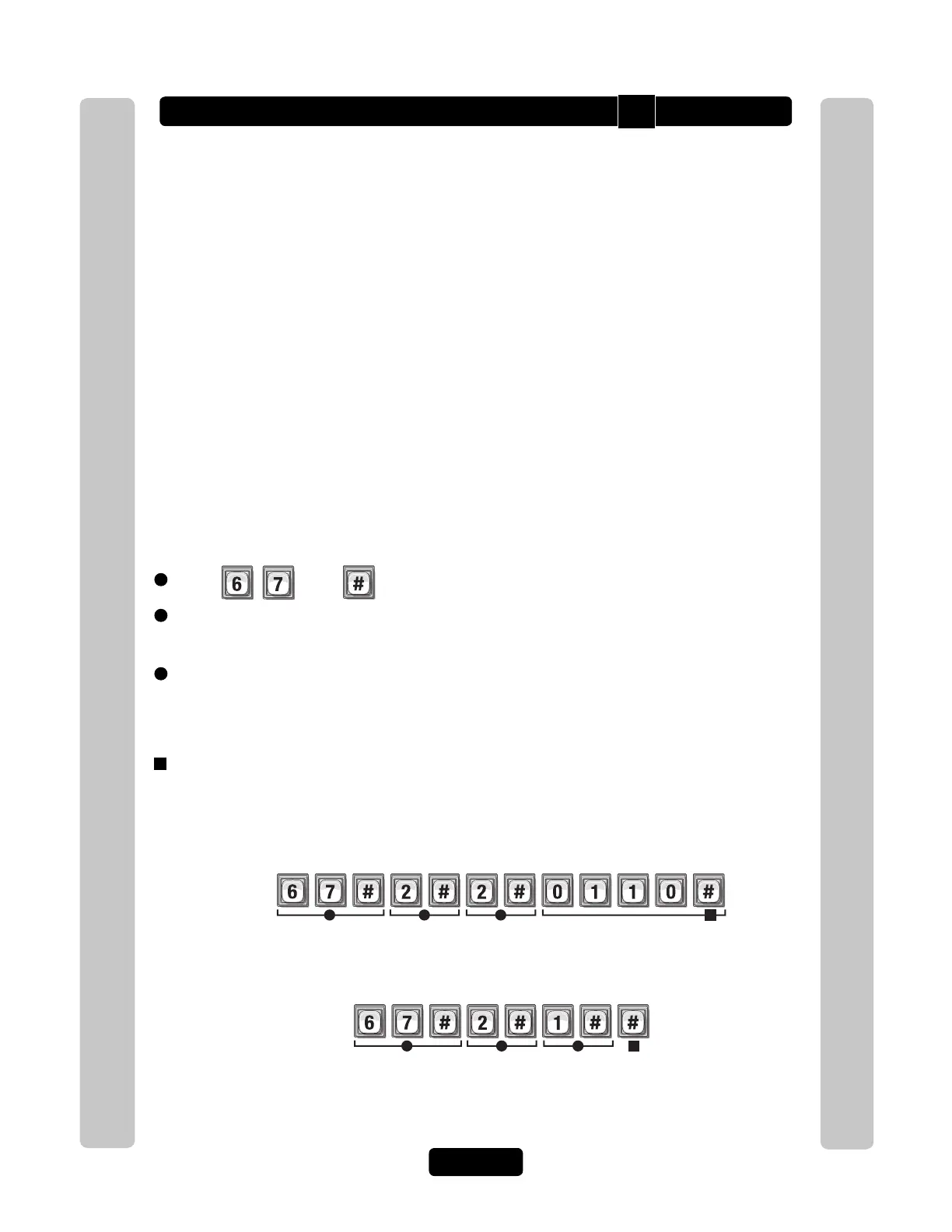
If Option "2" was Selected above, Specify Relay(s) to Activate (1111-0000). Then (#)
0=Deactivate, 1=Activate (1st digit=Relay 4, 2nd digit=Relay 3, etc.)
1 2 3
When the REX Device wired to Door "2" is activated, Only assigned relay "2" and “3”
will activate.
Example A:
Relay 4 Relay 3 Relay 2 Relay 1
4
1 2 3
When the REX Device wired to Door "2" is activated, Your assigned relay(s) from
Door 2 of Your Door Settings will activate (see page 25).
Example B:
4
Deact Deact
Activate Activate
• The REX can be assigned a door number (1-4) that will activate preset relay(s) from
Your Door Settings (see page 25).
OR
• The REX can have one or more specific relays assigned to it.
A REX device is usually a Normally Open Push Button wired to a specific "Door" that
allows it’s relay to function as an Exit Door. Factory Setting: REX 1=Door 1,
REX 2=Door 2, REX 3=Door 3, REX 4=Door 4
67



 To Next Page