Page 45
4
Enter Sequence Code (0-2). Then (#)
5
Enter ID Number (0-26). Then (#)
6
Enter Button Number (1-4). Then (#)
Transmitters
Add, Edit or Delete Transmitter Codes
When adding or editing transmitter codes, note the following:
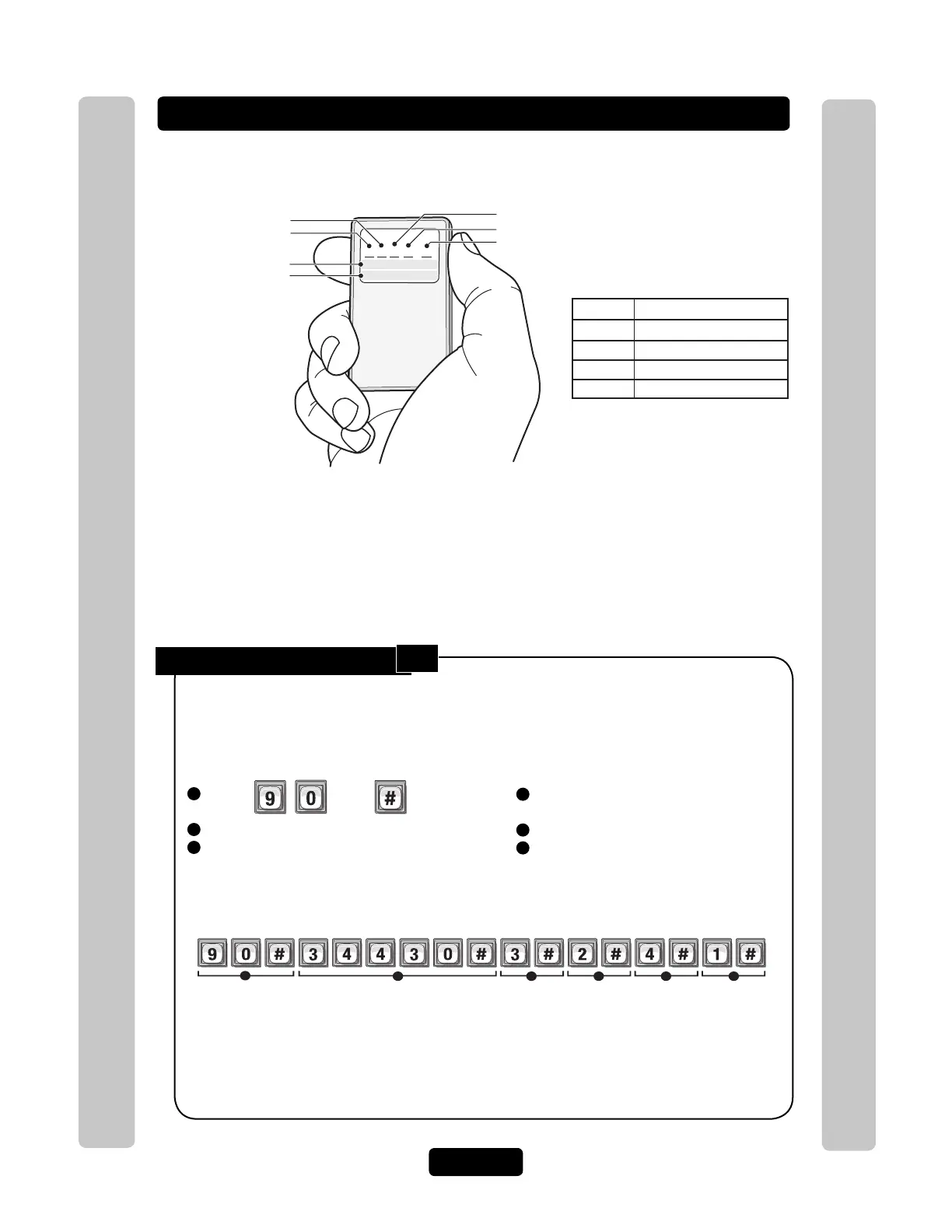
• The label on the back of the transmitter displays the codes necessary to program the transmitter.
Add a Basic Transmitter:
1
Press Then
2
Enter Transmitter Number (1-65534). Then (#)
3
Enter Facility Code (0-255). Then (#)
Add a Basic transmitter to the system’s database. A basic transmitter will be active,
unlock all doors/gates assigned to the RF module with no time constraints (i.e., can be
used 24 hours a day, 7 days a week). For Full Function transmitters (i.e., transmitters
with additional options such as schedules, assignments per door), see next page.
Important: Steps 1-6 must be performed for EACH Transmitter assigned.
PASSPORT
S W I D SE Q F C PIN
Codes for Buttons 1-3
Button Number
ID Number
Transmitter Number
Facility Code
Sequence Code
Codes for Button 4
1- 3 0 3 0 0 03 4 12241
4 0 3 0 0 16 3 45009
Button Opens Relay For Door
1
2
3
4
1
2
3
4
• Keep a record of each transmitter code you assign; in particular, write down the resident names
associated with each transmitter. This will help when adding, editing, or deleting transmitter codes
later.
• Once the ID number, sequence, facility and transmitter number are programmed use the chart in the
illustration.
• When adding transmitters buttons 1-3 are automatically entered and active. You do not have to repeat
a step for buttons 2 and 3.
Activates transmitter number "34430", facility code "3", sequence code "2", ID number "4" and button "1".
Example:
2 3 4 5
1
6
Transmitters
NOTE: To replace a lost transmitter first delete the lost transmitter (Step 100 on page 47) and
then add the new transmitter to the unit’s database (Step 90 on this page).
NOTE: The new card uses the default settings for active and inactive values. To modify these
settings use Step 98 on page 48.
90



 To Next Page