Page 32
1 2 3
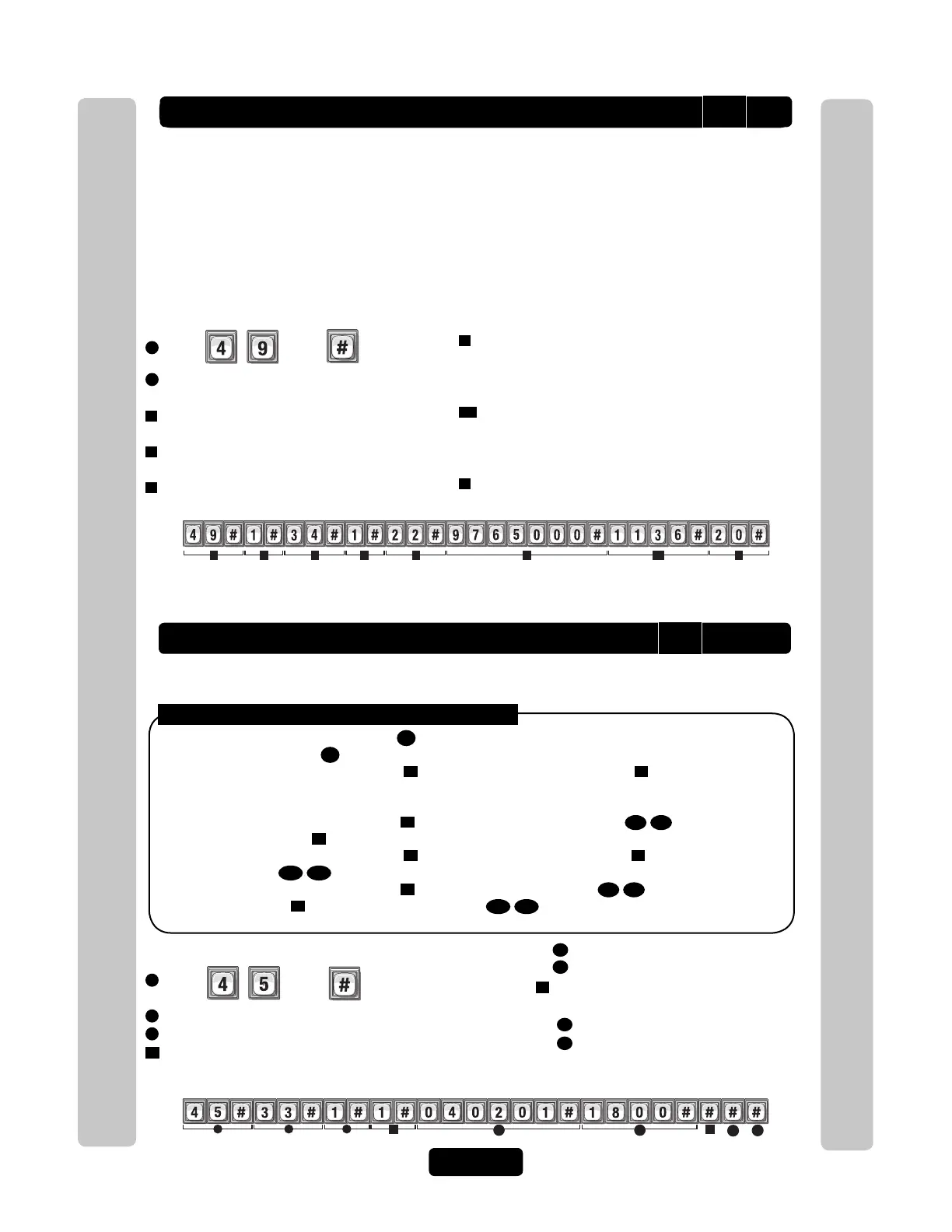
Directory Code "33" is Activated on February 1st, 2004 at 6PM.
Example:
Year Month Day
24-Hour Time
4
5
4A
4B
5B
5A
Directory Codes
Directory Codes
Add / Modify Resident DnD and/or Call Forwarding
Add/Modify DnD and Call Forwarding Information for the Resident (NPB) or manager. Do
Not Disturb (DnD) Schedules prevent visitors from calling the Resident (NPB) or manager
phone during specified time frames. Call Forwarding redirects visitor calls to an outside
telephone number instead of ringing the Resident (NPB) or manager phone. During a Call
Forwarding call, the visitor will hear normal telephone line sounds but will not hear the
number being dialed.
You can Enable or Disable, individually, the DnD and Call Forwarding features for the
Resident (NPB) or manager phone. Factory Setting: DnD Control Setting is Disabled (0);
Call Forwarding Control Setting is Disabled.
1
Press
Then
2
Set DnD Control Setting, Enabled (1) or
Disabled (0). Then (#).
3
Enter Do Not Disturb Schedule (0-63).
Then (#).
4
Set Call Forward Control Setting, Enabled (1)
or Disabled (0). Then (#)
5
Enter Call Forward Schedule (0-63). Then (#)
Activate or Deactivate a Directory Code
Activate or deactivate Directory Codes. Also activate or deactivate specific dates and
times for those Directory Codes.
Activate / Deactivate a Directory Code:
1
Press Then
2
Enter Directory Code (1-4 digits). Then (#)
3
Activate Directory Code, (Enable-1 or Disable-0). Then (#)
4
Use Start Activation Date, (Enable-1 or Disable-0). Then (#)
The DnD Control Setting is Enabled and uses Schedule "34". It also Enables Call Forwarding which uses
Schedule "22". Call Forwarding uses Phone Number "976-5000" with Extension "1136" and waits "20"
seconds before dialing the Extension.
To Activate or Deactivate a Directory Code:
4A
Start Date (yymmdd). Then (#)
4B
Start Time (hhmm). Then (#)
5
Use End Deactivation Date, (Enable-1
or Disable-0). Then (#)
5A
End Date (yymmdd). Then (#)
5B
End Time (hhmm). Then (#)
NOTE: All time must be entered using a
24-hour format (8AM=0800, 3PM=1500 etc.)
Disabling the Activate Directory Code
3
, the Directory Code will always be deactivated. If you enable the
Activate Directory Code
3
, then the four If statements could apply:
1. If you disable the Start Activation Date
4
and disable the End Deactivation Date
5
and omit all dates and
times, the Directory Code will immediately become active and stay that way until the code is deactivated or
deleted.
2. If you enable the Start Activation Date
4
and add only a "Start Date and Time"
4A
4B
and disable the
End Deactivation Date
5
, the Directory Code will activate on that "Start Date and Time".
3. If you disable the Start Activation Date
4
and enable the End Deactivation Date
5
and add only an "End
Date and Time"
5A
5B
, the Directory Code will deactivate on that "End Date and Time".
4. If you enable the Start Activation Date
4
and add a "Start Date and Time"
4A
4B
enable the End
Deactivation Date
5
and add an "End Date and Time"
5A
5B
, the Directory Code will activate on that
"Start Date and Time" and deactivate on the "End Date and Time".
49
45
6
Only Enter New Call Forward Phone Number (up to
20 digits). Then (#)
(Skip this step to keep existing Call Forward Phone
Number)
6A
Enter Call Forward Phone Extension (up to 5 digits).
Then (#)
(If using an extension the unit MUST have a phone
number).
7
Enter Call Forward Extension Delay (0-30 sec.).
Then (#)



 To Next Page