Page 41
Access Cards
Access Cards
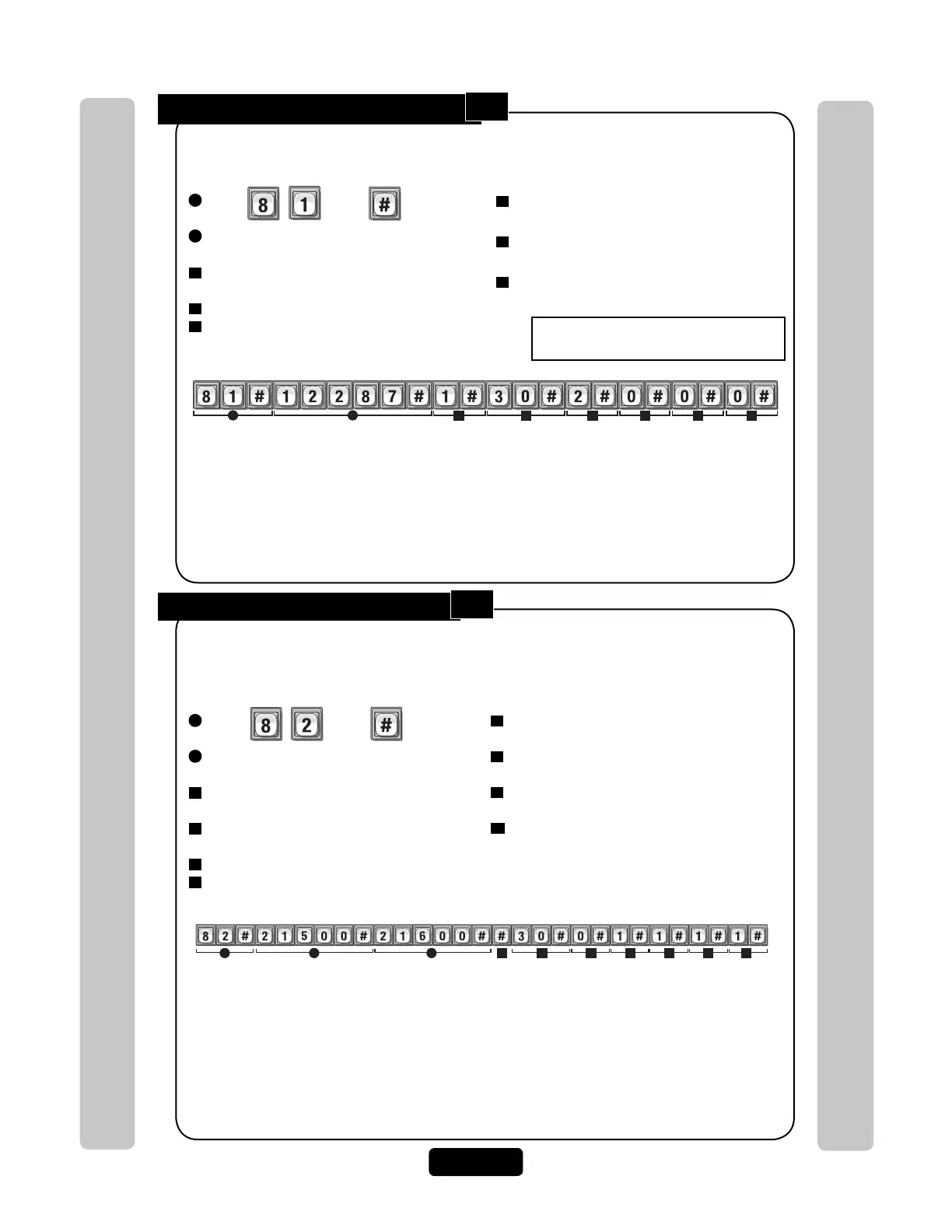
Add a Group of Cards at Once:
1
Press Then
2
Enter Card Number (1-65534 [26 or 30-bit]).
Then (#)
3
Enter Ending Card Number (1-65534 [26 or
30-bit]). Then (#)
3
Enter Facility Code (0-63 [30-bit],
0-255 [26-bit]). Then (#)
3
Card Type (26 or 30). Then (#)
3
Activate (1) or Deactivate (0). Then (#)
This feature allows you to enter a large number of cards into the system at one time. Individual
cards from a group can be edited later. For example, you have 250 cards that you want to enter
into the system so that every time someone needs a card, you won’t have to program the
system individually to enter a new card.
NOTES:
• Group cards must be the same Card Type and have the same Facility Code. In addition,
you may also activate the cards, add a schedule to one or more doors. These options must
also be the same.
• If you don’t add a Facility Code or Card Type when adding a new card group, the system will
add the defined default values. For details see Default Facility Code or Default Card Type on
page 43.
7
Schedule for Door 1 (0 to 63). Then (#)
0=Full Restrictions 1=Full Access
8
Schedule for Door 2 (0 to 63). Then (#)
0=Full Restrictions 1=Full Access
9
Schedule for Door 3 (0 to 63). Then (#)
0=Full Restrictions 1=Full Access
10
Schedule for Door 4 (0 to 63). Then (#)
0=Full Restrictions 1=Full Access
Factory Settings: All Doors = 1 Full Access
Adds a inactive group of Cards that range between "21500" and "21600", default Facility Code,
30-bit Card Type, inactive, and valid at all doors.
cA
d
Example:
1 2 3 4 5 6 7 8 9 10
Add or Edit a Full Function Card:
1
Press Then
2
Enter Card Number (1-65534 [26 or 30-bit]).
Then (#)
3
Enter Facility Code (0-63 [30-bit],
0-255 [26-bit]). Then (#)
4
Enter Card Type (26 or 30). Then (#)
5
Schedule for Door 1 (0-63). Then (#)
0=Full Restrictions 1=Full Access
When adding a full function card, it will default as "Active". To deactivate a code, or deactivate
on a specific time and date, see Activate or Deactivate Card on page 42.
Example:
Door 2Door 1
3
4 5 6
Door 3
7
Door 4
8
21
NOTE: For new cards, if you don’t add a Facility Code or Card Type, the system will add the
defined default values. For details, see Default Facility Code or Default Card Type on page 43.
NOTE: To replace a lost card first delete the lost card (Step 88 on page 42) and then add the
new card to the unit’s database (Step 81 on this page).
NOTE: The new card uses the default settings for active and inactive values. To modify these
settings use Step 87 on page 42.
6
Schedule for Door 2 (0-63). Then (#)
0=Full Restrictions 1=Full Access
7
Schedule for Door 3 (0-63). Then (#)
0=Full Restrictions 1=Full Access
8
Schedule for Door 4 (0-63). Then (#)
0=Full Restrictions 1=Full Access
Factory
Settings
All Doors = 1 Full Access
Adds card with number "12287", Facility Code "1", 30-bit Card Type, schedule
"2", that opens door 1 ONLY
82
81



 To Next Page