Page 58
Communications To and From Unit
Communications To and From Unit
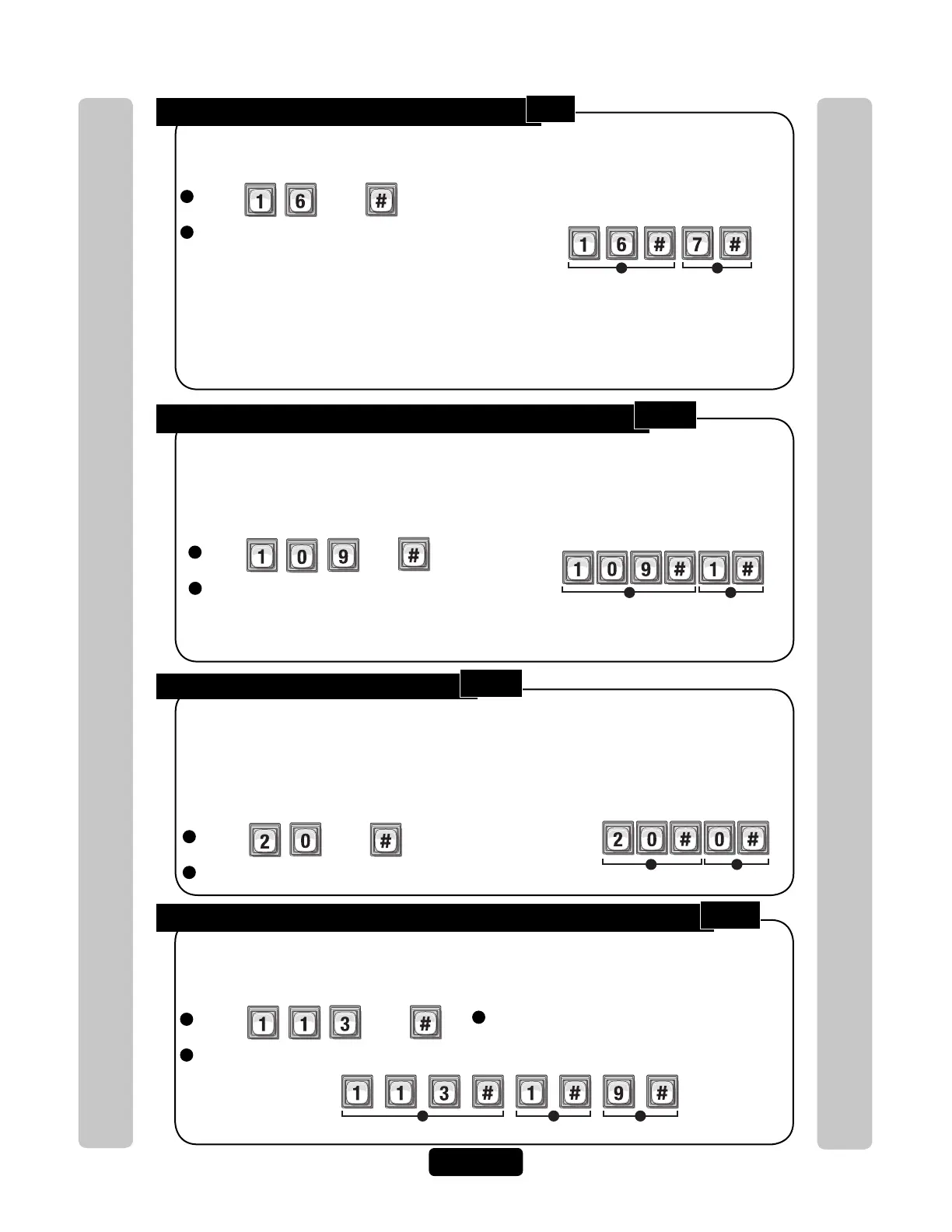
Number of Rings Before Unit Answers:
Override Telephone Company Answering Service:
Press Then
Enable (1) or Disable (0). Then (#)
You can override an answering service by dialing the line attached to your unit, letting the
phone ring only once or twice, then hang up. After a few seconds, dial the same number
again. The unit will immediately answer the second call. If you do not call back within 60
seconds, this feature will reset and you must start over. Factory Setting: Disabled
1
Press Then
2
Enter Number of Rings (0 to 15). Then (#)
When someone remotely calls the unit for programming, the unit answers the call after a
configurable number of rings.
Factory Setting: 5 Rings
"0" disables the unit and no incoming
calls will be answered. It will NOT be able
to be remotely programmed.
NOTE: If you have an answering machine (or answering service) attached to the same
phone line as the unit, set the unit count for two (2) or more rings higher than the
answering machine/service count. See also Override Telephone Company Answering
Service (See Below).
Unit will Answer a Remote Call after 7 Rings
Example:
1 2
Override is enabled. The unit will answer the second call after
a few number of rings, hang up and callback is performed.
Enable or Disable Telco Mode:
1
Press Then
2
Enable (1) or Disable (0). Then (#)
Telco mode is using the main telephone line for the unit’s communications to a house or
complex.
Enable the Telco mode if the unit will use a regular telephone line.
Disable the Telco mode if the unit will not have a regular telephone line connected to it. If the
Telco mode is disabled and the unit is connected to a regular telephone line, it will ignore all
Telco features (call forwarding, call waiting, etc.).
Factory Setting: Enabled
Telco mode is disabled.
Example:
1 2
Dial "0-9" First to Get an Outside Line Using an Automated Phone System:
1
Press Then
2
Enable (1) or Disable (0). Then (#)
When the unit is connected to a PBX telephone system (Automated), it can be programmed
to dial a specific PBX number (0-9) then pause briefly, allowing the PBX system to give the
unit an outside line.
Factory Setting: Disabled
Example:
Enables Unit to dial "9 and Pause" to connect to an outside line.
1 2 3
3
Enter Specific PBX Digit (0-9). Then (#)
1
2
16
109
20
113



 To Next Page