Configuring the Local Network
Quantum Spark 1500, 1600, and 1800 Appliances R81.10.X Locally Managed Administration Guide|90
To configure Application Control and URL Filtering on an appliance in the Bridge Mode that uses Tag-
based VLANs
Background:
Logical topology before the change:
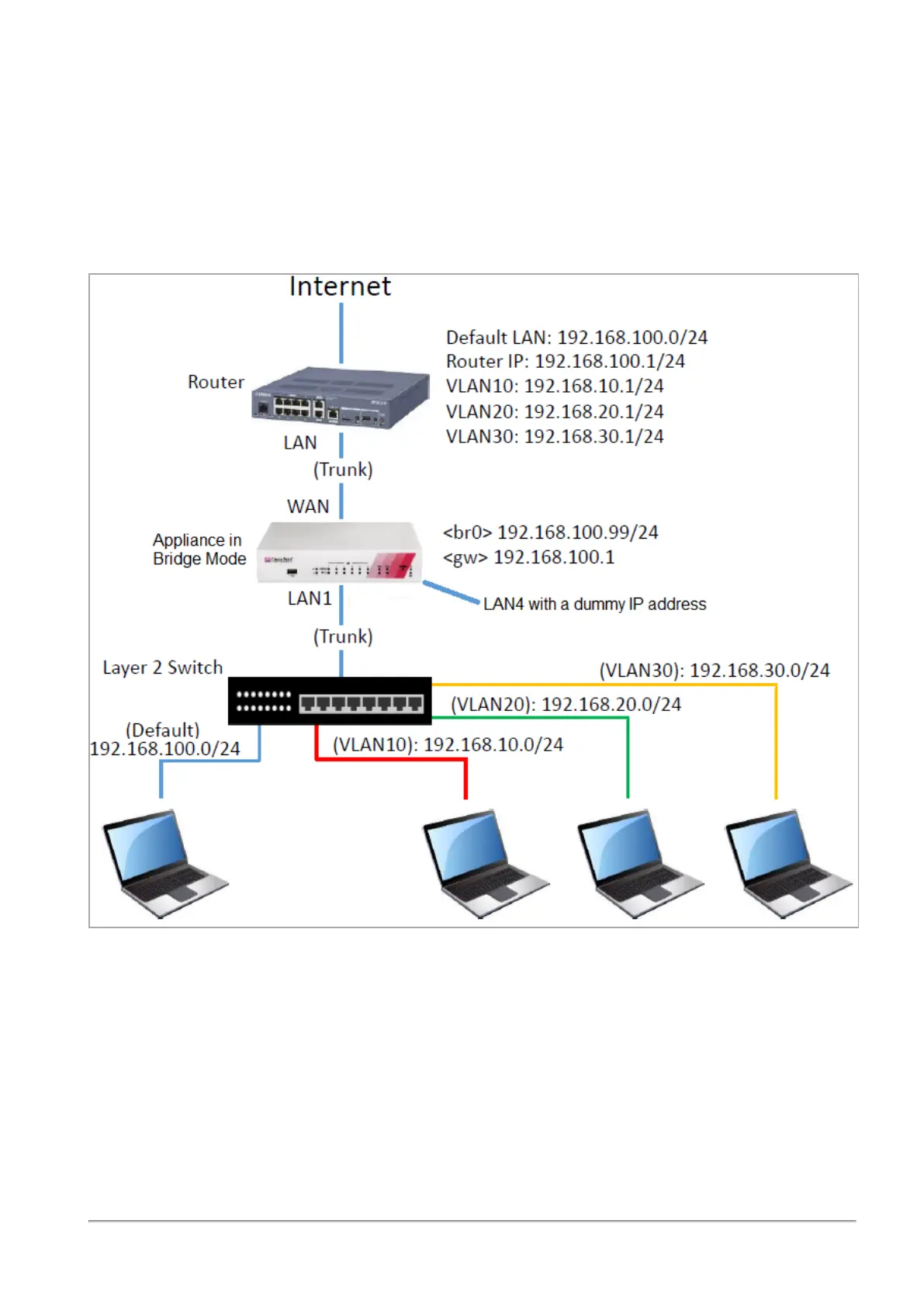
[SWITCH] --- VLAN Trunk --- (LAN) [Appliance in Bridge Mode] (WAN) --- VLAN Trunk --- [ROUTER]
Example physical topology after the change (configuring an interface with a dummy IP address):
Configuration steps:
1. Disconnect a cable from one of the available physical interfaces on the appliance (in our example,
LAN4).
2. Assign a random IP address to this interface.
This can by a dummy IP address that must not be used in your internal networks.
3. Go to the Device > Advanced Settings page. See
"Advanced Settings" on page149
.
4. Search for UserCheck Portal - Redirect Address
5. Select this attribute.









 To Next Page