31 Copyright © 2024 Cisco Systems, Inc. All rights reserved.D15519.02 | 2024 JANUARY | Cisco Room Kit EQX Installation Guide
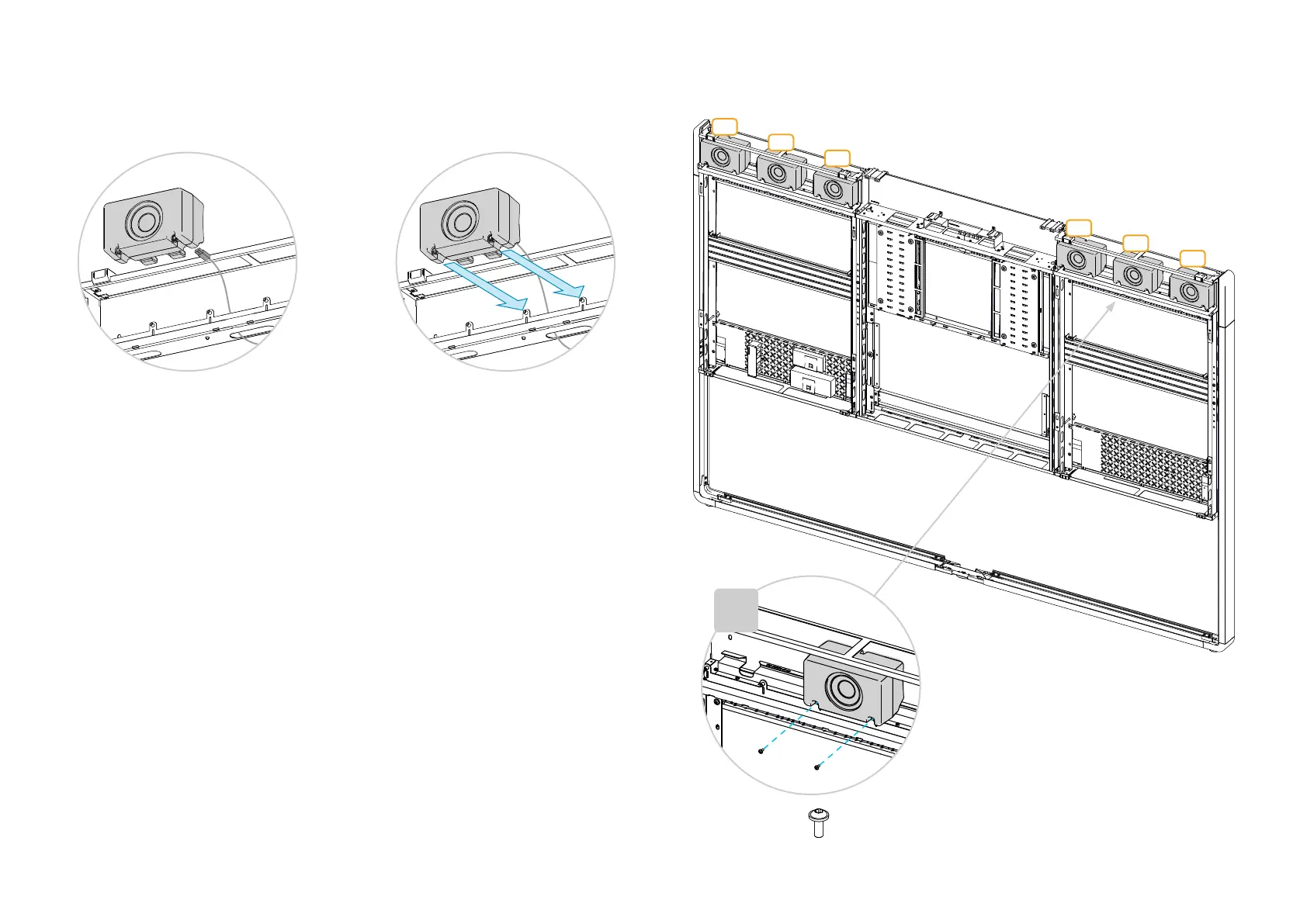
8.2. Insert the loudspeakers
The system has six loudspeakers; three on each side of the camera. The speakers are identical.
Repeat this procedure for all loudspeakers.
1. Connect the correct cable to the
loudspeaker.
The cables are marked with S1 to S6 -
counting from the left, see illustration.
2. Enter the loudspeaker onto the pegs.
Check that the rubber gaskets stay firmly
on the pegs.
Make sure that no cables are touching
the loudspeakers. If they do, they may
cause rattling noise.
3. Fasten each loudspeaker with two
screws
(M4x10, Torx T20).
S1
S2
S3
S4
S5
S6
×6
12x


 To Next Page