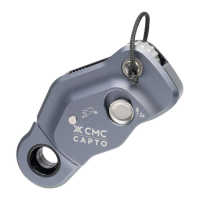
| CAPTO USER MANUAL 29
During use, carrying, storage, and
transport, keep the equipment away from
acids, alkalis, rust, and strong chemicals.
Do not expose the equipment to ame
or high temperatures. Store in a cool,
dry location. Ensure that the equipment
is protected from external impact, sharp
edges, excessive vibration, extreme
temperatures, chemical reagents and
ultraviolet radiation.
Cleaning
Clean and dry this equipment after each
use to remove any dust, debris and mois-
ture. Use clean fresh water to wash off
any dirt or debris. Do not use a pressure
washer to clean the device. If device gets
wet from use or cleaning, allow the device
to air dry at temperatures between 10° C
and 30° C, keep away from direct heat.
After using CAPTO in dirty or dusty
environments, the latching mechanism
may need to be cleaned and lubricated to
maintain proper function. When cleaning,
use a cotton swab saturated with isopropyl
alcohol to wipe away dirt or dust from
the surfaces of the Sideplate Release
Button, Sideplate Latch, and lock pins as
highlighted in the illustrations.
Warranty & Repairs
If your product has a defect due to
workmanship or materials, please contact
Customer Support at info@cmcpro.com
for warranty information and service.
CMC’s warranty does not cover damages
caused by improper care, improper use,
alterations and modications, accidental
damage, or the natural breakdown of
material over extended use and time.
The equipment should not be modied
in any way or altered to attach additional
parts without the manufacturer’s written
recommendation. If original components
are modied or removed from the product,
its safety aspects may be restricted. All
repair work shall be performed by the
manufacturer. All other work or modica-
tions void the warranty and releases CMC
from all liability and responsibility as the
manufacturer.
5. COMPATIBILITY
Verify that this product is compatible with
the other equipment in the system and
that its intended applications meet current
standards. Equipment used with this prod-
uct must meet regulatory requirements
in your jurisdiction and/or country, and
provide safe, functional interaction.
When combining this product with other
equipment and/or using this product in a
rescue / fall prevention system, users must
understand the instructions of all compo-
nents prior to use and comply with them to
ensure that safety aspects of these items
do not interfere with each other.
Danger may arise and functionality may
be compromised by combining other
equipment with this product in which the
safe function of any one item is affected by
or interferes with the safe function of an-
other. User assumes all responsibility for
non-standard use or added components.
Contact CMC if you are uncertain about
the compatibility of your equipment.
Rope
Use only the recommended diameters
and types of synthetic rope. Different
types of anchor lines may change the
characteristics and safe function of the
device. Rope grab performance can be
affected by various parameters such as
the diameter, construction, wear and tear,
and surface treatment of the rope, as well
as other variables such as ropes that are
frozen, muddy, wet, or dirty.
Depending on relevant regulations,
the equipment can only be used with
rope types listed in the Standards &
Certications table.
For the certications EN 12841:2006/B
and EN 567:2013, the following ropes
have been used:
• Teufelberger Fiber Rope Corp, KMIII,
10.5 mm and 11 mm
WARNING: Do not use on wire ropes or
braided (laid) ropes.
Connectors
When installing carabiners into the becket,
it is advisable to orient the carabiner such
that the widest part interfaces with the
device. To minimize tri-loading, make sure
that the carabiner is aligned with the rope
and device and when the load is applied, it
does not cause binding in the becket.
Connectors with tight internal radii and/or
sharp angles can increase edge loading
of the becket and can reduce strength
or cause damage to the carabiner or
the CAPTO. Aluminum carabiners are
preferred for use with the CAPTO. Steel
or Stainless steel connectors, especially
those with tight internal radii or sharp
angles, are not recommended for use
in the becket.
• EN 12841/B use: EN 362 Class B
carabiners.
• NFPA 2500 (2022 ED) use: Technical or
General Use carabiners.
Anchors
It is essential that the device and the
anchor points are always correctly placed
above the user, and that the work is orga
-
nized in such a way to minimize the risk of
a fall from a height. Always ensure enough
clearance to avoid impacts with the ground
or other obstacles in case of a fall.
For EN 12841/B, use only anchor points
that comply with the EN 795 standard
(minimum strength of 12kN or 18kN for
non-metallic anchors) that do not have
sharp edges.
Harnesses
This product is compatible with work
harnesses (EN 813, EN 361) when used
in compliance with EN 12841 and with
mountaineering harnesses (EN 12277)
when used in compliance with EN 567
and EN 12278.
Lanyard Connection (EN12841)
In compliance with EN 12841:2006/B, the
device can be connected to the harness
using an EN 813 attachment point on
the harness, an EN 354 lanyard and EN
362 connectors. The total length of the
connection shall be less than 1 meter,
and it is imperative to ensure that the
device remains within the user’s reach at
full extension.
6. PRODUCT USE
Opening & Closing the Sideplate
To open CAPTO, actuate the Sideplate
Release Button two consecutive times.
This will release the Sideplate and allow it
to swing completely open.
To close CAPTO, push the Sideplate
back into its closed position. The latch
should make two audible clicks as the
Sideplate closes.
Installation & Removal
Installation:
• Open the Sideplate by actuating the
Sideplate Release Button twice as
previously described.
• Hold CAPTO with one hand and use the
other hand to pull slight tension on the
host rope (if not already taught).
• Push CAPTO against the rope while
moving it along the rope. This will help
guide the rope into place. Follow the
rope path indicated by the product
markings and the manual illustrations.
• As needed, pull the Sideplate
fully open using the thumb of the hand
holding CAPTO. This will move the
Cam completely out of the way for rope
installation.
• Close CAPTO by rotating the Sideplate
to the closed position as described
above. Listen for two audible “clicks”
and visually check that the Sideplate
is fully closed.
• Function test CAPTO to conrm that
the rope is correctly installed and the
device is working properly. Always use a
backup safety system when performing
this test.
Removal:
• Remove any load that may be acting
on CAPTO.
• Push CAPTO a few centimeters toward
the anchor / load to disengage the Cam.
• Open the Sideplate by actuating the
Sideplate Release Button twice. When
the Sideplate is fully opened, it also
moves the Cam away from the rope for
easy removal.
• Take CAPTO off the working line, re-
moving rope from the pulley if needed.
WARNINGS:
• Do not load CAPTO unless the Side-
plate is fully closed and the Sideplate
Release Button has returned to the
lower position. See gure 6A.
• Do not attempt to release the Cam while
the device is under load.
• If the Cam is engaged, do not attempt
to pry it off the rope using the Sideplate.
Instead, disengage the Cam by moving
CAPTO a few centimeters toward the
anchor / load.
• Ensure that the rope follows the path
indicated by the laser markings and
illustrations. See gure 6B.
• Make sure the rope does not pass
above the Rear Rope Guide.
• Do not load CAPTO as a high line
trolley. It is not intended to support a
perpendicular load when placed on a
tensioned line. See gure 6C.
• Do not install the rope directly from the
rope grab into the inner pulley track.
See gure 6D.
• Installing the rope through the rope grab
and around the outside of the pulley
will allow for progress capture in a 1:1
haul. Use in this conguration should
be limited to taking up slack. CAPTO is
not intended to be used as a progress
capture pulley. Use in this manner could
cause premature wear to the rope or
device. See gure 6D.
Use in Hauling
CAPTO is designed to function as a
Pulley Rope Grab (PRG) in haul systems.
In this conguration, CAPTO works in
combination with a Progress Capture
Device (PCD), such as a belay / rappel
device or a self-braking descender like
the CMC CLUTCH by Harken Industrial™.
Install CAPTO in a xed position on the
working line between the PCD and the
load, and use the integrated pulley and
becket to add the desired mechanical
advantage.
3:1 Mechanical Advantage System
Open CAPTO as previously described
and install it on the load line going to the
PCD. Take the tail end of the rope coming
from the PCD and pass it around the
CAPTO pulley in the direction indicated
on the laser markings and shown in the
illustrations. Ensure the Sideplate is fully
closed before loading the system and
hauling with this simple 3:1 Z-Rig.
5:1 Mechanical Advantage System
To progress from a simple 3:1 to a simple
5:1 mechanical advantage system, use
appropriate connectors to attach a pulley
at the PCD side of the system and another
pulley to the CAPTO becket. Take the tail
side of the rope coming from the CAPTO
pulley and thread it through the additional
pulleys. Make sure to orient the pulleys
in line with the rope. Swivel pulleys are
recommended for this purpose but not
required. A number of additional mechan
-
ical advantage systems can be built using
CAPTO’s pulley and integrated becket.
Re-Setting the System
To re-set the haul system, release tension
on the haul strand and push CAPTO
toward the load. The becket provides a
useful point of leverage to reset the device
to the desired position. Installation of an
optional accessory loop can also provide a
place from which to pull / re-set CAPTO.
To collapse the haul system, ease the haul
strand and push CAPTO a few centimeters
toward the load to release the Cam. Use
a thumb on the Cam Grip to hold the Cam
open and slide CAPTO towards the PCD.
Use in Ascending
Use of CAPTO in this application allows
ascending a rope in accordance with
EN567, EN12841/B, and NFPA 2500 Rope
Grab / Ascender. When the adjustable
anchor line is loaded by the full weight
of the user it becomes a working line.


 To Next Page
 Loading...