Chapter 4: Using the web interface
98-129217-D Administration 114
Link monitoring
You can monitor the external IP connection of the SAILOR FleetBroadband system using the
link monitoring feature. With this feature activated, the terminal will send out ping commands
(ICMP Echo Requests) to a server of your choice.
To set up link monitoring, do as follows:
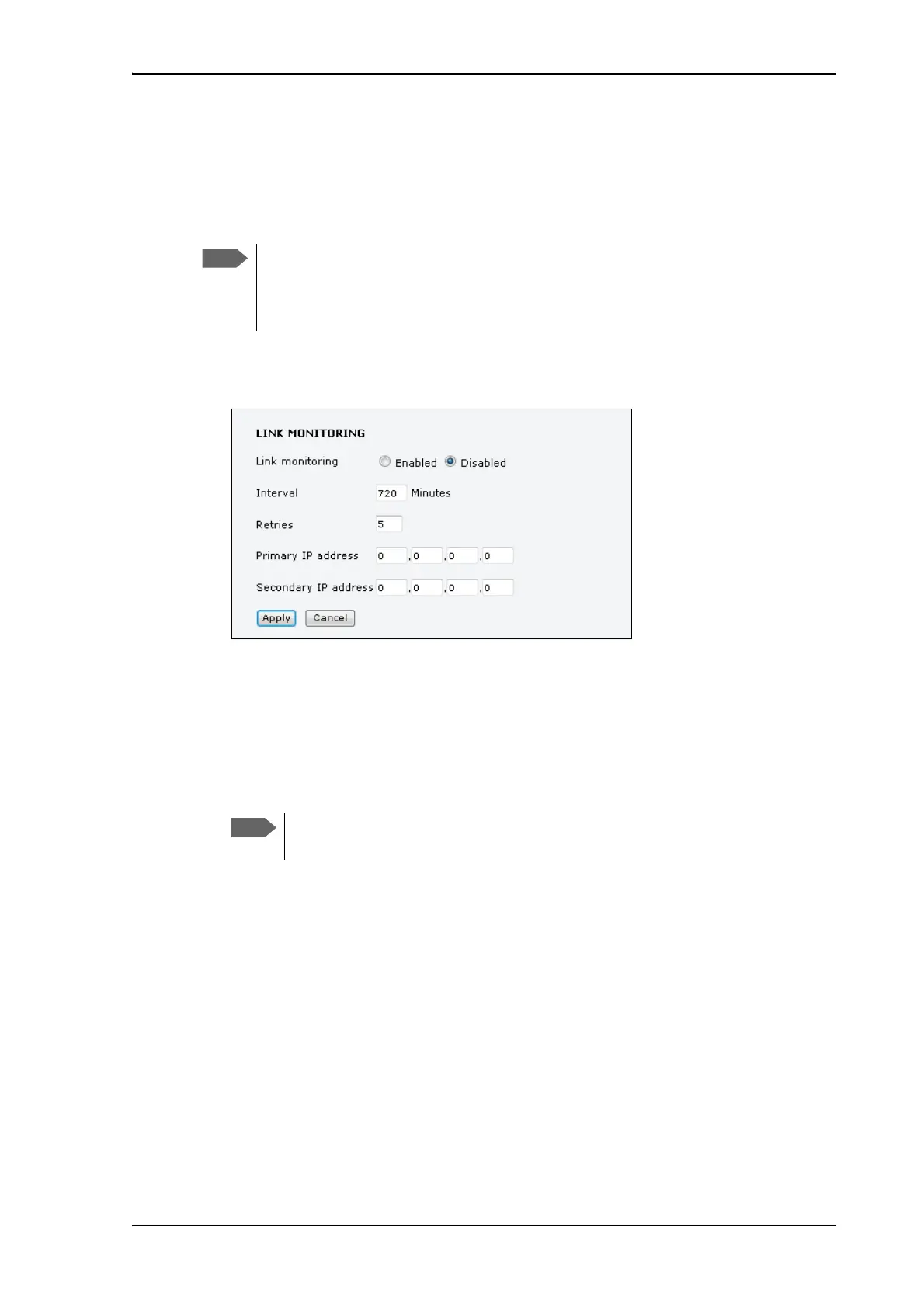
1. From the left navigation pane, select ADMINISTRATION > Link monitoring.
2. Select Enabled if you want to enable Link monitoring.
3. Select the Interval between each ping.
4. Select the number of Retries before the terminal reboots.
5. Type in the Primary and optionally the Secondary IP address.
This is the IP address of the server(s) to which the terminal will send ping commands.
6. Click Apply.
When a data session is started with the Default network user group, the terminal will start
sending ping commands to the Primary IP address the number of times specified at Retries. If
no response is received, it will send the same number of ping commands to the Secondary IP
address, if available. If no response is received here either, the terminal will reboot.
Link monitoring is only performed on data connections with
the Default network user group (see Network user groups
on page 70). This data connection must be activated before
link monitoring can start.
Use a server that is reliable and that supports and
responds to ICMP Echo Requests.











 To Next Page