Chapter 5: Maintenance and troubleshooting
98-129217-D Troubleshooting guide 126
Troubleshooting guide
The below table provides information on some of the problems that might occur, including
possible causes and remedies to solve the problems.
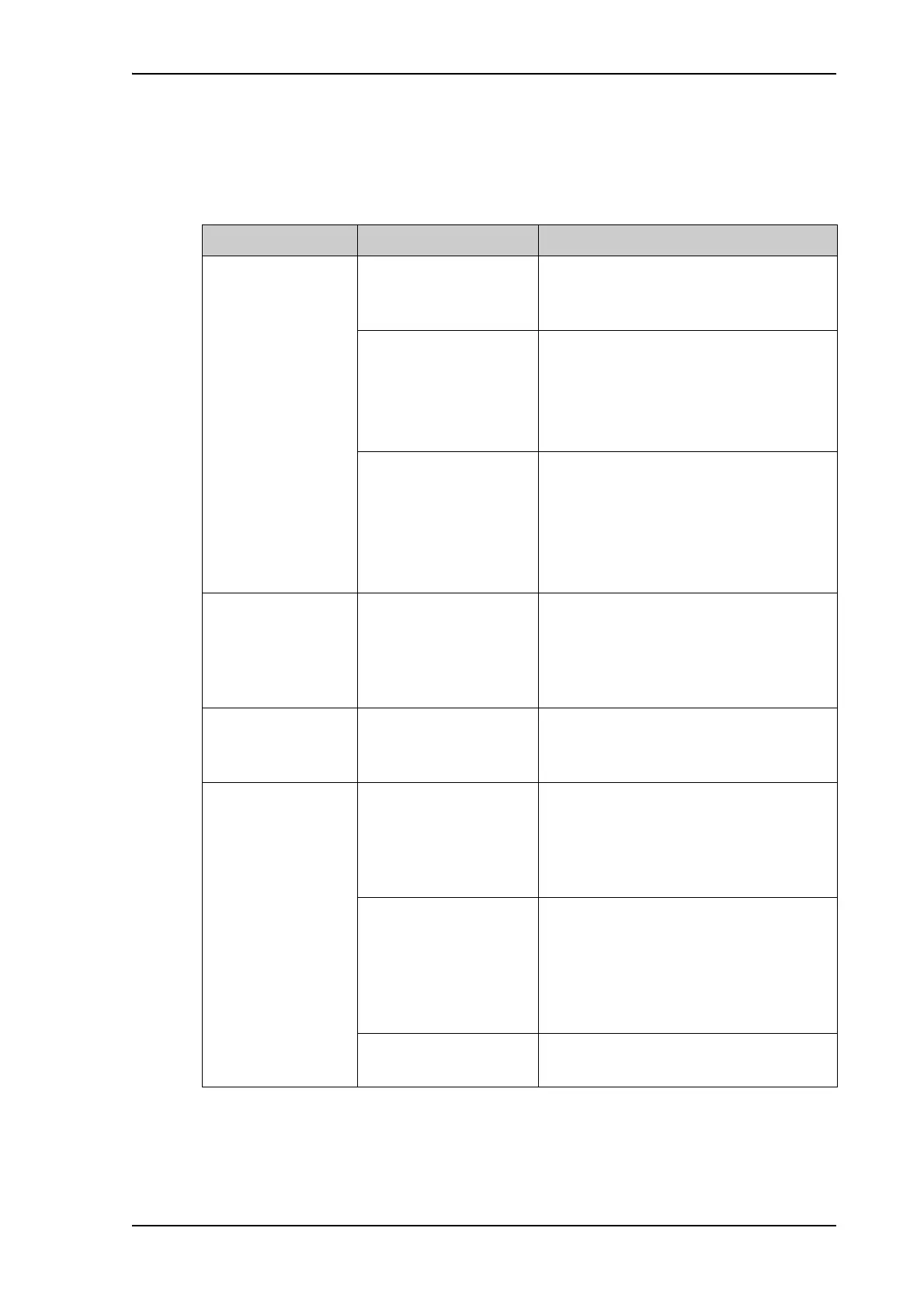
Problem Possible Cause Remedy
No signal or weak
signal from the
BGAN satellite.
The view to the satellite
is blocked.
Make sure the antenna has a clear view in
all directions. See the installation manual
for details.
The antenna cable is not
properly connected.
Check that both ends of the cable are
connected properly according to the
guidelines in the Installation manual.
Also check that no connectors are
damaged.
The system is set up to
use one specific satellite,
but the system is outside
coverage from that
satellite.
Enter the web interface. Select
SETTINGS > Satellite selection. Select
Auto and click Apply.
The system will now search for the
satellite with the strongest signal and
attempt to connect.
No transmission on
the BGAN network is
possible.
The Radio silence
function is activated
from an external device
connected to the I/O
interface of the terminal.
If the Radio silence function should not be
activated, deactivate it from the external
device.
Connection to the
Internet cannot be
established.
Your network user group
does not allow Internet
access.
The administrator can access and change
network user groups in the built-in web
interface of the terminal.
The web interface
cannot be accessed.
The browser is
configured to use a
proxy server.
For Microsoft Internet Explorer, select
Tools > Internet Options >
Connections > LAN Settings and clear
the field Use a proxy server for your
LAN.
You have entered a
wrong IP address.
Check the IP address and re-enter it. If you
do not have the correct IP address, you
can set the IP address temporarily to the
default address (192.168.0.1) by pressing
the Reset button. See Function of the
Reset button on page 139.
You are connected using
VPN
Close down your VPN connection.











 To Next Page