Chapter 3: Operating the system
98-129217-D Using a phone or fax machine 32
Holding a call
During a call, you may place the initial call on hold while another call is made.
Thrane IP Handset:
Select Options > Hold in the Thrane IP Handset. For further details, refer to the section
“Handling calls” in the user manual for the Thrane IP Handset.
Analogue 2-wire phones with R key:
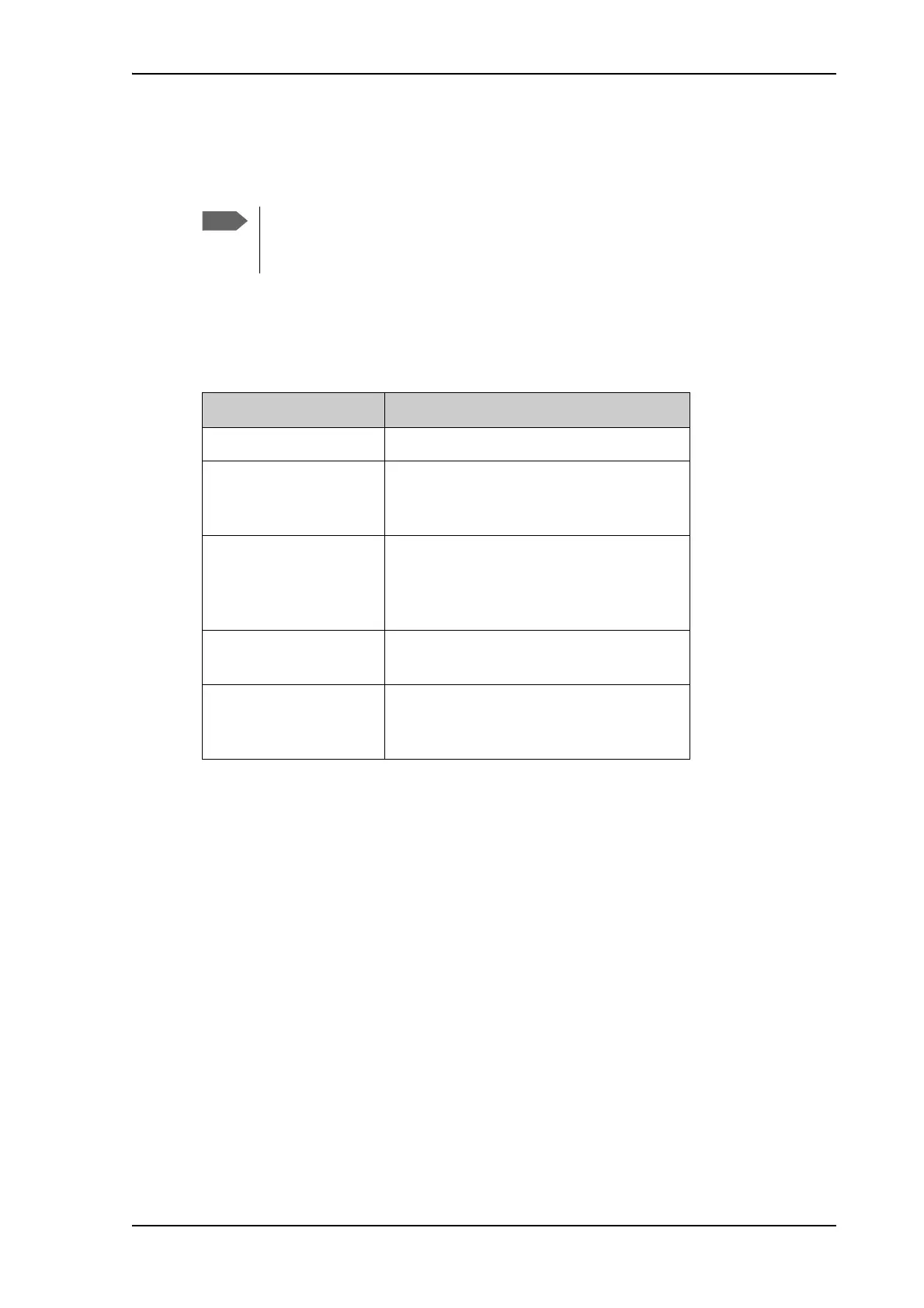
Different types of phone have different methods/keys for the functions listed below.
If you have another type of phone than the ones listed below, refer to the
documentation for your phone/handset.
If you want to: Do as follows (standard 2-wire phone):
Place a call on hold. Press R 2 #.
Place the existing call on
hold and establish a new
call.
Press R and dial the second phone number
followed by #.
Shuttle between the two
calls.
Press R 2 #
(irrespective of whether the second call
was acquired using Call Hold or acceptance
of Call Waiting.)
Clear the held call, if no
waiting call exists.
Press R 0 #.
Clear an active call and
return to the held call.
Press R 1 #.
Note that this is only possible if no waiting
call exists.











 To Next Page