EasyManua.ls Logo

Commodore 128D - Page 92

Commodore 128D
427 pages
Print Icon
To Next Page IconTo Next Page
To Previous Page IconTo Previous Page
Loading...
a
contingency.
Neither
line
is
executed
UNLESS
there
is
an
error.
When
an
error
occurs,
the
line
with
the
TRAP
statement
is
enacted,
and
control
is
directed
to
another
part
of
the
program.
You
can
use
these
statements
to
catch
anticipated
errors
in
entering
data,
resume
execution,
or
return
to
text
mode
from
a
graphics
mode,
to
name
just
a
few
options.
If
you
run
the
DO/LOOP
example
(which
doubled
numbers)
without
an
UNTIL
statement,
you
can
get
an
OVERFLOW
error
and
the
program
crashes.
You
can
prevent
that
from
happening
by
adding
two
lines,
one
at
the
beginning
of
the
program
and
one
at
the
end.
For
this
example,
you
might
add
these
two
lines:
5
TRAP
100
100
IF
N>1
THEN
END
Even
though
N
has
been
much
greater
than
one
for
the
entire
program,
the
statement
isn't
con
sidered
until
there
is
an
error.
When
the
number
"overflows"
(is
greater
than
the
computer
can
accept),
the
TRAP
statement
goes
into
effect.
Since
N
is
greater
than
one,
the
program
is
directed
to
END
(rather
than
crashing.)
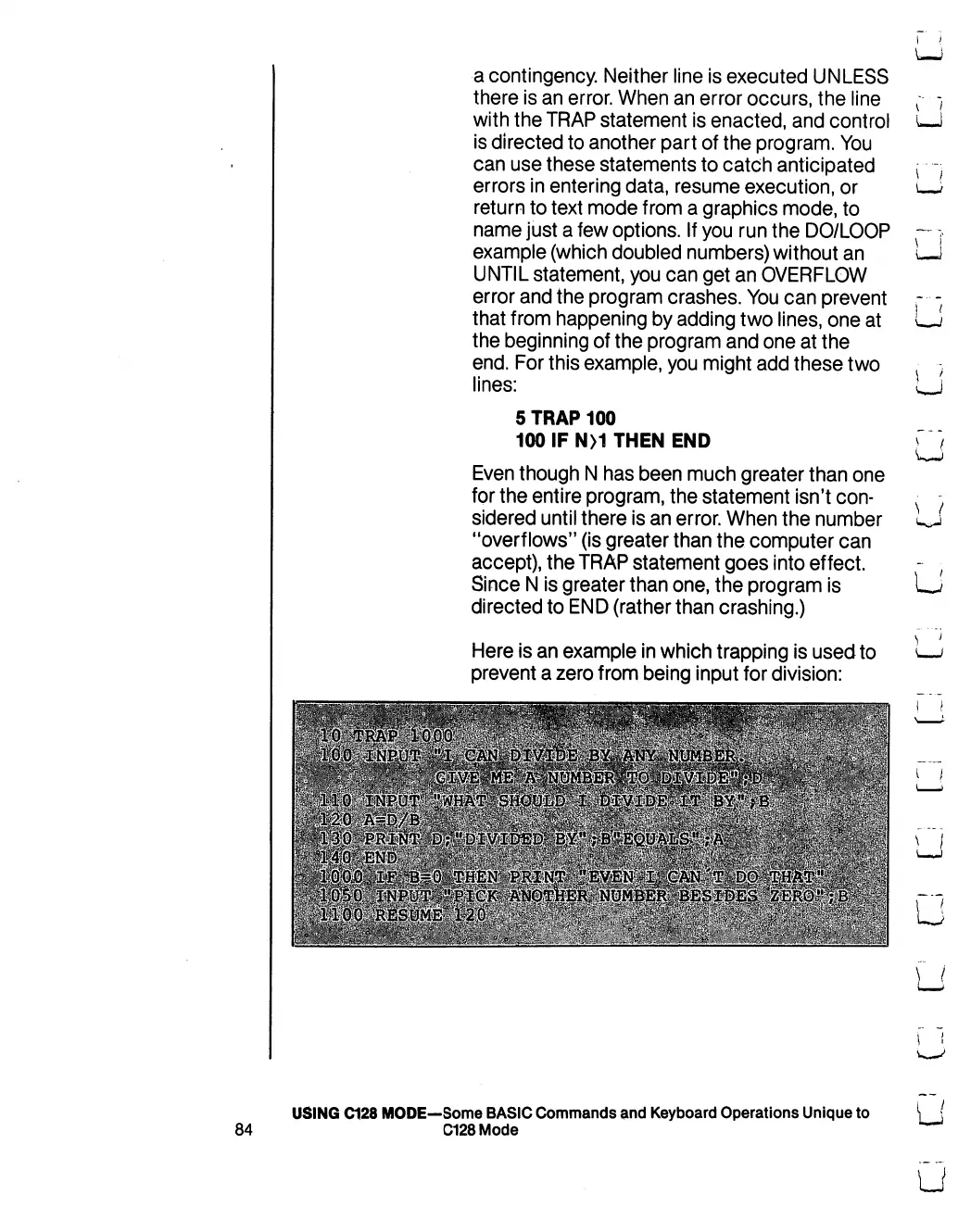
Here
is
an
example
in
which
trapping
is
used
to
prevent
a
zero
from
being
input
for
division:
U
\
/
LJ
U
LJ
USING
C128
MODE—Some
BASIC
Commands
and
Keyboard
Operations
Unique
to
84
C128Mode

Table of Contents

Other manuals for Commodore 128D

Related product manuals