EasyManua.ls Logo

Commodore 128D - Random Sounds

Commodore 128D
427 pages
Print Icon
To Next Page IconTo Next Page
To Previous Page IconTo Previous Page
Loading...
the
"Y"
key,
the
program
continues
with
line
160,
which
returns
pro
gram
control
to
line
10
and
the
program
repeats.
To
stop
the
Sound
Player
program,
press
the
RUN/STOP
and
RESTORE
keys
at
the
same
time.
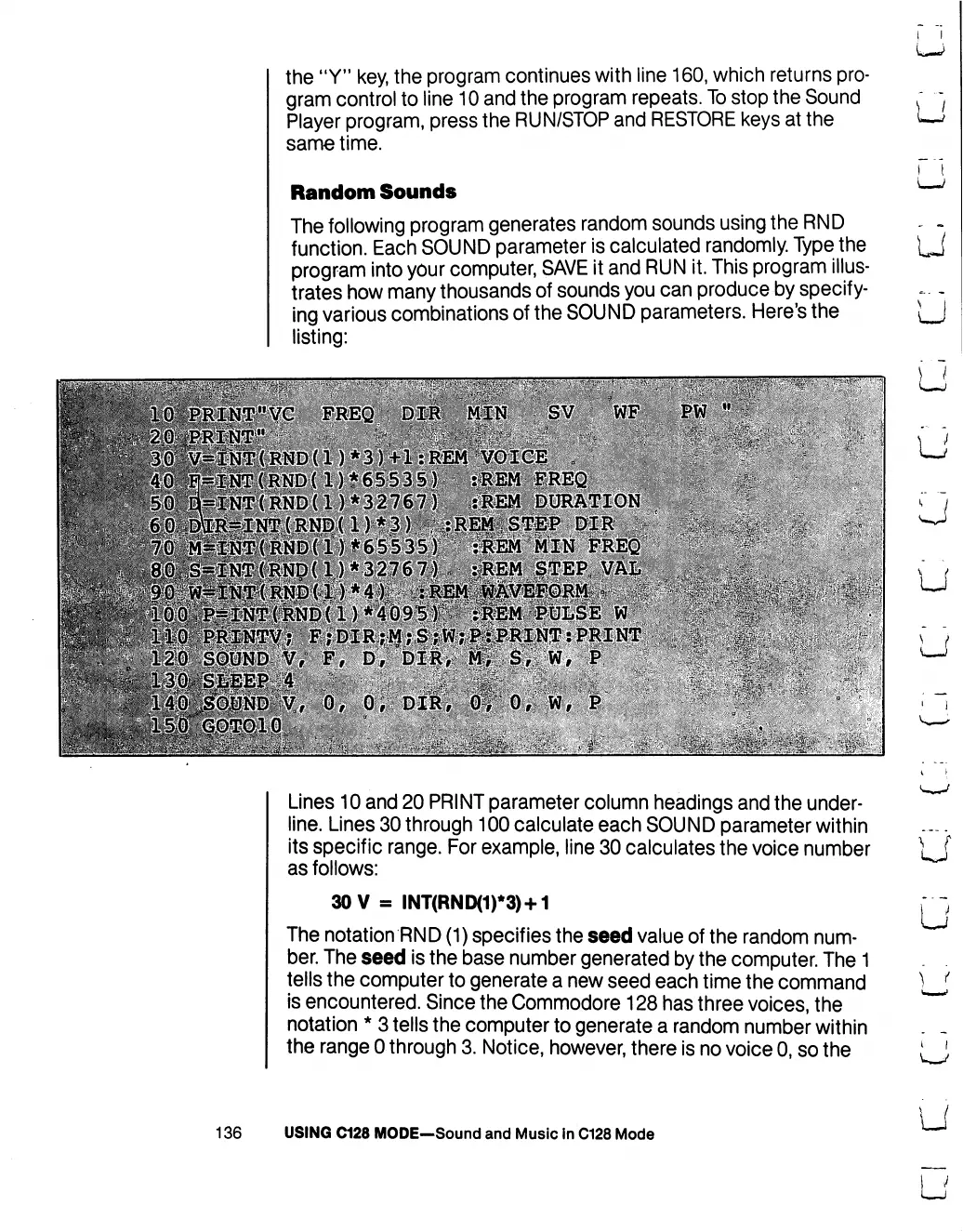
Random
Sounds
The
following
program
generates
random
sounds
using
the
RND
function.
Each
SOUND
parameter
is
calculated
randomly.
Type
the
program
into
your
computer,
SAVE
it
and
RUN
it.
This
program
illus
trates
how
many
thousands
of
sounds
you
can
produce
by
specify
ing
various
combinations
of
the
SOUND
parameters.
Here's
the
listing:
^^PI^^"
FREQ
DJ&
HIN
SV
WF
S^fN*iTRNDtl)
*3)
+1
:R'EM
)*65535)
:fEM
EREQ
1)*32767J
iiEM
DURATION
PW
"
■::$.:■■
:jfc
■:■>
^^■^ffi|ST'(:RiND(l)*65535;f:"'
iREM'MIN
FREQ
?:%4f
p^^|j^{RNp(
U
*
3276
7f
:
'if
EM
fTEP.
.VAL'.
.,
■;■■...-.;<.:/
■■'
?.:'£:.
*:j
F.jDIR;l?;,&|
:
PRINT
,:..■■■*.■.
■.■»»-,,
i
i
u
Lines
10
and
20
PRINT
parameter
column
headings
and
the
under
line.
Lines
30
through
100
calculate
each
SOUND
parameter
within
its
specific
range.
For
example,
line
30
calculates
the
voice
number
as
follows:
30
V
=
INT(RND(1)*3)
+
1
The
notation
RND
(1)
specifies
the
seed
value
of
the
random
num
ber.
The
seed
is
the
base
number
generated
by
the
computer.
The
1
tells
the
computer
to
generate
a
new
seed
each
time
the
command
is
encountered.
Since
the
Commodore
128
has
three
voices,
the
notation
*
3
tells
the
computer
to
generate
a
random
number
within
the
range
0
through
3.
Notice,
however,
there
is
no
voice
0,
so
the
136
USING
C128
MODE—Sound
and
Music
in
C128
Mode

Table of Contents

Other manuals for Commodore 128D

Related product manuals