EasyManua.ls Logo

Commodore 128D - Page 143

Commodore 128D
427 pages
Print Icon
To Next Page IconTo Next Page
To Previous Page IconTo Previous Page
Loading...
up
to
three
voices.
Experiment
and
create
a
program
which
utilizes
all
three
voices.
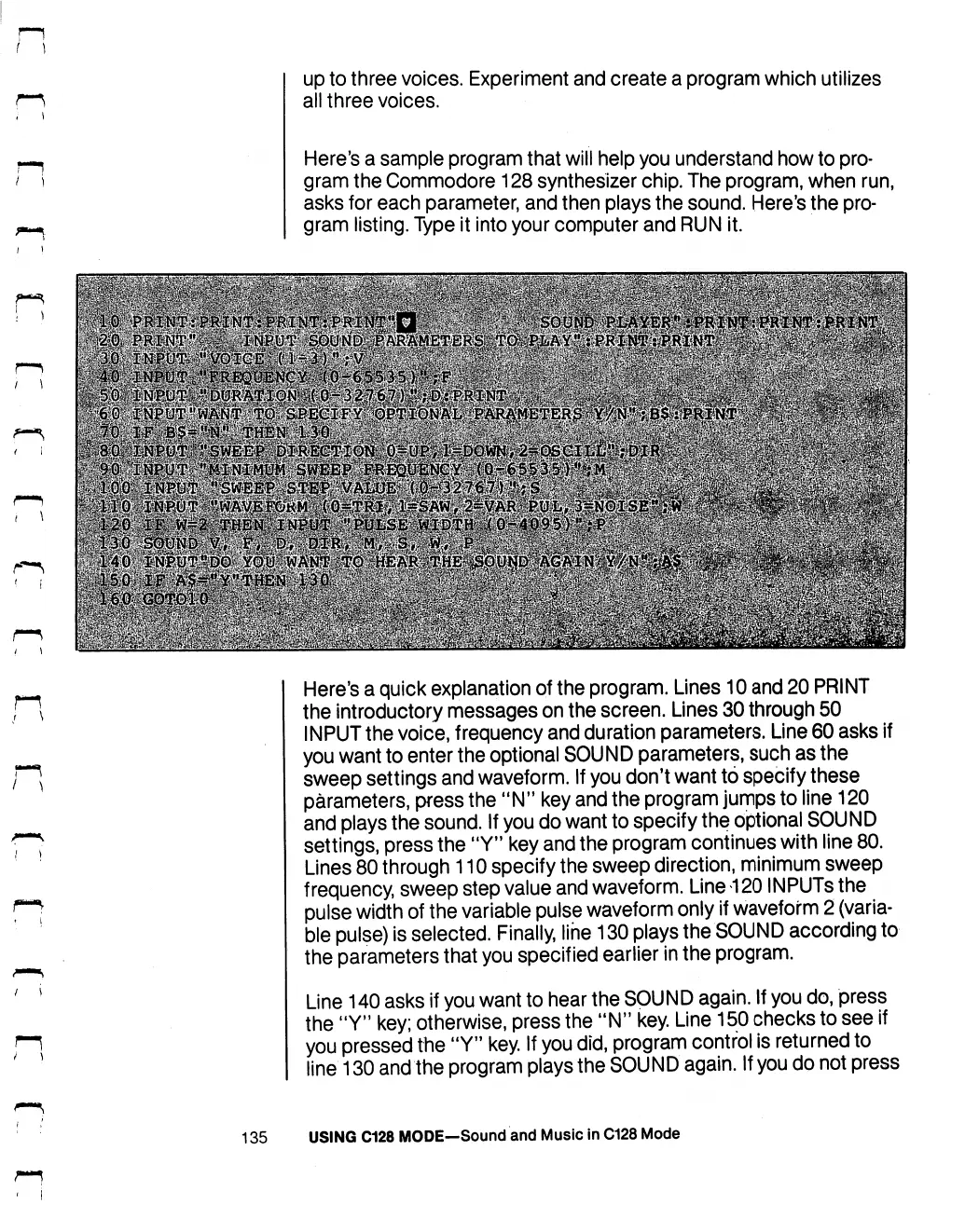
Here's
a
sample
program
that
will
help
you
understand
how
to
pro
gram
the
Commodore
128
synthesizer
chip.
The
program,
when
run,
asks
for
each
parameter,
and
then
plays
the
sound.
Here's
the pro
gram
listing.
Type
it
into
your
computer
and
RUN
it.
n
Here's
a
quick
explanation
of
the
program.
Lines
10
and
20
PRINT
the
introductory
messages
on
the
screen.
Lines
30
through
50
INPUT
the
voice,
frequency
and
duration
parameters.
Line
60
asks
if
you
want
to
enter
the
optional
SOUND
parameters,
such
as
the
sweep
settings
and
waveform.
If
you
don't
want
to
specify
these
parameters,
press
the
"N"
key
and
the
program
jumps
to
line
120
and
plays
the
sound.
If
you
do
want
to
specify
the
optional
SOUND
settings,
press
the
"Y"
key
and
the
program
continues
with
line
80.
Lines
80
through
110
specify
the
sweep
direction,
minimum
sweep
frequency,
sweep
step
value
and
waveform.
Line
120
INPUTS
the
pulse
width
of
the
variable
pulse
waveform
only
if
waveform
2
(varia
ble
pulse)
is
selected.
Finally, line
130
plays
the
SOUND
according
to
the
parameters
that
you
specif
ied
earlier
in
the
program.
Line
140
asks
if
you
want
to
hear
the
SOUND
again.
If
you
do,
press
the
"Y"
key;
otherwise,
press
the
"N"
key.
Line
150
checks
to
see
if
you
pressed
the
"Y"
key.
If
you
did,
program
control
is
returned
to
line
130
and
the
program
plays
the
SOUND
again.
If
you
do
not
press
135
USING
C128
MODE—Sound
and
Music
In
C128
Mode

Table of Contents

Other manuals for Commodore 128D

Related product manuals