()ot
Value
-+-+-+-+-I--+-f-.+-
f-+-
-+-.+-1--+
___
-+-+_I--+-+~+.~-+--+_
64
32
16
8
4
--~.~~-+-+-4-+-~-+~+-~~~~+-~-+~~-+-~-
2
42
42
42
42
42
85
85
85
85
85
85
85
85 85
85
85
85
85 85
85
-+--i-
-r-
.~4-+-~~~+-~-+~~+-~-+~4-+-~
64
--4-+-~-+~+-~~~~+-~-+~4-+-~-+~+-~~-
32
__
~_+-~-+_+-+-~~~~+-~-+~-+-+-~-+~+-~~_
16
--4-+-~-+~+-~~~~+-~-+~4-+-~-+~+-~~-
8
--4-+-~-+~+-~~~~+-~-+~4-+-~-+~+-~~-
4
--4-+-~-+~+-~~-t-~+-~-+~4-+-~-+-r~~~-
2
--4-+-~-+~+-~~~~+-~-+~4-+-I--+-+~~+-~-
42 42 42 42
42
42 42 42
42
42
42
42 42 42 42
42
42
42 42
42
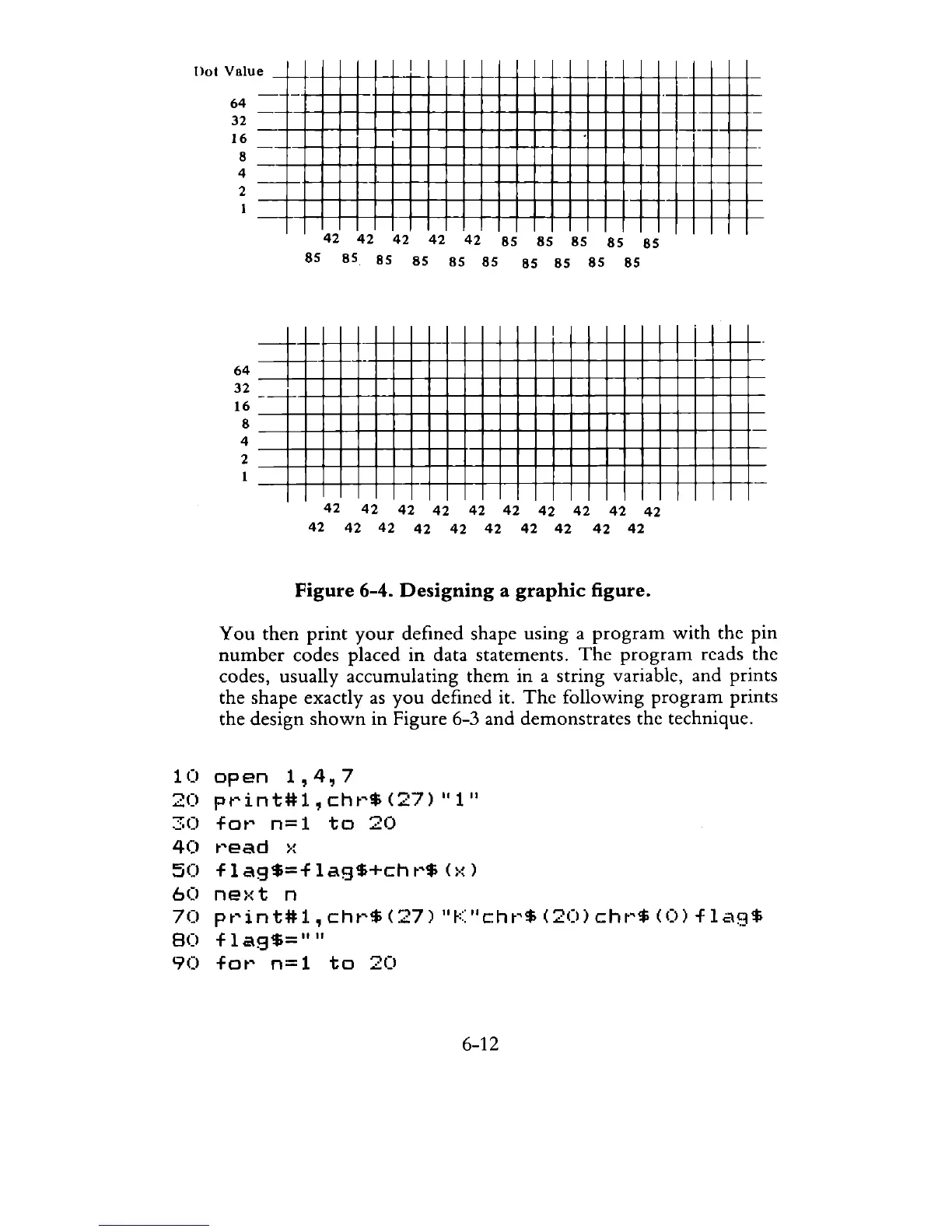
Figure
6-4.
Designing
a
graphic
figure.
You
then
print
your
defined shape using a
program
with
the pin
number
codes placed in data statements.
The
program
reads the
codes, usually accumulating
them
in a string variable, and prints
the shape exactly
as
you
defined it.
The
following
program
prints
the design
shown
in Figure 6-3 and demonstrates the technique.
10
open
1,4,7
20
print#l,
cht~$
(27)
"1"
30
for
n=l
to
20
40
t~ead
>:
50
flag$=flag$+chr$(x)
60
ne>:t
n
70
pt~in
t#l,
cht~$
(27)
"K
"cht~$
(20)
cht~$
(0)
f 1
ag$
80
flag$=""
90
fot~
n=
1
to
20
6-12



 To Next Page