The
first step in creating
your
own
characters is
to
layout
the dots
in
the
matrix
as
you
want
them
to print.
Even
though
the
matrix
is
nine dots high, the characters can be
only
eight
dots high, like the
MPS
1200's
standard
characters. (This is a
limitation
of
the size
of
a
data byte,
which
has
eight
bits,
not
of
the
print
head itself.)
Most
characters use
only
the
top
seven dots, while the descenders (such
as
p
and
g)
use
the
bottom
seven pins.
And
the
characters
you
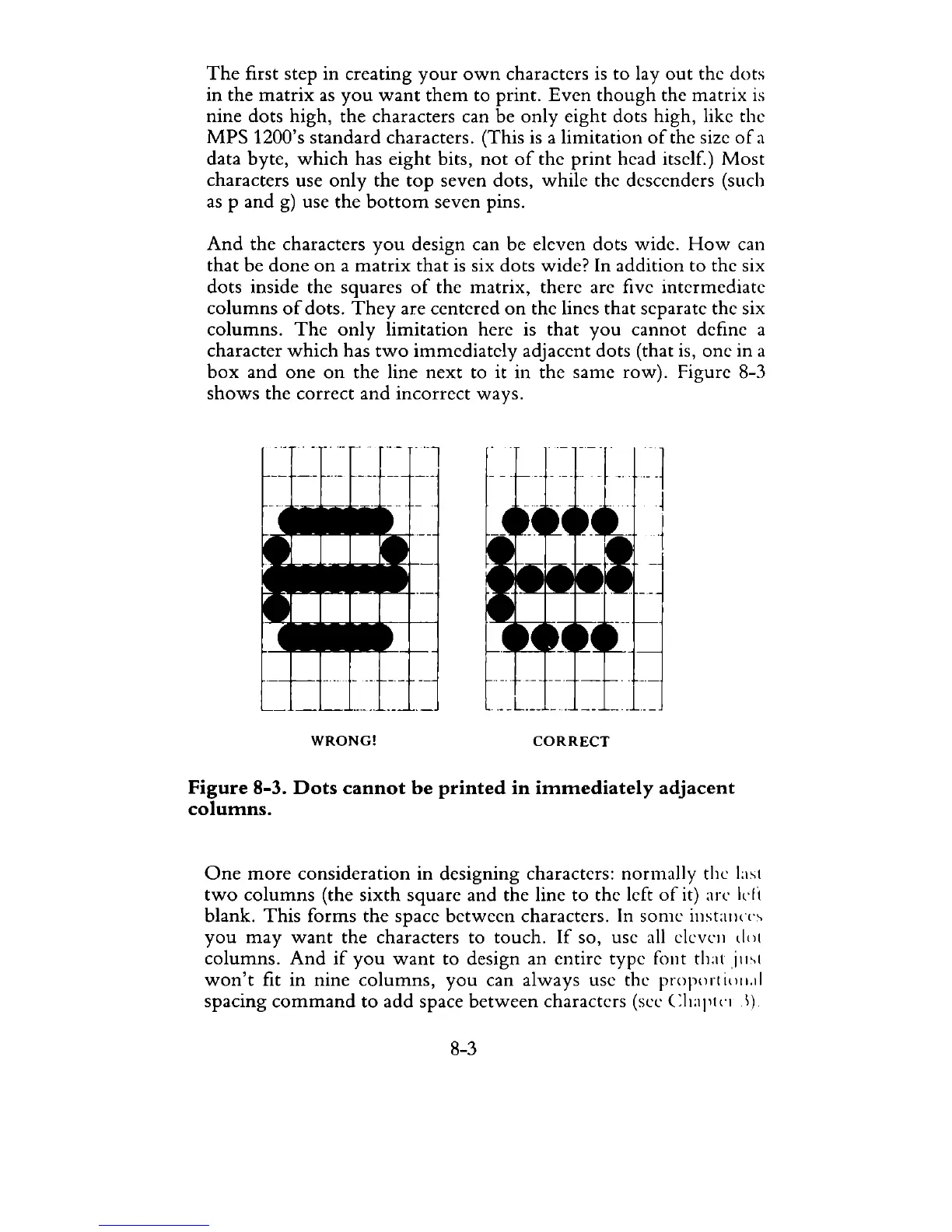
design can be eleven dots wide.
How
can
that
be
done
on
a
matrix
that
is
six dots wide? In addition
to
the six
dots inside the squares
of
the matrix, there are five intermediate
columns
of
dots.
They
are centered
on
the lines
that
separate
the
six
columns.
The
only
limitation
here is
that
you
cannot
define a
character
which
has
two
immediately
adjacent dots (that is,
one
in a
box
and
one
on
the
line
next
to it in the same row). Figure 8-3
shows
the correct
and
incorrect
ways.
WRONG!
CORRECT
Figure
8-3.
Dots
cannot
be
printed
in
immediately
adjacent
columns.
One
more
consideration
in designing characters: normally the laSI
two
columns
(the
sixth
square and
the
line
to
the left
of
it) arc
kli
blank.
This
forms
the
space
between
characters. In
some
illst:llln·s
you
may
want
the
characters
to
touch.
If
so, use
all
clevcll
d()l
columns.
And
if
you
want
to
design an entire
type
fOllt
th:ltjml
won't
fit
in
nine
columns,
you
can always use the proporl
i()II.1i
spacing
command
to
add
space
between
characters (sec
CIt:ll'll·ll)
8-3



 To Next Page