EasyManua.ls Logo

Commodore MPS 1200 - JUSTIFIED PRINTING

Commodore MPS 1200
250 pages
Print Icon
To Next Page IconTo Next Page
To Previous Page IconTo Previous Page
Loading...
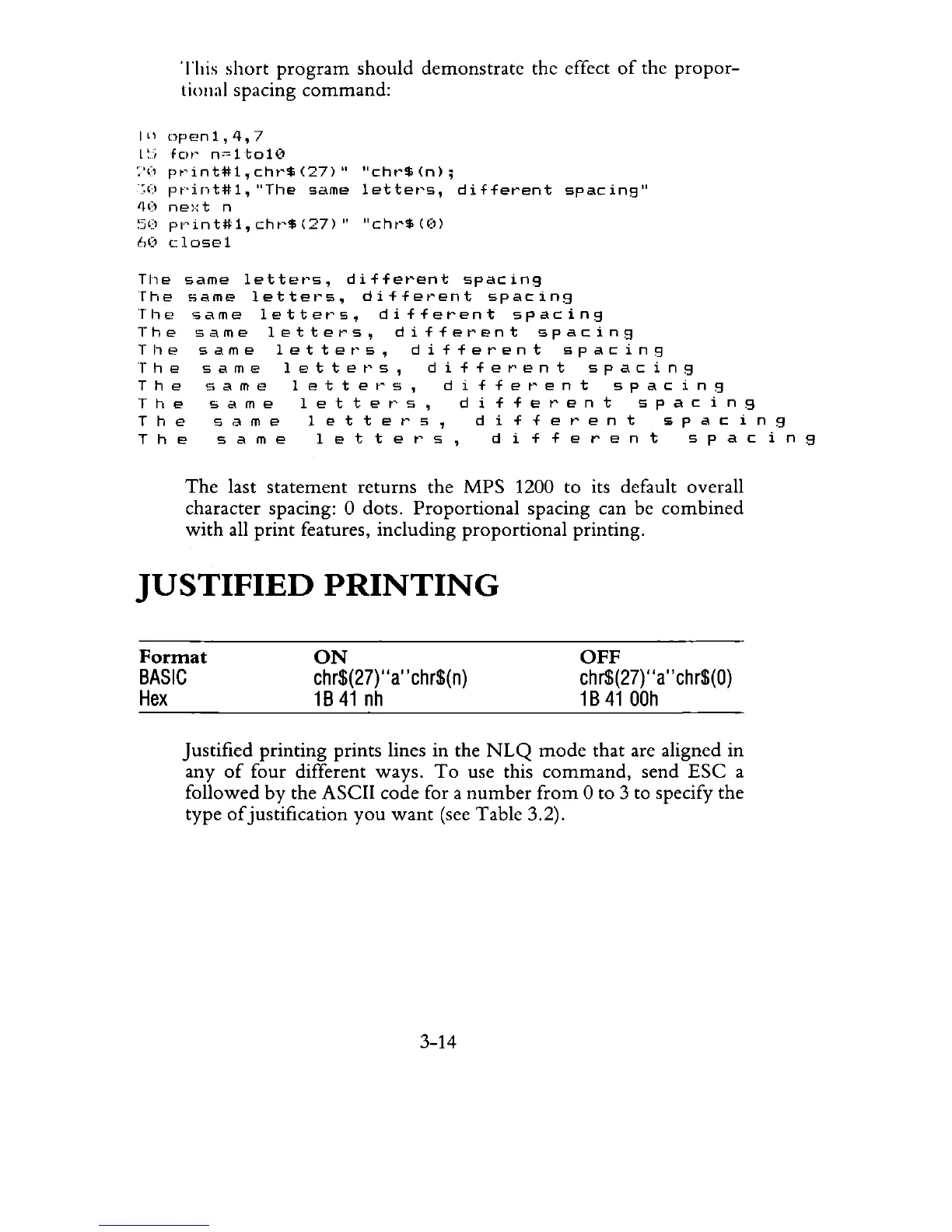
This
short
program
should
demonstrate the effect
of
the
propor-
tional spacing
command:
I"
npenl,4,7
L~j
fClI'
n"'ltol\)
:'(1
pt'int#l,
cht'$
(27)"
"cht'$
(n);
-;()
pr'int#l,
"The
same
lettet's,
different
spacing"
'I(!
ne:·:t
n
~5(!
pl"'int#l,
chr'$
(27)"
"cht'$
«(I)
60
closel
The
same
letters,
different
spacing
The
same
letters,
different
spacing
The
same
letters,
different
spacing
The
same
letters,
different
spacing
The
same
letters,
different
spacing
The
same
lettet's,
differ'ent
spacing
The
sam
e 1 e t t e r
5,
d
iff
ere
n t
spa
c i n g
The
sam
e
let
t e r
s,
d
iff
ere
n t
spa
c i n 9
The
sam
e
let
t e r
s,
d
iff
ere
n t $
pac
i n g
The
sam
e
let
t e r
s,
d
iff
ere
n t
spa
c i n g
The
last statement returns the MPS 1200 to its default overall
character spacing: 0 dots, Proportional spacing can be combined
with
all
print
features, including proportional printing,
JUSTIFIED
PRINTING
Format
BASIC
Hex
ON
chr$(27)
"a"chr$(n)
1B41
nh
OFF
ch
r$(27}"
a"
ch
r$(O)
1B
41
OOh
Justified printing prints lines in the
NLQ
mode
that are aligned in
any
of
four
different ways,
To
use this
command,
send
ESC
a
followed
by
the ASCII code for a
number
from
0 to 3 to specify the
type
of
justification
you
want
(see Table 3,2),
3-14

Related product manuals