EasyManua.ls Logo

Commodore MPS 1200 - Page 80

Commodore MPS 1200
250 pages
Print Icon
To Next Page IconTo Next Page
To Previous Page IconTo Previous Page
Loading...
Table
3-6.
International
Characters
PET
ASCII
Code
(
:mllltry
35
36
64
91
92
93
94
95
96
123
124
125
126
U.S.A.
I!
$
@
\ 1
hallce I!
$
a
<;:
§
e u e
Germany
II
$
§
is.
d 0 a 0 u e
Lilyialld
f.
$
©
[
\.
}
Dellmark
I!
$
@
IE
I2l
A
iE
II!
~
Sweden
I!
):(
E:
A d A 0
e
a.
0
~
u
Italy
I!
$
".
@
\ e
u a 0 e i
Spain
-------
----.
R
$
@
f:l
G
n
Japan
II
$
@
¥
]
Norway
II
):(
E
fE
I2l
A 0 e iE
II!
~
u
Dellmark
II
I!
$
E:
IE
I2l
A 0 e
iE
II!
tt
u
Commodore
USA/UK
II
$
@
[
£
1"-
+-
+
~l
I
X
Denmark
II
$
©
iE
0
~
1"-
+-
IE
0
A
X
Sweden
II
$
@
a.
0
~
1"-
+-
is.
tl
A
X
Germany
I!
$
§ [
\
]
1"-
A
tl
0
:n::
France
II
$
©
[
\
]
1"-
e
1:
:n::
Italy
II
$
©
[
\
]
1"-
e
1:
:n::
Switzerland
II
$
©
[
\
]
1"-
e
1:
2
:n::
Spain
II
$
@
\
]
1"-
L
f:l
:n::
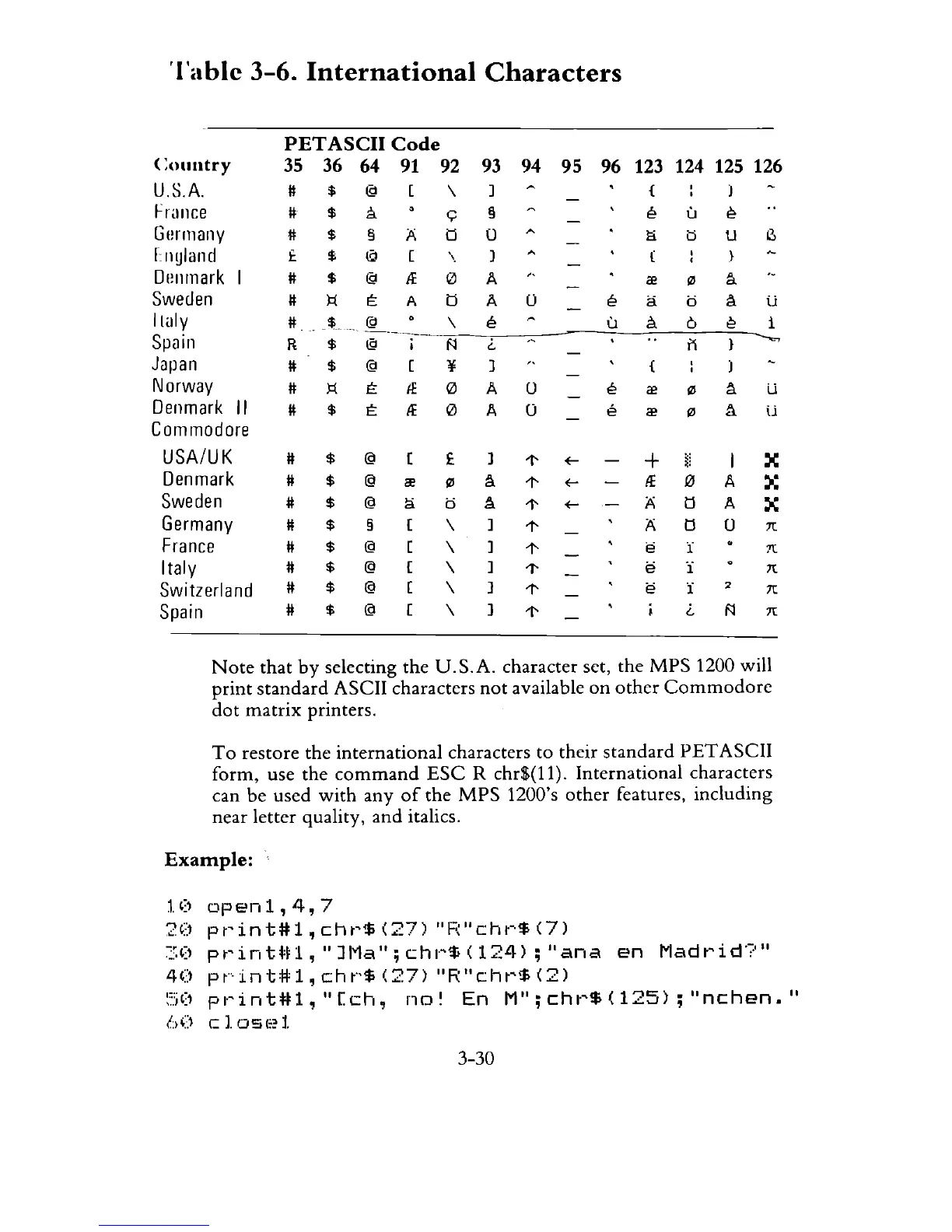
Note
that
by
selecting the
U.S.A.
character set, the
MPS
1200 will
print
standard
ASCII characters
not
available
on
other
Commodore
dot
matrix
printers.
To
restore the international characters to their
standard
PET
ASCII
form, use the
command
ESC
R
chr$(ll).
International characters
can
be
used
with
any
of
the
MPS
1200's
other
features, including
near letter quality,
and
italics.
Example:
1.0
open1,4,7
20
pt~int#l,
cht'$
(27)
"Fo~"cht'$
(7)
~:.O
pt'int*t1,"
JI'1a";
chl"$
(124);
"ana
en
Madt'id',?"
40
pt"'int#l,
cht"$
(27)
"R"cht'$
(2)
~'.:jO
pl"int#l,"[ch,
no~
En
M";chl·~$(125);"nchen."
b()
c
1.
OS(;?
1.
3-30

Related product manuals