JHL90 Service Manual
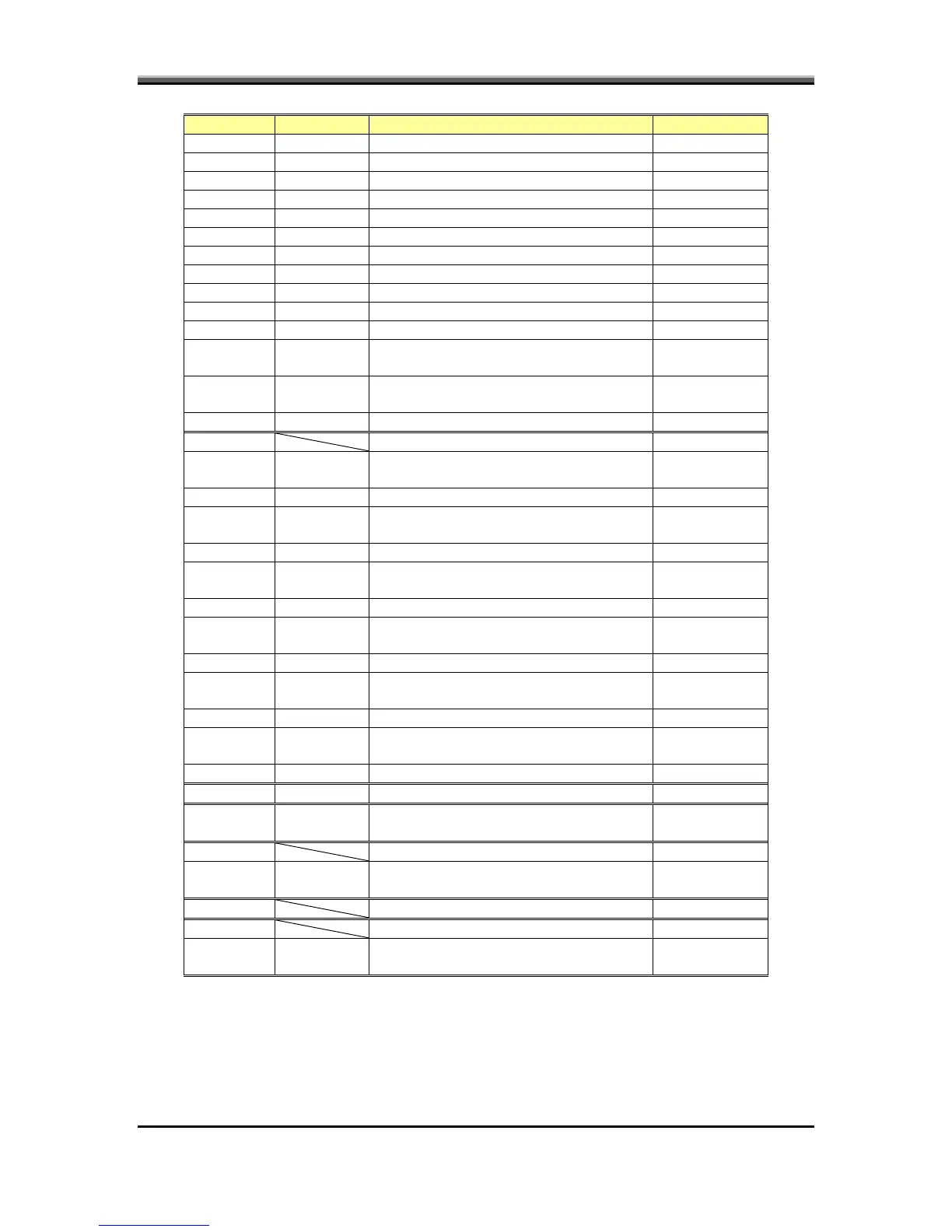
CMD DATA Description return
E1h Turn LCD back-light on None
E2h Turn LCD back-light off None
E4h Select EX keyboard Matrix None
E5h Select US keyboard Matrix None
E6h Select JP keyboard Matrix None
E7h Select UK keyboard Matrix None
E8h EC into ACPI mode None
E9h Non-ACPI mode (EC default) None
F1h Enter Idle mode None
F2h Enter flash mode None
F6h To get the System action flag None
F7h Restart system and Clear header of Boot
code
None
F8h Shut down system and Clear header of
Boot code
None
F9h Clear header of Boot code None
5Ah RTC update (No Support)
A0h Update Year of RTC, Year (00-99) BCD
format
Year which want to display None
A1h Update Month of RTC, Month (1. 12)
BCD format
Month which want to display None
A2h Update DAY of RTC, Day (01-07) BCD
format
Day which want to display None
A3h Update HOUR of RTC, Hour (00-23)
BCD format
Hour which want to display None
A4h Update Minute of RTC, Minute (0. 59),
BCD format
Minutes which want to display None
A5h Update Second of RTC, Second (0. 59),
BCD format
Seconds which want to display None
5Bh Reserved
5Ch None Get brightness level
Current brightness level (0x00-0x0a)
One byte
5Dh Set brightness level
0x00h-
0x07h
New brightness level None
5Eh Get contrast level (No Support) One byte
5Fh Set contrast level (No Support)
0x00h-
0x3Fh
New contrast level None
2-27



 To Next Page