Low Power Outdoor (LPOD) Amplifier/Block Up Converter (BUC)
Revision 15
Ethernet Interface Operation 4–8 MN-LPOD
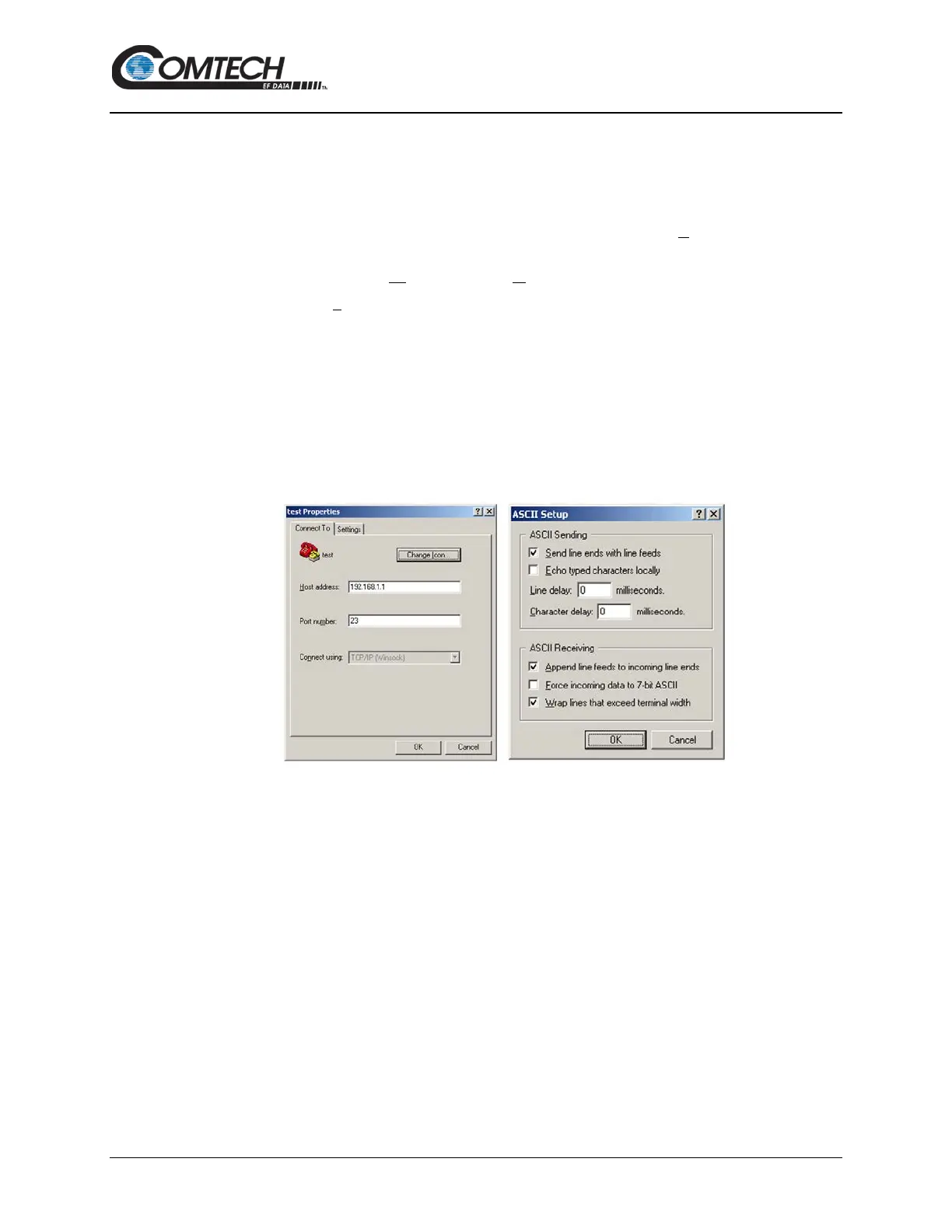
4.3.1.1 Configure HyperTerminal for Telnet Remote Control Operation
Do the following steps (See Figure 4-3):
1. Define the Connect To Telnet connection properties correctly (File Properties) (Figure
4-3, left side):
a. Enter the LPOD’s Traffic/Management IP Address as the “Host address” (e.g.,
192.168.1.1).
b. Enter TCP Port 23 as the “Port number”.
c. Set “Connect using” to TCP/IP (Winsock) instead of COM1 or COM2.
d. Click [OK] to save your settings.
2. ASCII Setup (File Properties Settings ASCII Setup) (Figure 4-3, right side):
a. Check the “Send line ends with line feeds” option in the ‘ASCII Sending’ section.
b. Check the “Append line feeds to incoming line ends” option in the ‘ASCII
Receiving’ section.
c. Click [OK] to save your settings.
Figure 4-3. Configure HyperTerminal



 To Next Page