64 Maintenance
6.6 Resetting the cylinder status
CAUTION!
DO NOT reset the cylinder status in the control software unless the steam cylinder has been
replaced/cleaned.
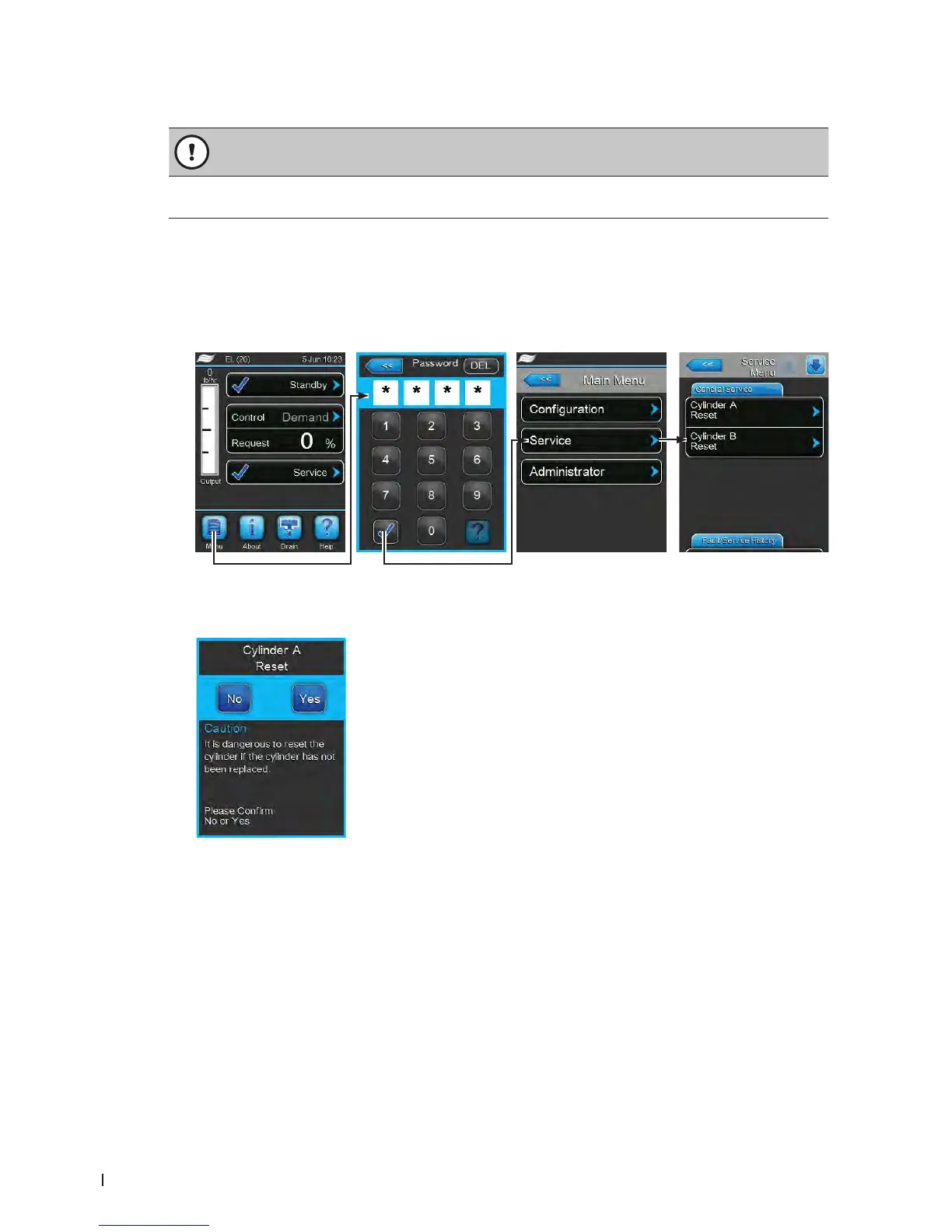
After the steam cylinder has been replaced/cleaned the cylinder status (for module A or module B or for
both) must be reset. Proceed as follows:
Note: On double units and large units with two steam cylinders, individually reset the appropriate cylinder
monitoring function.
1. Select in the "Service" submenu the corresponding cylinder reset function.
2. The reset dialogue appears:
• Press the <Yes> button to reset the selected cylinder. The "Cylinder Spent" message and cylinder
status is reset.
• Press the <No> button if the maintenance work has not been completed and you want abort the
reset procedure. The control unit returns to the "Service" submenu.
Password: 8808















 To Next Page