25D-Link DSL-2740M User Manual
Section 3 - Conguration
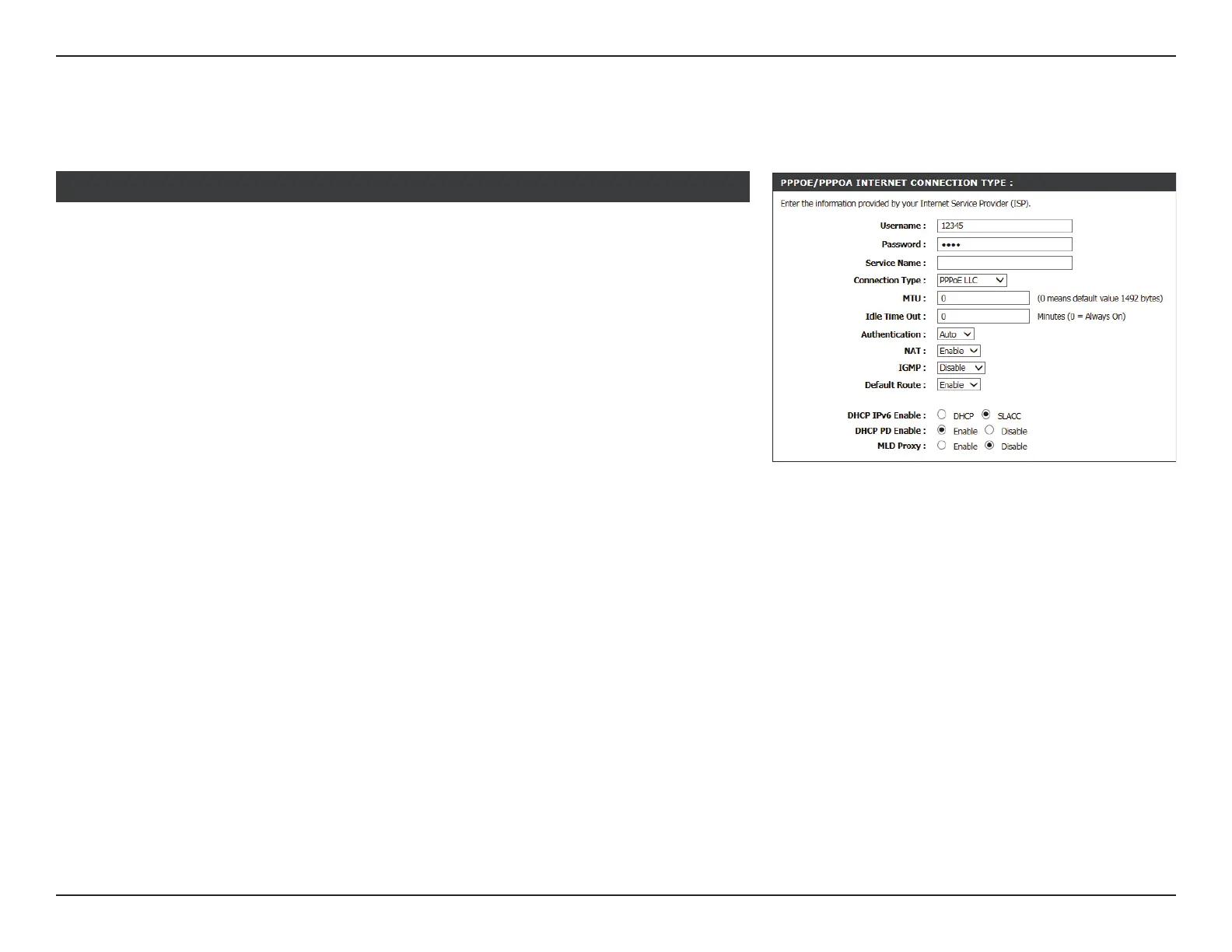
If you selected PPPoE/PPPoA, congure the following information:
PPPoE/PPPoA
Username: Enter your ISP account username.
Password: Enter your ISP account password.
Service Name: Enter your service name (Optional).
Connection Type: Select the type of encapsulation your ISP uses, PPPoE LLC,
PPPoE VC-Mux, PPPoA LLC, or PPPoA VC-Mux.
MTU: Enter the maximum receive unit (MTU) packet size. (IPv4 only)
Idle Time Out: Enter the amount time the router waits if there is no activity
before disconnecting.
Authtenticiaton: Select the authentication protocol your ISP uses. The options are
PAP, CHAP, or AUTO.
NAT: Check this box to Enable Network Address Translation (NAT).
(IPv4 only)
IGMP: Select Disable, IGMP-v1, or IGMP -v2. (IPv4 only)
Default Route: Select Enable or Disable.
If IPv4/IPv6 or IPv6 is selected, congure the following settings:
DHCP IPv6 Enable: Select either DHCP or SLAAC addressing.
PPPOE/PPPOA INTERNET CONNECTION TYPE :



 To Next Page