5D-Link G530 User Manual
Section 1 - Product Overview
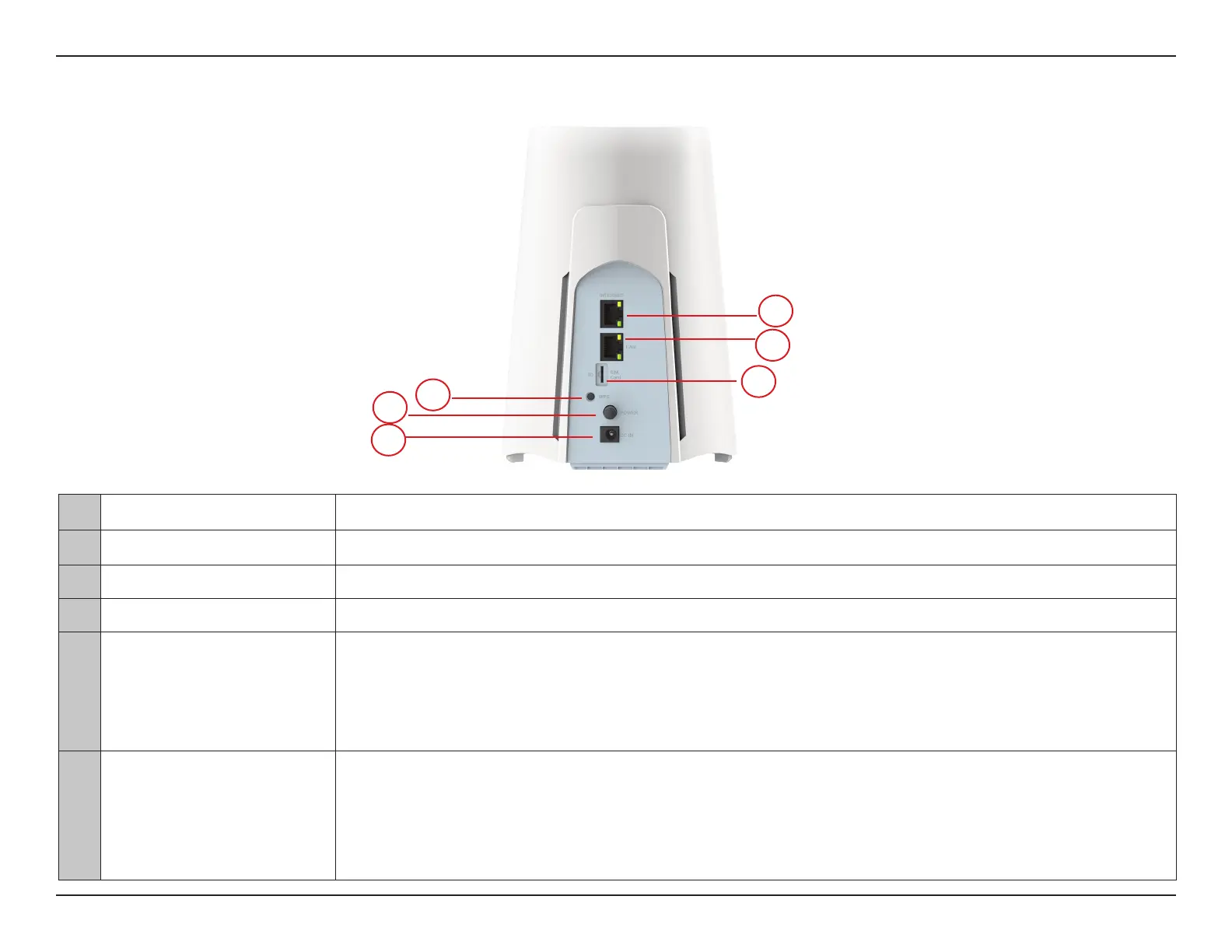
Rear View: Back Panel and LED Indicators
1 DC Power Connector Connector for the supplied power adapter.
2 Power Button Press power button to turn on/o the router.
3 WPS Button Press WPS button to establish a secure Wi-Fi connection.
4 SIM Card Slot Insert 4FF sim card to establish a cellular network.
5 LAN Port/Indicator
Solid Orange: Ready for 1Gbps data transimission with an Ethernet cable connected
Blinking Orange: Data transmission in process at 1Gbps transfer rate
Solid Green: Ready for 10/100Mbps data transimission with an Ethernet cable connected
Blinking Green: Data transmission in process at 10/100Mbps transfer rate
6 Internet Port/Indicator
Solid Orange: Ready for 1Gbps data transimission with an Ethernet cable connected
Blinking Orange: Data transmission in process at 1Gbps transfer rate
Solid Green: Ready for 10/100Mbps data transimission with an Ethernet cable connected
Blinking Green: Data transmission in process at 10/100Mbps transfer rate
1
3
2
4
5
6



 To Next Page