ENGLISH
40
3. Panoramic View of the Product:
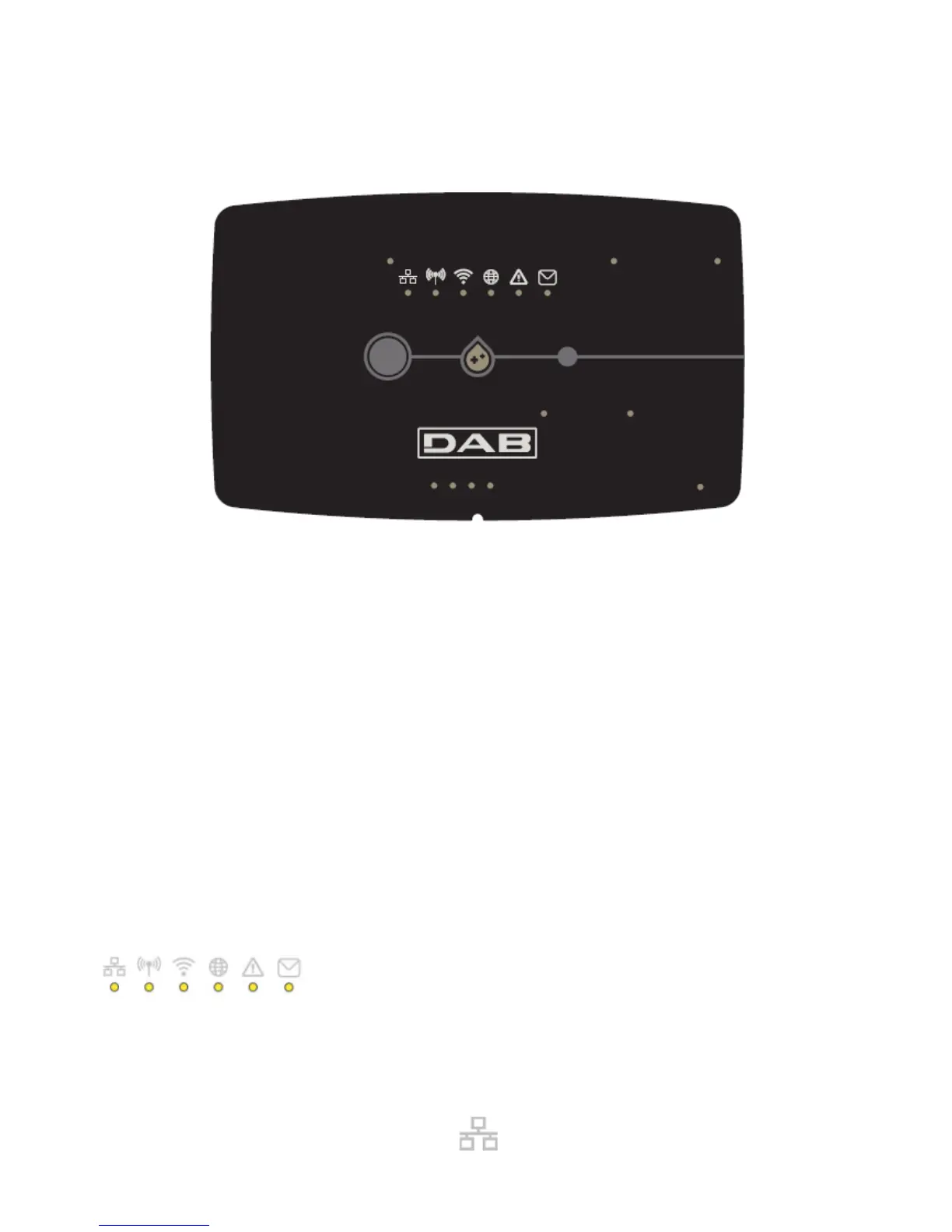
3.1 View from Above:
Led Positions
3.1.1 Buttons:
On the DConnect Box there are 2 buttons for interacting with the product.
Hold down the 2 buttons simultaneously for 5 sec.: release the device.
Hold down the 2 buttons simultaneously for 10 sec.: Passage indicated by the APP to allow the
Connection of the DConnect Box to the network and to the DAB Service Centre and the search for
the connected devices.
Note: once this operation has been carried out, the current WiFi network saved in the system will be
definitively removed and you will have to make a new connection following the App’s indications.
Hold down the left button for 5 sec: Associating the DConnect Box with a pump with wireless
technology, for example e.sybox or a group of e.sybox units previously set in association mode.
Hold down the left button for 10 sec: Manual update of pump software and e.sybox previously set in
loader/programming mode.
Hold down the right button for 5 sec: Dissociating the DConnect Box from an e.sybox or a group of
E.sybox units.
3.1.2 DConnect Led Bar:
There are 6 Leds on the top of the DConnect BOX which are lit with a fixed light or blink to indicate particular
connection statuses or events. Specifically:
LAN Status Led:
Indicates if it is connected to the LAN network.


 To Next Page