ENGLISH
48
9. Use of the DAB DConnect APP
Before starting the APP, make sure that
You have correctly connected the DConnect Box and the devices to be managed (see respective section).
In the case of Wi-Fi connection of the DConnect Box, you have an excellent signal reception.
You have Internet access.
You have installed the DConnect APP on your smartphone/tablet and have registered with the service
centre.
Note: The DConnect Box can be connected to one network at a time. In configuration mode the
DConnect Box and the smartphone/tablet will not be connected to the Internet. So ignore any messages
about this from your Android system or Apple iOS.
The DConnect DAB App allows you to configure the DConnect Box to connect it to the DAB Service Centre
and to remote-control your installations connected to the DConnect Box..
To configure the DConnect Box and create your own installations or add new devices:
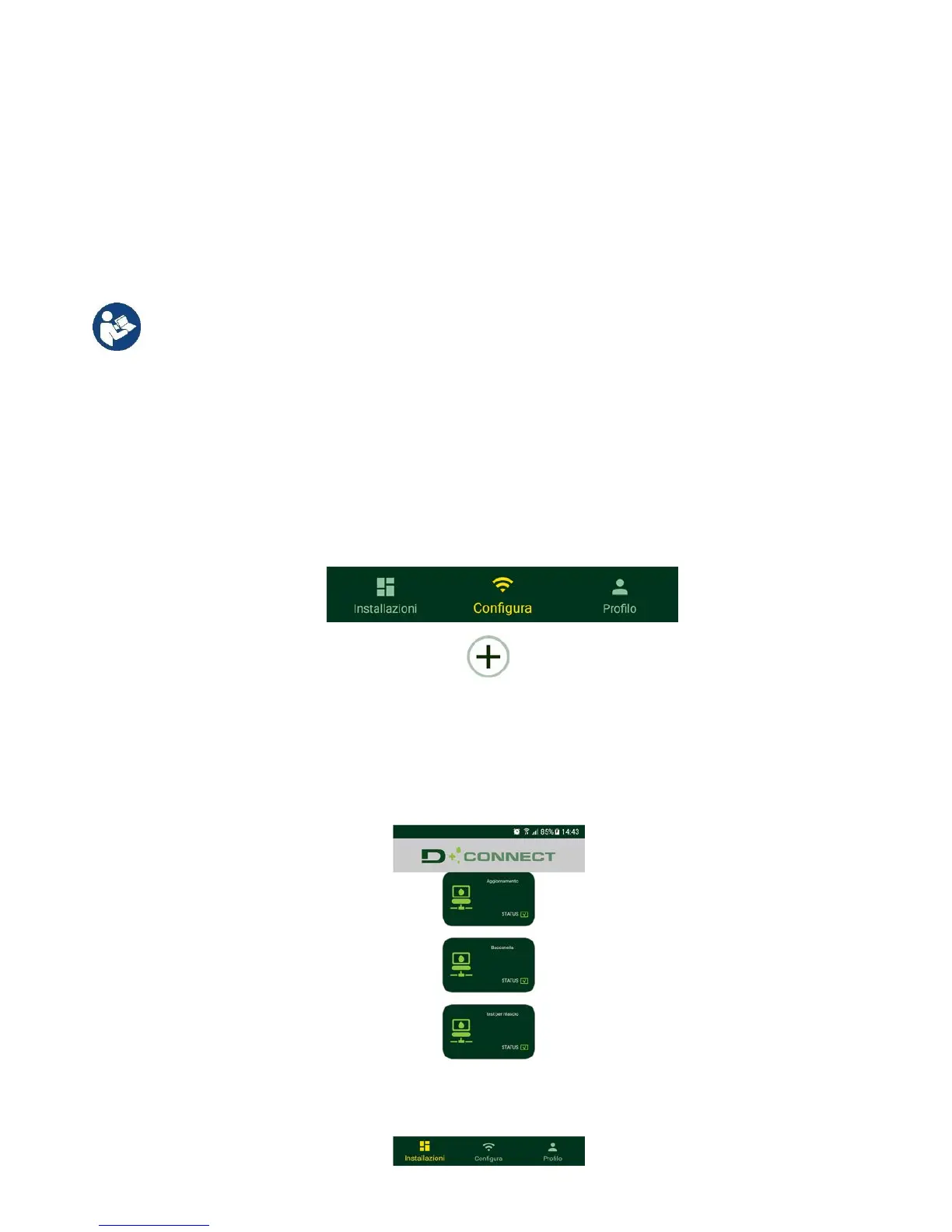
1. Start the App and press Configure to associate the DConnect Box with the network and search for
the devices connected to it.
2. In the case of first/new installation, press the button
.
3. The configuration wizard will start, which will guide you step-by-step in the network configuration.
To monitor the installations already created:
1. Start the App and click on the Installations button.
2. Select the installation to be controlled from the list.


 To Next Page