ENGLISH
54
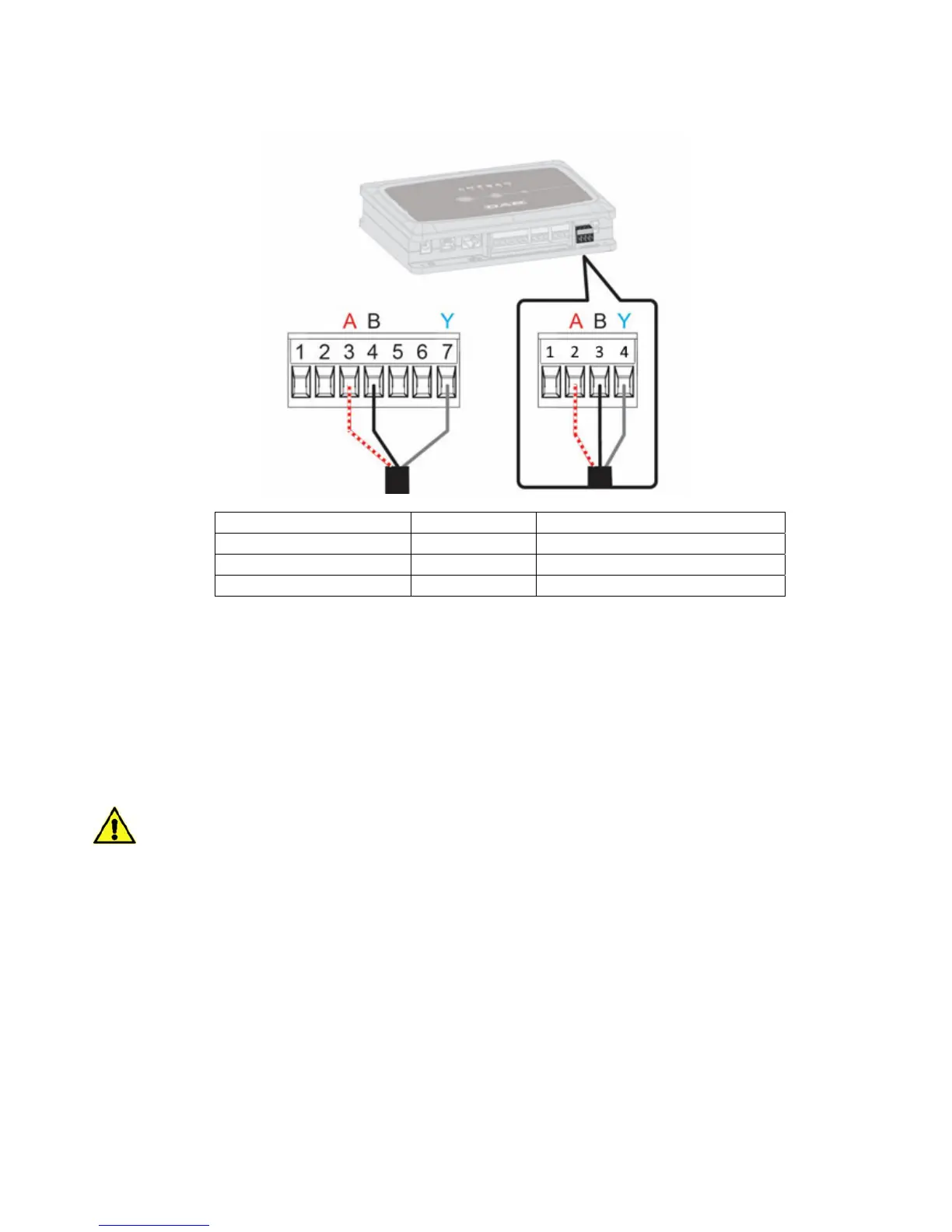
2. Connect the wire and the extractable terminal board of the multifunction module for Evoplus
Small:
MODBUS Terminals Terminal No. Description
A 3 Non-inverted terminal (+)
B 4 Inverted terminal (-)
Y 7 GDN
Figure 3 Multifunction Module Extractable Terminal Board and DConnect Box Extractable Terminal Board
3.
Power the products.
4.
Start the DAB DConnect APP and configure the product.
11.2 Example of DConnect Box connection with Evoplus M/L
Before starting work, disconnect the power from the supply line and use only the recommended
cables and accessories.
Initial Requirements:
ModBus cable of a suitable length available as product accessory and respective connector supplied
with the product.
You have enabled the Modbus parameter from the Product Menu, see section "Evoplus and Evoplus
Small Software Configuration".
You have installed the DConnect APP on your smartphone/tablet and have registered with the service
centre.


 To Next Page