ENGLISH
55
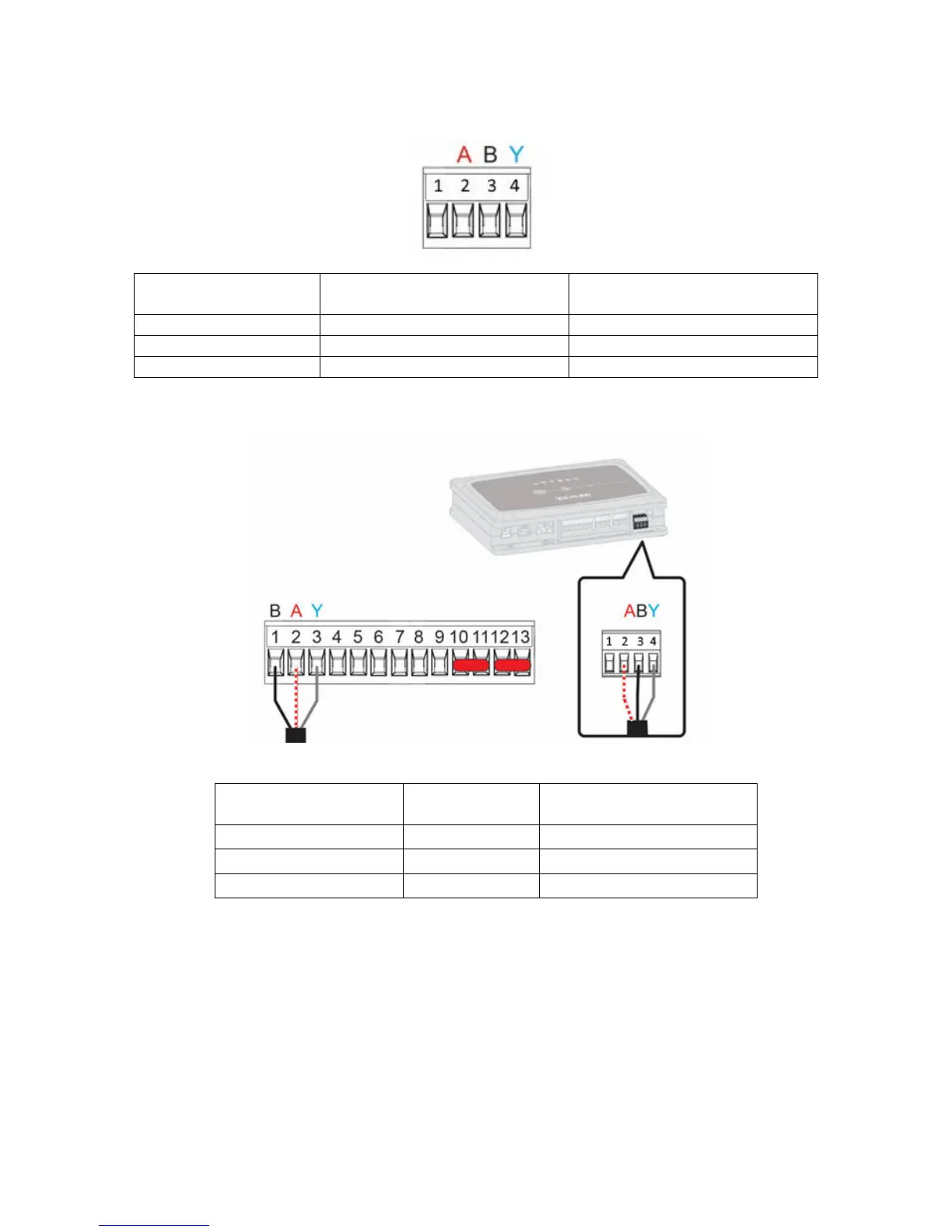
1. Connecting the wire and extractable ModBus terminal board of the DConnect Box:
repare the respective 4-pole terminal supplied with the DConnect respecting the indicated polarities.
MODBUS
Terminals
Terminal No.
DConnect Box
Description
A 2 Non-inverted terminal (+)
B 3 Inverted terminal (-)
Y 4 GND
Figure 4 Extractable ModBus terminal board of the DConnect Box
2. Connect the wire and extractable terminal board of the Evoplus M/L:
MODBUS Terminals Terminal No.
EVOPLUS
Description
A 2 Non-inverted terminal (+)
B 1 Inverted terminal (-)
Y 3 GND
Figure 5 - Evoplus M/L Extractable Terminal Board and DConnect Box Extractable Terminal Board
3. Power the products.
4.
Start the DAB DConnect APP and configure the product.


 To Next Page