ENGLISH
43
4. Wall Mounting:
Remove the front frame of the DConnect Box applying slight force.
On the four corners of the product you will see 4 cuts in the plastic.
Strike gently with a punch or other suitable pointed tool to free the hole.
Mark the wall with a pencil in the points corresponding to the four holes created.
Drill holes as usual and secure the DConnect Box to the wall fixtures.
5. DIN Bar Panel Mounting:
Screw the bracket supplied onto the bottom of the DConnect Box to ensure an easy connection of the panel
to the DIN bar.
6. Commissioning:
Select one of the connection options.
6.1 Connection by LAN network cable
Note: It is recommended to use the wired connection via Ethernet.
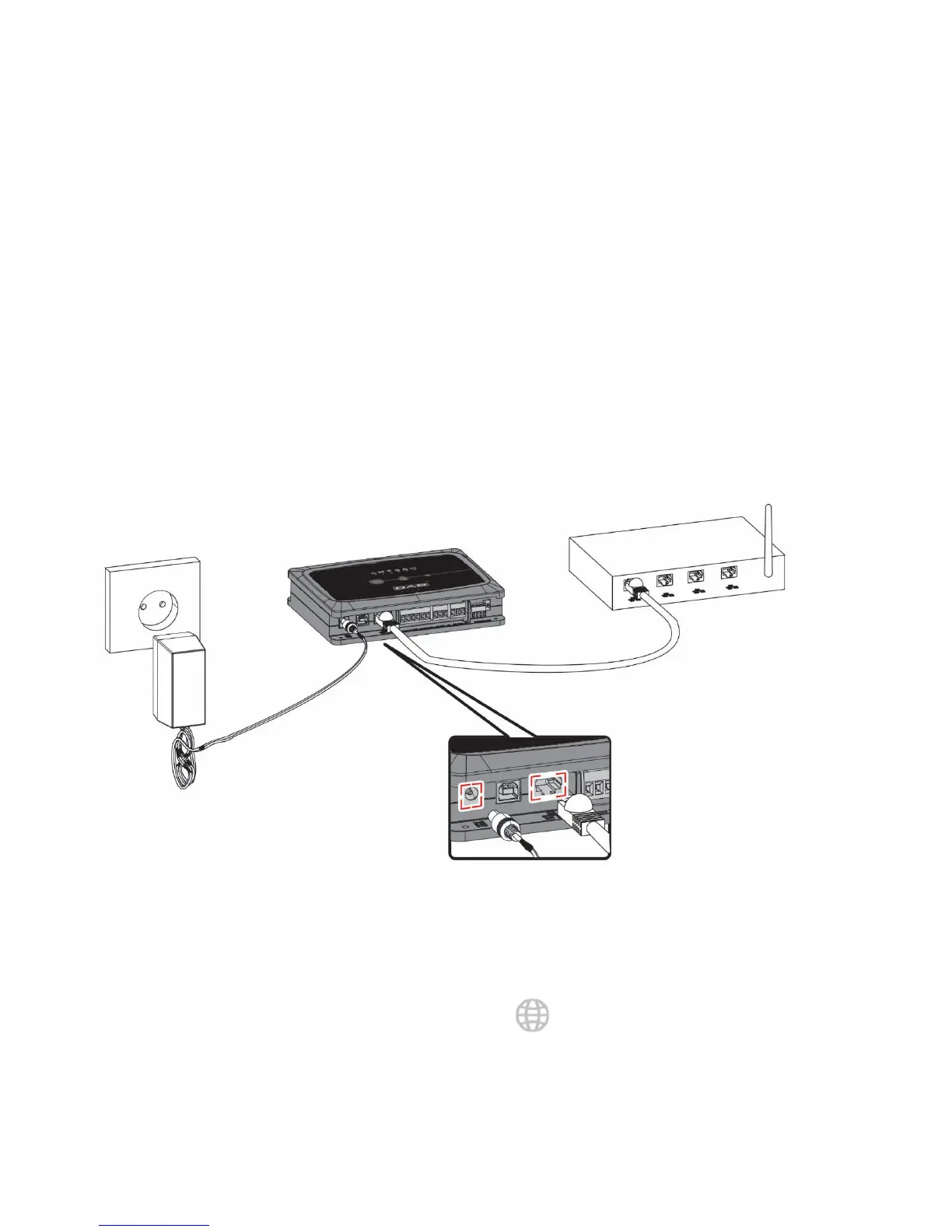
1. Connect a network cable to the DConnect Box in the LAN port located on the front and ensure that
the other end is connected to a network socket with the following requirements:
◦ Active Internet connection, with active DHCP service, port 10/100 Mbit/s.
2. Connect the DConnect Box to the power socket with the feeder supplied.
During starting, the Service Centre Connection led blinks.
3. The DConnect Box is ready for use about 90 seconds after starting.


 To Next Page