ENGLISH
70
12. Modbus cable and Active Driver Plus Specifications
Multi-pair twisted cable 0.22 mm², 250 V, F/UTP screening, PVC sheath.
13. Evoplus and Evoplus Small Software Configuration
Initial requirements:
Make sure you have correctly connected the ModBus cable to the DConnect Box.
In the case of an Evoplus Small connection, make sure that the Multifunction module has been
installed correctly; for any doubt, consult the respective manual.
1.
Switch on the Evoplus or Evoplus Small.
2.
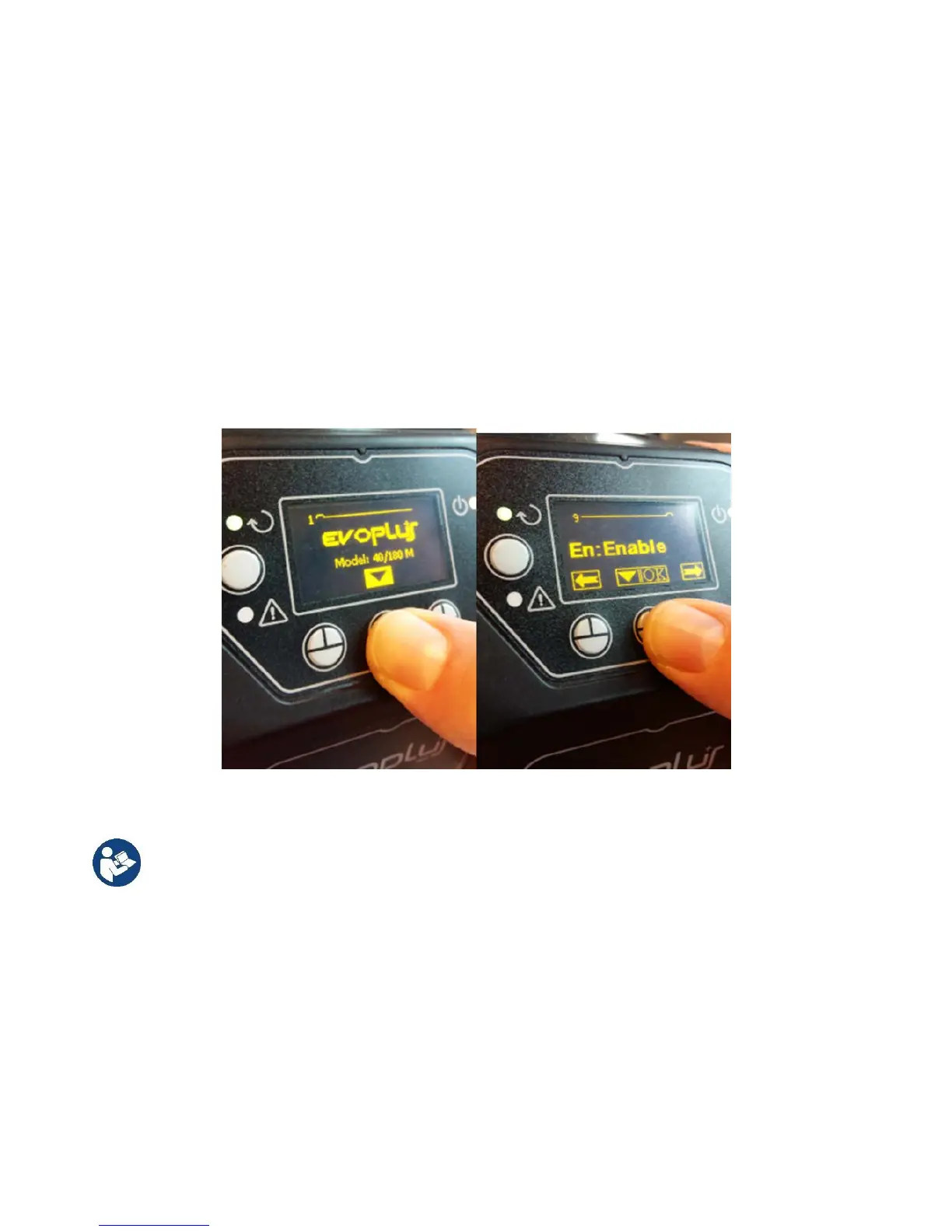
From the main menu, hold down the Menu button for 5 seconds until the “Evoplus” logo appears on
the screen.
3.
Scroll through the menu to the item “En”. By default, this parameter is set on Disable.
4. Change it to Enable to allow operation.
Figure 10- Software configuration of the multifunction module
NOTE
: In the ModBus configuration menu there are other important parameters of the ModBus
configuration: Address, Baudrate, Parity may differ according to the installation.
IMPORTANT
: In the case of several devices, manually set a unique “Ad” address for each of them. For
example, Installation with 4 set Ad:1 for the first, Ad:2 for the second, Ad:3 for the third and so on.
Make sure that the Baud Rate and Parity value is common to all and that the “En” parameter is “Enable” on
all the connected products.


 To Next Page