11
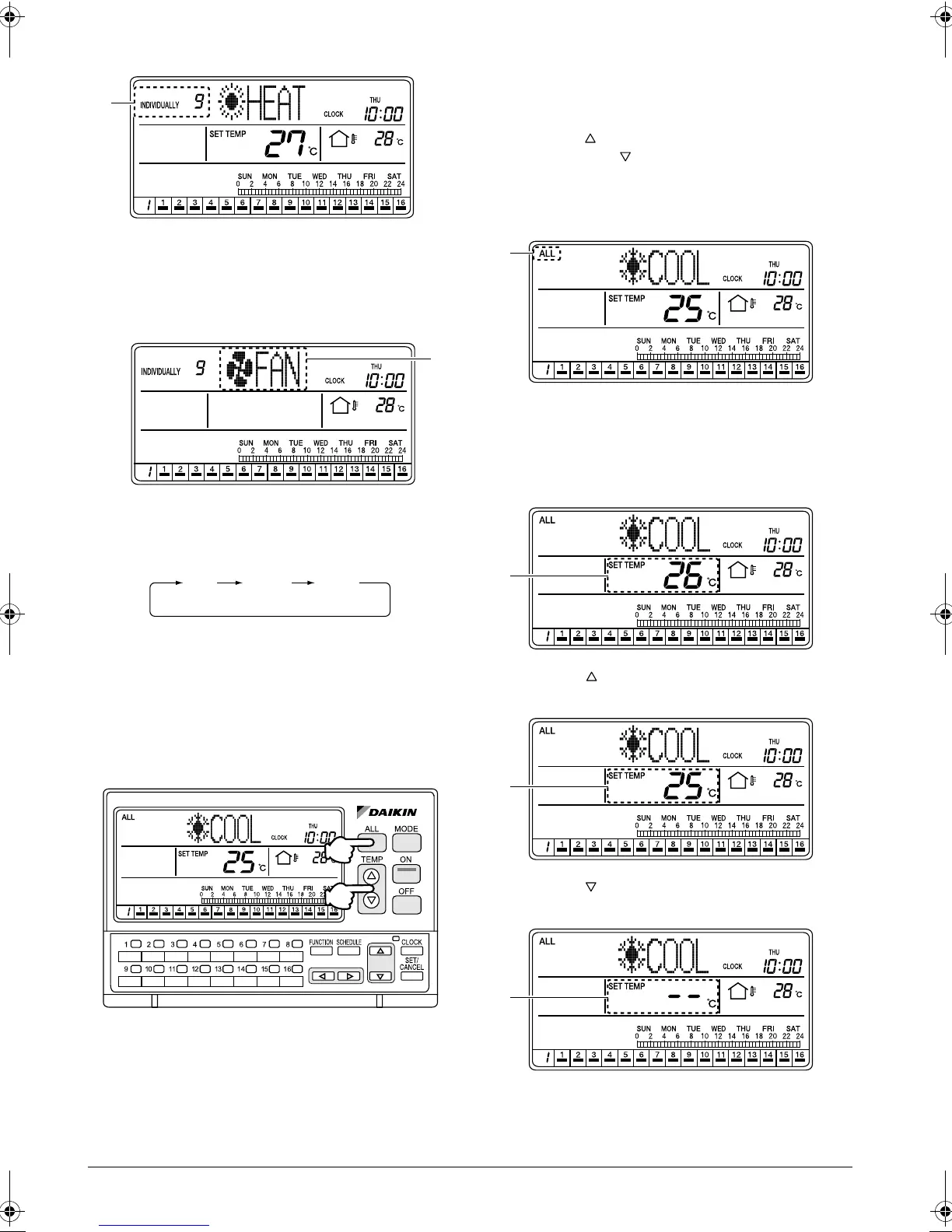
[Screen Display]
C. When the No. of an air conditioner is selected with
one of the individual group selection buttons (1)
(1 - 16), the display changes to the INDIVIDUALLY
screen and the No. of the selected air conditioner
is shown at the upper left corner of the screen.
D. Each time the MODE button (2) is pressed, the
operation mode of the selected air conditioner
(group) changes in the following sequence.
HOW TO ADJUST THE SET TEM-
PERATURE
Adjusting the set temperature in all
connected air conditioners
[Operating Procedure]
1. Press the ALL button (1) to display the ALL screen.
2. Each time one of the TEMP buttons (2) is pressed,
the set temperature changes.
Press the button to raise the set temperature by
1°C. Press the button to lower the set tempera-
ture by 1°C.
[Screen Display]
A. When the ALL button (1) is pressed, the ALL
screen appears and “ALL” is indicated at the upper
left of the screen.
If no button is operated for 20 seconds, the display
changes to the INDIVIDUALLY screen.
B. Press the TEMP button (2) to raise the set tem-
perature by 1°C.
C. Press the TEMP button (2) to lower the set tem-
perature by 1°C.
C
D
FAN
COOL HEAT
(1)
(2)
A
B
C
D
01_EN_3P124623-10N.fm Page 11 Monday, January 28, 2008 4:58 PM



 To Next Page