28
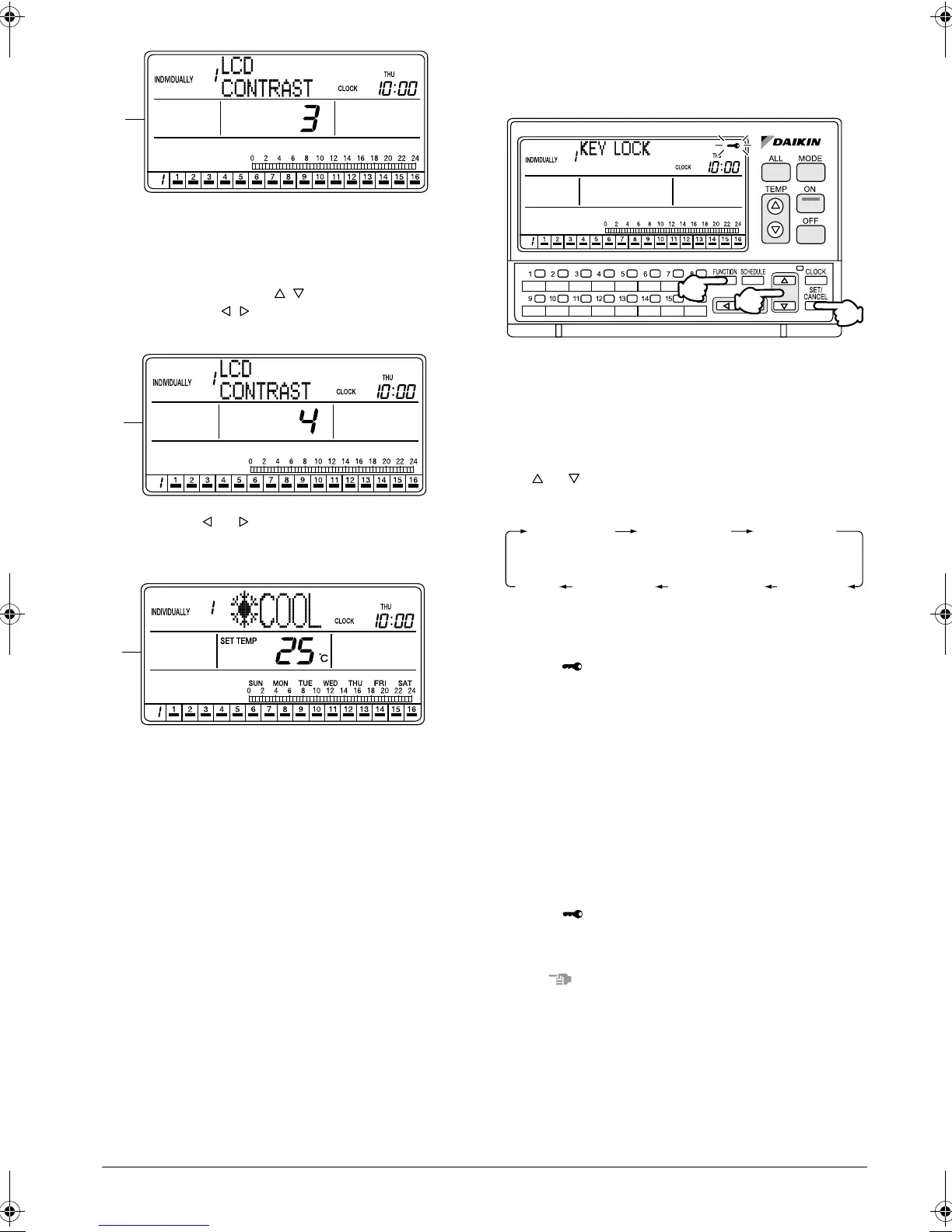
D. The Contrast setting screen appears and indicates
the current contrast level.
If no button is operated for 2 seconds while the dis-
play shows screen C to screen E on page 27, a
guidance message, “ BUTTONS: CHANGE
FUNCTION, BUTTONS: ADJUST CON-
TRAST,” appears.
E. Press the or button to adjust the contrast
level.
The contrast can be adjusted between 1 and 4.
F. If no button is operated for 1 minute or the FUNC-
TION button (1) is pressed once, the display
returns to the INDIVIDUALLY screen.
KEY LOCK SETTING
Disabling operation buttons
[Operating Procedure]
1. While the ALL or INDIVIDUALLY screen is dis-
played, press the FUNCTION button (1) once.
2. The Function Menu appears.
The Function Menu changes as follows when the
or button (2) is pressed.
3. While the Key Lock screen is displayed, press the
SET/CANCEL button (3) once.
The mark blinks for 2 seconds and changes to
constant On. The key lock is set, and the display
returns to the ALL screen if the setting was made
in the ALL screen, or to the INDIVIDUALLY screen
if the setting was made in the INDIVIDUALLY
screen.
After the key lock is set, button operations for ON,
OFF, operation mode change, etc. are disabled.
If an operation for ON, OFF or operation mode
change is performed, the “KEY LOCK” indication
blinks for 4 seconds.
4. To cancel the key lock, hold the SET/CANCEL
button (3) for more than 4 seconds.
The mark blinks for 1 second and then turns
Off, indicating that the key lock has been can-
celled.
NOTE
1. Operate buttons while the backlights are lit.
2. In each of steps 2 and 3, if no button is operated for
1 minute, the display returns to the ALL screen
when the setting was made in the ALL screen, or to
the INDIVIDUALLY screen when the setting was
made in the INDIVIDUALLY screen.
In the above-mentioned case, the setting being
entered will not be applied.
D
E
F
(2)
(1)
(3)
OPERATION
CODE
RESET
FILTER SIGN
OUTDOOR
TEMP
DISPLAY
DAYLIGHT
SAVING
SET DAYLIGHT
SAVING TIME
CONTRAST
KEY
LOCK
01_EN_3P124623-10N.fm Page 28 Monday, January 28, 2008 4:58 PM



 To Next Page